Colliders
Colliders represent the geometric shapes that generate contacts and collision events when they touch. Attaching one or multiple colliders to a rigid body allow the rigid-body to be affected by contact forces.
Creation and insertion
A collider is created by a ColliderBuilder structure that is based on the builder pattern. Then it needs
to be inserted into the physics world, i.e., into its ColliderSet,
which is processed by the physics-pipeline, collision-pipeline, and query-pipeline.
The following example shows several setters that can be called to customize the collider being built. The input values are just random so using this example as-is will not lead to a useful result.
- Example 2D
- Example 3D
use rapier2d::prelude::*;
use std::f32::consts::PI;

// The world that will contain our colliders.
let mut world = PhysicsWorld::new();

// Builder for a ball-shaped collider.
let _ = ColliderBuilder::ball(0.5);
// Builder for a cuboid-shaped collider.
let _ = ColliderBuilder::cuboid(0.5, 0.2);
// Builder for a capsule-shaped collider. The capsule principal axis is the `x` coordinate axis.
let _ = ColliderBuilder::capsule_x(0.5, 0.2);
// Builder for a capsule-shaped collider. The capsule principal axis is the `y` coordinate axis.
let _ = ColliderBuilder::capsule_y(0.5, 0.2);
// Builder for a triangle-mesh-shaped collider.
let _ = ColliderBuilder::trimesh(vertices, indices);
// Builder for a heightfield-shaped collider.
let _ = ColliderBuilder::heightfield(heights, scale);
// Builder for a collider with the given shape.
let collider = ColliderBuilder::new(SharedShape::ball(0.5))
    // The collider translation wrt. the body it is attached to.
    // Default: the zero vector.
    .translation(Vector::new(1.0, 2.0))
    // The collider rotation wrt. the body it is attached to.
    // Default: the identity rotation.
    .rotation(PI)
    // The collider position wrt. the body it is attached to.
    // Default: the identity isometry.
    .position(Pose::new(Vector::new(1.0, 2.0), PI))
    // The collider density. If non-zero the collider's mass and angular inertia will be added
    // to the inertial properties of the body it is attached to.
    // Default: 1.0
    .density(1.3)
    // The friction coefficient of this collider.
    // Default: ColliderBuilder::default_friction() == 0.5
    .friction(0.8)
    // Whether this collider is a sensor.
    // Default: false
    .sensor(true)
    // All done, actually build the collider.
    .build();

// Insert the collider into the world, without attaching it to a rigid-body.
let collider_handle = world.insert_collider(collider.clone(), None);

let rigid_body_handle = world.insert_body(RigidBodyBuilder::dynamic().build());
// Or insert the collider into the world and attach it to a rigid-body.
let handle = world.insert_collider(collider, Some(rigid_body_handle));
use rapier3d::prelude::*;
use std::f32::consts::PI;

// The world that will contain our colliders.
let mut world = PhysicsWorld::new();

// Builder for a ball-shaped collider.
let _ = ColliderBuilder::ball(0.5);
// Builder for a cuboid-shaped collider.
let _ = ColliderBuilder::cuboid(0.5, 0.2, 0.1);
// Builder for a capsule-shaped collider. The capsule principal axis is the `x` coordinate axis.
let _ = ColliderBuilder::capsule_x(0.5, 0.2);
// Builder for a capsule-shaped collider. The capsule principal axis is the `y` coordinate axis.
let _ = ColliderBuilder::capsule_y(0.5, 0.2);
// Builder for a capsule-shaped collider. The capsule principal axis is the `z` coordinate axis.
let _ = ColliderBuilder::capsule_z(0.5, 0.2);
// Builder for a triangle-mesh-shaped collider.
let _ = ColliderBuilder::trimesh(vertices, indices);
// Builder for a heightfield-shaped collider.
let _ = ColliderBuilder::heightfield(heights, scale);
// Builder for a collider with the given shape.
let collider = ColliderBuilder::new(SharedShape::ball(0.5))
    // The collider translation wrt. the body it is attached to.
    // Default: the zero vector.
    .translation(Vector::new(1.0, 2.0, 3.0))
    // The collider rotation wrt. the body it is attached to.
    // Default: the identity rotation.
    .rotation(Vector::new(0.0, PI, 0.0))
    // The collider position wrt. the body it is attached to.
    // Default: the identity isometry.
    .position(Pose::new(Vector::new(1.0, 2.0, 3.0), Vector::new(0.0, PI, 0.0)))
    // The collider density. If non-zero the collider's mass and angular inertia will be added
    // to the inertial properties of the body it is attached to.
    // Default: 1.0
    .density(1.3)
    // The friction coefficient of this collider.
    // Default: ColliderBuilder::default_friction() == 0.5
    .friction(0.8)
    // Whether this collider is a sensor.
    // Default: false
    .sensor(true)
    // All done, actually build the collider.
    .build();

// Insert the collider into the world, without attaching it to a rigid-body.
let handle = world.insert_collider(collider.clone(), None);
let rigid_body_handle = world.insert_body(RigidBodyBuilder::dynamic().build());
// Or insert the collider into the world and attach it to a rigid-body.
let handle = world.insert_collider(collider, Some(rigid_body_handle));
A collider is created by adding the Collider component. Other components like Transform,
Sensor, Friction, etc. can be added to customize the collider. Removing one of these optional components
afterwards resets the corresponding property of the collider to its default value.
The following example shows several initializations of components to customize collider being built. The input values are just random so using this example as-is will not lead to a useful result.
- Example 2D
- Example 3D
use bevy_rapier2d::prelude::*;

commands
    .spawn(Collider::cuboid(1.0, 2.0))
    .insert(Sensor)
    .insert(Transform::from_xyz(2.0, 0.0, 0.0))
    .insert(Friction::coefficient(0.7))
    .insert(Restitution::coefficient(0.3))
    .insert(ColliderMassProperties::Density(2.0));
use bevy_rapier3d::prelude::*;

commands
    .spawn(Collider::cuboid(1.0, 2.0, 1.0))
    .insert(Sensor)
    .insert(Transform::from_xyz(2.0, 0.0, 0.0))
    .insert(Friction::coefficient(0.7))
    .insert(Restitution::coefficient(0.3))
    .insert(ColliderMassProperties::Density(2.0));
A collider can optionally be attached to a rigid-body. Attaching a collider to a rigid-body will result in the rigid-body being affected by collisions. The collider's position will be automatically updated from the position of the rigid-body it is attached to. There are two ways of attaching a collider to a rigid-body. The second way allows you to attach multiple colliders to the same rigid-body:
- Attach the
Colliderto the same entity as theRigidBody. - Attach the
Colliderto an entity that is a child of the entity containing theRigidBody.
// Attach a single collider to a rigid-body.
commands
    .spawn(RigidBody::Dynamic)
    .insert(Collider::ball(0.5));

// Attach a multiple colliders to a rigid-body.
commands
    .spawn((RigidBody::Dynamic, GlobalTransform::default()))
    .with_children(|children| {
        children
            .spawn(Collider::ball(0.5))
            // Position the collider relative to the rigid-body.
            .insert(Transform::from_xyz(0.0, 0.0, -1.0));
        children
            .spawn(Collider::ball(0.5))
            // Position the collider relative to the rigid-body.
            .insert(Transform::from_xyz(0.0, 0.0, 1.0));
    });
A collider is created by a World.createCollider method. The initial state of
the collider to create is described by an instance of the ColliderDesc class.
Each collider create by the physics world is given an integer identifier. This identifier
is guaranteed to the different from any identifier of colliders still existing in the physics
world. However, the identifier may be equal to the identifier of an older collider that has
already been removed from the physics world with World.removeCollider.
The following example shows several setters that can be called to customize the collider being built. The input values are just random so using this example as-is will not lead to a useful result.
- Example 2D
- Example 3D
// The physics world.
let world = new RAPIER.World({ x: 0.0, y: -9.81 });

// Builder for a ball-shaped collider.
let example1 = RAPIER.ColliderDesc.ball(0.5);
// Builder for a cuboid-shaped collider.
let example2 = RAPIER.ColliderDesc.cuboid(0.5, 0.2);
// Builder for a capsule-shaped collider. The capsule principal axis is the `y` coordinate axis.
let example3 = RAPIER.ColliderDesc.capsule(0.5, 0.2);
// Builder for a triangle-mesh-shaped collider.
let example4 = RAPIER.ColliderDesc.trimesh(vertices, indices);
// Builder for a heightfield-shaped collider.
let example5 = RAPIER.ColliderDesc.heightfield(heights, scale);
// Builder for a collider with the given shape.
let colliderDesc = new RAPIER.ColliderDesc(new RAPIER.Ball(0.5))
    // The collider translation wrt. the body it is attached to.
    // Default: the zero vector.
    .setTranslation(1.0, 2.0)
    // The collider rotation wrt. the body it is attached to.
    // Default: the identity rotation.
    .setRotation(3.14)
    // The collider density. If non-zero the collider's mass and angular inertia will be added
    // to the inertial properties of the body it is attached to.
    // Default: 1.0
    .setDensity(1.3)
    // The friction coefficient of this collider.
    // Default: 0.5
    .setFriction(0.8)
    // Whether this collider is a sensor.
    // Default: false
    .setSensor(true);

// Create the collider, without attaching it to a rigid-body.
let handle = world.createCollider(colliderDesc);
// Or create the collider and attach it to a rigid-body.
let rigidBody = world.createRigidBody(RAPIER.RigidBodyDesc.dynamic());
let collider = world.createCollider(colliderDesc, rigidBody);
// The physics world.
let world = new RAPIER.World({ x: 0.0, y: -9.81, z: 0.0 });

// Builder for a ball-shaped collider.
let example1 = RAPIER.ColliderDesc.ball(0.5);
// Builder for a cuboid-shaped collider.
let example2 = RAPIER.ColliderDesc.cuboid(0.5, 0.2, 0.1);
// Builder for a capsule-shaped collider. The capsule principal axis is the `y` coordinate axis.
let example3 = RAPIER.ColliderDesc.capsule(0.5, 0.2);
// Builder for a triangle-mesh-shaped collider.
let example4 = RAPIER.ColliderDesc.trimesh(vertices, indices);
// Builder for a heightfield-shaped collider.
let example5 = RAPIER.ColliderDesc.heightfield(2, 2, heights, scale);
// Builder for a collider with the given shape.
let colliderDesc = new RAPIER.ColliderDesc(new RAPIER.Ball(0.5))
    // The collider translation wrt. the body it is attached to.
    // Default: the zero vector.
    .setTranslation(1.0, 2.0, 3.0)
    // The collider rotation wrt. the body it is attached to, as a unit quaternion.
    // Default: the identity rotation.
    .setRotation({ w: 1.0, x: 0.0, y: 0.0, z: 0.0 })
    // The collider density. If non-zero the collider's mass and angular inertia will be added
    // to the inertial properties of the body it is attached to.
    // Default: 1.0
    .setDensity(1.3)
    // The friction coefficient of this collider.
    // Default: 0.5
    .setFriction(0.8)
    // Whether this collider is a sensor.
    // Default: false
    .setSensor(true);

// Create the collider, without attaching it to a rigid-body.
let handle = world.createCollider(colliderDesc);
// Or create the collider and attach it to a rigid-body.
let rigidBody = world.createRigidBody(RAPIER.RigidBodyDesc.dynamic());
let collider = world.createCollider(colliderDesc, rigidBody);
A collider is described by a R3ColliderDesc structure, initialized by one of its constructors (e.g.
r3BallColliderDesc, r3CuboidColliderDesc, r3CapsuleYColliderDesc, or r3DefaultColliderDesc) which set
meaningful default values to all its fields. Its geometric shape is given by its shape field, a R3ShapeDesc
whose kind (e.g. R3_SHAPE_DESC_CUBOID) selects which of its fields are actually read. Then it needs to be
inserted into the physics world: with r3InsertCollider to attach it
to a rigid-body, or with r3InsertColliderWithoutParent otherwise. Both return the R3ColliderHandle identifying
the new collider.
The arrays referenced by a description (vertex buffers, index buffers, compound children, etc.) are only borrowed
until its insertion returns: they can be freed or reused right after. This is also the case of the shared
shapes (R3SharedShape) a description can point to, with the R3_SHAPE_DESC_SHARED kind. A shared shape is an
immutable geometry created by one of the r3...SharedShape functions (e.g. r3BallSharedShape), which can be given
to any number of colliders, and must be freed with r3FreeSharedShape. Some shapes, like convex decompositions or
voxels, can only be created as shared shapes.
The following example shows several fields that can be set to customize the collider being described. The input values are just random so using this example as-is will not lead to a useful result.
- Example 2D
- Example 3D
// The world that will contain our colliders.
R2World *world = r2NewWorld();

// Description of a ball-shaped collider.
R2ColliderDesc ball = r2BallColliderDesc(0.5);
// Description of a cuboid-shaped collider.
R2ColliderDesc cuboid = r2CuboidColliderDesc(r2Vector(0.5, 0.2));
// Description of a capsule-shaped collider. The capsule principal axis is the `x` coordinate axis.
R2ColliderDesc capsule_x = r2CapsuleXColliderDesc(0.5, 0.2);
// Description of a capsule-shaped collider. The capsule principal axis is the `y` coordinate axis.
R2ColliderDesc capsule_y = r2CapsuleYColliderDesc(0.5, 0.2);
// Description of a triangle-mesh-shaped collider.
R2ColliderDesc trimesh = r2DefaultColliderDesc();
r2ShapeDesc_SetTrimesh(&trimesh.shape, (R2VectorView){vertices, 3}, (R2TriangleView){indices, 1}, 0);
// Description of a heightfield-shaped collider.
R2ColliderDesc heightfield = r2DefaultColliderDesc();
heightfield.shape.kind = R2_SHAPE_DESC_HEIGHTFIELD;
heightfield.shape.heights = (R2RealView){heights, 4};
heightfield.shape.rows = 4;
heightfield.shape.columns = 1;
heightfield.shape.scale = scale;
// Description of a collider with the given shared shape.
R2SharedShape *shape = r2BallSharedShape(0.5);
R2ColliderDesc collider = r2DefaultColliderDesc();
collider.shape.kind = R2_SHAPE_DESC_SHARED;
collider.shape.sharedShape = shape;
// The collider translation wrt. the body it is attached to.
// Default: the zero vector.
collider.position.translation = r2Vector(1.0, 2.0);
// The collider rotation wrt. the body it is attached to.
// Default: the identity rotation.
collider.position.rotation = r2Rotation(R2_PI);
// The collider position wrt. the body it is attached to.
// Default: the identity pose.
collider.position = r2Pose(r2Vector(1.0, 2.0), r2Rotation(R2_PI));
// The collider density. If non-zero the collider's mass and angular inertia will be added
// to the inertial properties of the body it is attached to.
// Default: 1.0
collider.density = 1.3;
// The friction coefficient of this collider.
// Default: 0.5
collider.friction = 0.8;
// Whether this collider is a sensor.
// Default: 0
collider.isSensor = 1;

// Insert the collider into the world, without attaching it to a rigid-body.
R2ColliderHandle collider_handle = r2InsertColliderWithoutParent(world, &collider);

R2RigidBodyDesc rigid_body = r2DynamicRigidBodyDesc();
R2RigidBodyHandle rigid_body_handle = r2InsertRigidBody(world, &rigid_body);
// Or insert the collider into the world and attach it to a rigid-body.
R2ColliderHandle handle = r2InsertCollider(rigid_body_handle, &collider);
// The descriptions only borrow the shared shape: free it once it is no longer needed.
r2FreeSharedShape(shape);
// The world that will contain our colliders.
R3World *world = r3NewWorld();

// Description of a ball-shaped collider.
R3ColliderDesc ball = r3BallColliderDesc(0.5);
// Description of a cuboid-shaped collider.
R3ColliderDesc cuboid = r3CuboidColliderDesc(r3Vector(0.5, 0.2, 0.1));
// Description of a capsule-shaped collider. The capsule principal axis is the `x` coordinate axis.
R3ColliderDesc capsule_x = r3CapsuleXColliderDesc(0.5, 0.2);
// Description of a capsule-shaped collider. The capsule principal axis is the `y` coordinate axis.
R3ColliderDesc capsule_y = r3CapsuleYColliderDesc(0.5, 0.2);
// Description of a capsule-shaped collider. The capsule principal axis is the `z` coordinate axis.
R3ColliderDesc capsule_z = r3CapsuleZColliderDesc(0.5, 0.2);
// Description of a triangle-mesh-shaped collider.
R3ColliderDesc trimesh = r3DefaultColliderDesc();
r3ShapeDesc_SetTrimesh(&trimesh.shape, (R3VectorView){vertices, 3}, (R3TriangleView){indices, 1}, 0);
// Description of a heightfield-shaped collider (heights in column-major order).
R3ColliderDesc heightfield = r3DefaultColliderDesc();
heightfield.shape.kind = R3_SHAPE_DESC_HEIGHTFIELD;
heightfield.shape.heights = (R3RealView){heights, 4};
heightfield.shape.rows = 2;
heightfield.shape.columns = 2;
heightfield.shape.scale = scale;
// Description of a collider with the given shared shape.
R3SharedShape *shape = r3BallSharedShape(0.5);
R3ColliderDesc collider = r3DefaultColliderDesc();
collider.shape.kind = R3_SHAPE_DESC_SHARED;
collider.shape.sharedShape = shape;
// The collider translation wrt. the body it is attached to.
// Default: the zero vector.
collider.position.translation = r3Vector(1.0, 2.0, 3.0);
// The collider rotation wrt. the body it is attached to.
// Default: the identity rotation.
collider.position.rotation = r3RotationFromAxisAngle(r3Vector(0.0, 1.0, 0.0), R3_PI);
// The collider position wrt. the body it is attached to.
// Default: the identity pose.
collider.position = r3Pose(r3Vector(1.0, 2.0, 3.0), r3RotationFromAxisAngle(r3Vector(0.0, 1.0, 0.0), R3_PI));
// The collider density. If non-zero the collider's mass and angular inertia will be added
// to the inertial properties of the body it is attached to.
// Default: 1.0
collider.density = 1.3;
// The friction coefficient of this collider.
// Default: 0.5
collider.friction = 0.8;
// Whether this collider is a sensor.
// Default: 0
collider.isSensor = 1;

// Insert the collider into the world, without attaching it to a rigid-body.
R3ColliderHandle collider_handle = r3InsertColliderWithoutParent(world, &collider);

R3RigidBodyDesc rigid_body = r3DynamicRigidBodyDesc();
R3RigidBodyHandle rigid_body_handle = r3InsertRigidBody(world, &rigid_body);
// Or insert the collider into the world and attach it to a rigid-body.
R3ColliderHandle handle = r3InsertCollider(rigid_body_handle, &collider);
// The descriptions only borrow the shared shape: free it once it is no longer needed.
r3FreeSharedShape(shape);
A collider can also be disabled, by setting the enabled field of its description to 0 or, after its creation, with
r3Collider_SetEnabled. A disabled collider is excluded from all the collision-detection and physics until it is
enabled again, which is useful to "turn off" a collider temporarily without removing it (a collider is removed from
the world with r3RemoveCollider).
A collider is created by a ColliderBuilder that is based on the builder pattern: it is returned by one of the shape
constructors of the Collider class (e.g. Collider.ball, Collider.cuboid, or Collider.new which takes any
SharedShape), each of its methods returns a builder with the corresponding property set, and its build method
returns the Collider. These properties can also be given as keyword arguments of the shape constructors, e.g.,
Collider.ball(0.5, density=2.0, friction=0.3). Then it needs to be inserted into the physics world
with PhysicsWorld.add_collider, which attaches it to the rigid-body given as its optional parent argument, and
returns the ColliderHandle identifying the new collider. Colliders can also be inserted together with the rigid-body
they are attached to with the colliders argument of PhysicsWorld.add_body. Once inserted, the collider is accessed
with world.colliders[handle], which returns a live view: assigning one of its properties modifies the collider of
the physics world directly.
The following example shows several setters that can be called to customize the collider being built. The input values are just random so using this example as-is will not lead to a useful result.
import math

import rapier3d as rp

# The world that will contain our colliders.
world = rp.PhysicsWorld()

# Builder for a ball-shaped collider.
_ = rp.Collider.ball(0.5)
# Builder for a cuboid-shaped collider.
_ = rp.Collider.cuboid(0.5, 0.2, 0.1)
# Builder for a capsule-shaped collider. The capsule principal axis is the `x` coordinate axis.
_ = rp.Collider.capsule_x(0.5, 0.2)
# Builder for a capsule-shaped collider. The capsule principal axis is the `y` coordinate axis.
_ = rp.Collider.capsule_y(0.5, 0.2)
# Builder for a capsule-shaped collider. The capsule principal axis is the `z` coordinate axis.
_ = rp.Collider.capsule_z(0.5, 0.2)
# Builder for a triangle-mesh-shaped collider.
_ = rp.Collider.trimesh(vertices, indices)
# Builder for a heightfield-shaped collider.
_ = rp.Collider.heightfield(heights, scale)
# Builder for a collider with the given shape.
collider = (
    rp.Collider.new(rp.SharedShape.ball(0.5))
    # The collider translation wrt. the body it is attached to.
    # Default: the zero vector.
    .translation((1.0, 2.0, 3.0))
    # The collider rotation wrt. the body it is attached to, as a rotation vector (axis * angle).
    # Default: the identity rotation.
    .rotation((0.0, math.pi, 0.0))
    # The collider position wrt. the body it is attached to.
    # Default: the identity isometry.
    .position(rp.Isometry3((1.0, 2.0, 3.0), rp.Rotation3.from_scaled_axis((0.0, math.pi, 0.0))))
    # The collider density. If non-zero the collider's mass and angular inertia will be added
    # to the inertial properties of the body it is attached to.
    # Default: 1.0
    .density(1.3)
    # The friction coefficient of this collider.
    # Default: 0.5
    .friction(0.8)
    # Whether this collider is a sensor.
    # Default: False
    .sensor(True)
    # All done, actually build the collider.
    .build()
)

# Insert the collider into the world, without attaching it to a rigid-body.
collider_handle = world.add_collider(collider)

rigid_body_handle = world.add_body(rp.RigidBody.dynamic())
# Or insert the collider into the world and attach it to a rigid-body.
handle = world.add_collider(collider, parent=rigid_body_handle)
A collider can also be disabled, with ColliderBuilder.enabled(False) or, after its creation, by setting its
is_enabled property to False. A disabled collider is excluded from all the collision-detection and physics until
it is enabled again, which is useful to "turn off" a collider temporarily without removing it (a collider is removed
from the world with PhysicsWorld.remove_collider).
Collider type
There are two types of colliders:
ColliderType::Solid: solid collidersA solid collider A solid collider A solid collider A solid collider represents a geometric shape that can have contact points with other colliders to generate contact forces to prevent objects from penetrating-each-others.ColliderType::Sensor: sensor collidersSensor colliders Sensor colliders Sensor colliders Sensor colliders on the other end don't generate contacts: they only generate intersection events when one sensor collider and another collider start/stop touching. Sensor colliders are generally used to detect when something enters an area. Note that, for symmetry with non-sensor colliders, sensors do contribute to the mass of a rigid-body they are attached to.
By default a collider is a solid collider. This can be changed to a sensor when constructing the collider, or after its construction:
/* Set the collider type when the collider is created. */
let collider = ColliderBuilder::ball(0.5).sensor(true).build();
/* Set the collider type after the collider creation. */
let collider = &mut world.colliders[collider_handle];
collider.set_sensor(true);
assert!(collider.is_sensor());
/* Set the collider sensor when the collider is created. */
commands.spawn(Collider::ball(0.5)).insert(Sensor);
/* Change the collider sensor status inside of a system. */
fn modify_collider_type(mut commands: Commands, sensors: Query<Entity, With<Sensor>>) {
    for entity in sensors.iter() {
        commands.entity(entity).remove::<Sensor>();
    }
}
/* Set the collider type when the collider is created. */
let colliderDesc = RAPIER.ColliderDesc.ball(0.5)
    .setSensor(true);
let collider = world.createCollider(colliderDesc);
/* Set the collider type after the collider creation. */
collider.setSensor(true);
/* Set the collider type when the collider is created. */
R2ColliderDesc collider = r2BallColliderDesc(0.5);
collider.isSensor = 1;
/* Set the collider type after the collider creation. */
r2Collider_SetSensor(collider_handle, 1);
assert(r2Collider_IsSensor(collider_handle));
The sensor status is set with the ColliderBuilder.sensor method, or with the is_sensor property of the collider:
# Set the collider type when the collider is created.
collider = rp.Collider.ball(0.5).sensor(True).build()
# Set the collider type after the collider creation.
collider = world.colliders[collider_handle]
collider.is_sensor = True
assert collider.is_sensor
Shapes
Overview
The main characteristic of a collider is its geometric shape. The supported shapes are illustrated below:
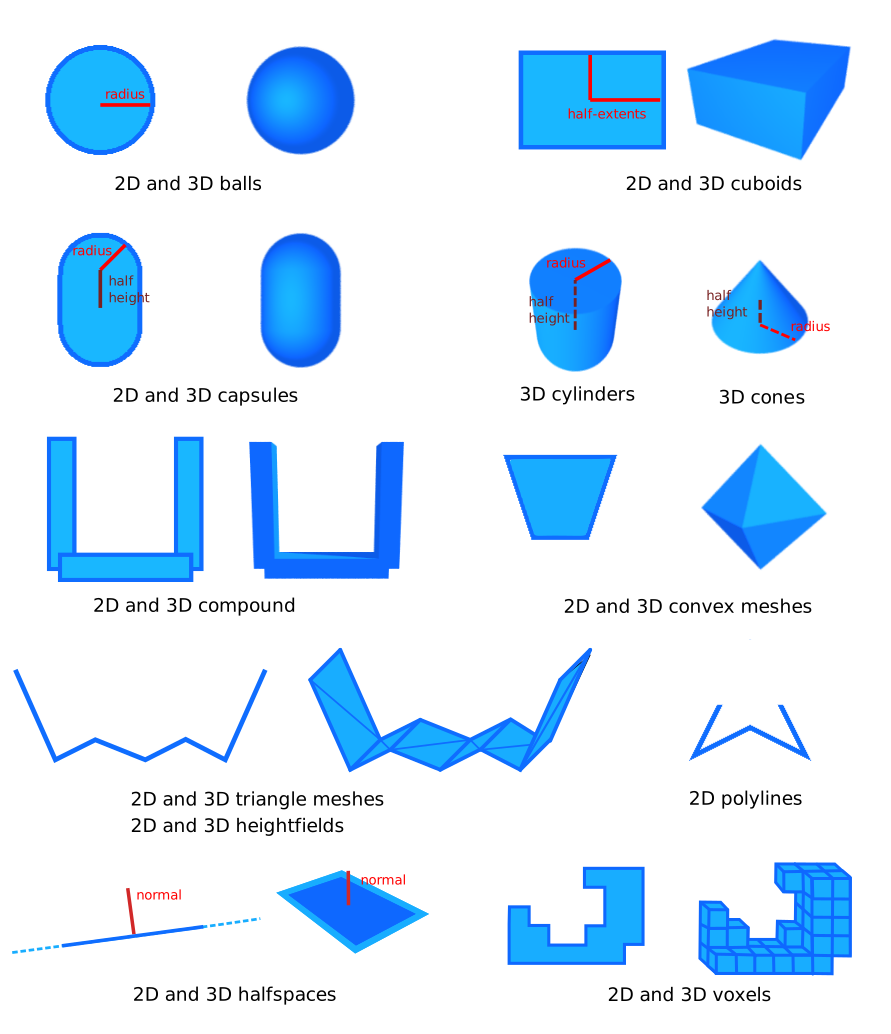
Shapes only hold information about their geometry. Their world-space position is given by the collider's position. Balls, cuboids, capsules, cylinders, and cones are all described by their half-height and/or radius. Compound shapes, convex meshes, triangle meshes, heightfields, and polylines are more complicated shapes described in the next paragraphs.
Convex meshes
A convex mesh is a shape such that, if two points are part of the shape, then the segment between these two points is also part of the shape:
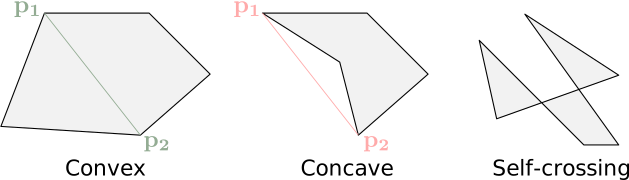
There are two ways of creating a collider with a convex shape:
- Using
ColliderBuilder::convex_hull(points)Collider::convex_hull(points)ColliderDesc.convexHull(points)r3ShapeDesc_SetConvexHull(&desc.shape, points)(orr3ConvexHullSharedShape(points)) - Using
ColliderBuilder::convex_mesh(points, indices)Collider::convex_mesh(points, indices)ColliderDesc.convexMesh(points, indices)r3ConvexMeshSharedShape(points, indices)ColliderBuilder::convex_polyline(points)Collider::convex_polyline(points)ColliderDesc.convexPolyline(points)r2ConvexPolylineSharedShape(points)ColliderBuilder::convex_hullCollider::convex_hullColliderDesc.convexHullr3ShapeDesc_SetConvexHull
- Using
Collider.convex_hull(points). This is the simplest approach: it will automatically compute the convex hull of the given set of points. A convex hull is the smallest convex shape that contains all the given points. - Using
Collider.convex_mesh(vertices, indices). This takes a mesh described by its vertex buffer and index buffer and assumes it is already convex (you need to ensure that it is convex yourself). This will be more efficient than theCollider.convex_hullconstructor because it won't perform any calculations to ensure convexity. However, if the input mesh isn't actually convex, the collision-detection for that shape will give an incorrect result.
The points and vertices are given as an (N, 3) NumPy array (or a sequence of 3-vectors), and the indices as an
(M, 3) integer array (or a sequence of triples) of triangle indices. Both constructors raise a MeshConversionError if the shape can't be built.
Triangle meshes and polylines
Triangle meshes (in 3D) and polylines (in 2D) can be used to describe the boundary of any kind of shape. This is generally useful to describe the fixed environment in games (terrains, buildings, etc.) Triangle meshes and polylines are defined by their vertex buffer and their index buffer. The winding of the triangles of a triangle mesh does not matter. Its topology doesn't matter either (it can have holes, cavities, doesn't need to be closed or manifold). It is however strongly recommended to avoid triangles that are long and thin because they can result in a lower numerical stability of collision-detection.
A triangle mesh/polyline is composed of triangles/segments with no thickness. This means that geometric queries like point-containment tests won't work intuitively because the triangle mesh is assumed to have no interior.
Triangle mesh
A triangle-mesh collider can be built
with ColliderBuilder::trimesh(vertices, indices)Collider::trimesh(vertices, indices)ColliderDesc.trimesh(vertices, indices)r3ShapeDesc_SetTrimesh(&desc.shape, vertices, indices, flags) (or r3TrimeshSharedShape(vertices, indices))Collider.trimesh(vertices, indices)vertices is the buffer containing all the vertices of the mesh, and indices is a set of indices indicating what vertex is used by
what triangle. The vertex buffer and index buffer may have different lengths, and any vertex can be shared
by multiple triangles.
To have more control over the resulting Trimesh,TriMeshFlags (possibly a combination of several flags with the | operator) to the optional third argument flags of Collider.trimesh.ColliderBuilder::trimesh_with_flags(vertices, indices, trimesh_flags).Collider::trimesh_with_flags(vertices, indices, trimesh_flags).ColliderDesc.trimesh with a third optional parameter trimeshFlags.R3_TRIMESH_* flags to the last argument of r3ShapeDesc_SetTrimesh (or call r3TrimeshSharedShapeWithFlags(vertices, indices, flags)).
For example, TrimeshFlags::FIX_INTERNAL_EDGESR3_TRIMESH_FIX_INTERNAL_EDGES
TriMeshFlags documentation for more information.R3_TRIMESH_* constants in rapier.h for more information.For example, TriMeshFlags.FIX_INTERNAL_EDGES is a popular choice to help with correcting ghost collision.
See the docstring of TriMeshFlags in the API reference of the Python bindings for more
information.
Polyline
A polyline collider can be built
with ColliderBuilder::polyline(vertices, indices)Collider::polyline(vertices, indices)ColliderDesc.polyline(vertices, indices)r3ShapeDesc_SetPolyline(&desc.shape, vertices, indices, flags) (or r3PolylineSharedShape(vertices, indices))vertices is the buffer containing all the vertices of the polyline, and indices is an optional set of indices
indicating what vertex is used by what segment. The vertex buffer and index buffer may have different lengths, and any
vertex can be shared by multiple segments. If the given None[vertices[0], vertices[1]], [vertices[1], vertices[2]], etc.
A polyline collider can be built with Collider.polyline(vertices, indices) where vertices is an (N, 3) array
containing all the vertices of the polyline, and indices is an optional (M, 2) array of indices indicating what
vertex is used by what segment. The vertex buffer and index buffer may have different lengths, and any vertex can be
shared by multiple segments. If indices is None (the default) then the input vertices are assumed to form a line
strip, i.e., the polyline is formed from the segments [vertices[0], vertices[1]], [vertices[1], vertices[2]], etc.
A triangle-mesh and a polyline are two-sided by default: they generate contacts on both of their sides, which lets a
body crushed against a thin wall squeeze through it when the contact normal flips. This is why they can also be built
as oriented (one-sided) shapes, with ColliderBuilder::oriented_polyline and with the TriMeshFlags::ORIENTED
flag of ColliderBuilder::trimesh_with_flagsCollider::oriented_polyline (2D only), with the
PolylineFlags::ORIENTED flag of Collider::polyline_with_flags, and with the TriMeshFlags::ORIENTED flag of
Collider::trimesh_with_flags
A triangle-mesh and a polyline are two-sided by default: they generate contacts on both of their sides, which lets a
body crushed against a thin wall squeeze through it when the contact normal flips. This is why they can also be built
as oriented (one-sided) shapes, with the R2_POLYLINE_ORIENTED flag of r2ShapeDesc_SetPolyline (or with
r2OrientedPolylineSharedShape) in 2D, and with the R3_TRIMESH_ORIENTED flag of r3ShapeDesc_SetTrimesh (or of
r3TrimeshSharedShapeWithFlags) in 3D. An oriented shape only collides on its outward side, which is given by the
winding of its vertices, and is therefore the right choice for the walls of a container.
A triangle-mesh is two-sided by default: it generates contacts on both of its sides, which lets a body crushed against
a thin wall squeeze through it when the contact normal flips. This is why it can also be built as an oriented
(one-sided) shape, with the TriMeshFlags.ORIENTED flag of Collider.trimesh. An oriented shape only collides on its
outward side, which is given by the winding of its vertices, and is therefore the right choice for the walls of a
container.
It is discouraged to use a triangle meshes or a polylines for colliders attached to
dynamic rigid-bodies. Because they have no interior, it is easy for another object to get stuck into them.
In order to simulate properly non-convex objects, it is recommended to use a convex decomposition with a
Heightfields

Heightfields are a more restrictive version of triangle-meshes and polylines. However, they can be easier to define and use much less memory. Therefore heightfields are useful to define large parts of terrains with simple topologies.
A 3D heightfield is basically large rectangle in the X-Z plane, subdivided in a grid pattern at regular intervals. Each
vertex of this subdivision is given a height, i.e., the coordinate of that point along the Y axis. A 3D heightfield
collider can be created
with ColliderBuilder::heightfield(heights, scale)Collider::heightfield(heights, num_rows, num_cols, scale)ColliderDesc.heightfield(heights, scale)r3HeightfieldSharedShape(heights, rows, columns, scale) (or the R3_SHAPE_DESC_HEIGHTFIELD shape kind)heights is a matrix indicating the altitude of each subdivision point of that heightfieldnum_rows * num_cols heights in column-major order)rows * columns heights in column-major order)Z axis, and the number of columns is the number of subdivision along the
X axis. The scale argument indicates the size of the rectangle of the X-Z plane.
A 3D heightfield is basically large rectangle in the X-Z plane, subdivided in a grid pattern at regular intervals.
Each vertex of this subdivision is given a height, i.e., the coordinate of that point along the Y axis. A 3D
heightfield collider can be created with Collider.heightfield(heights, scale) where heights is a 2D NumPy array (or nested
sequences) indicating the altitude of each subdivision point of that heightfield. The row index i of heights[i, j]
advances along the Z axis, and its column index j advances along the X axis: the number of rows of that array is
the number of subdivision points along the Z axis, and the number of columns is the number of subdivision points along
the X axis. The scale argument indicates the size of the rectangle of the X-Z plane (and its Y component
scales the heights).
A heightfield collider can be given any orientation by changing the orientation of the collider itself.
A 2D heightfield is a large segment along the X axis, subdivided at regular intervals. Each vertex of this
subdivision is given a height, i.e., the coordinate of that point along the Y axis. A 2D heightfield collider
can be created
with ColliderBuilder::heightfield(heights, scale)Collider::heightfield(heights, scale)ColliderDesc.heightfield(heights, scale)r2HeightfieldSharedShape(heights, rows, 1, scale) (or the R2_SHAPE_DESC_HEIGHTFIELD shape kind with a single column)heights is a vector indicating the altitude of each subdivision point of that heightfield. The number of elements on
that vector is the number of subdivision of the heightfield. The scale argument indicates the length of the subdivided
segment along the X axis.
Voxels
Voxel shapes are useful to represent 3D volumes made of small uniform cubes (voxels), such as Minecraft-like worlds or volumetric data. Unlike triangle meshes, voxel-based shapes can offer improved collision detection robustness and performance due to their regular structure.
A voxel collider is constructed from a 3D grid of occupied cells.
- Example 2D
- Example 3D
// A voxels shape from arbitrary points
let shape = ColliderBuilder::voxels_from_points(
    Vector::new(1.0, 1.0),
    &[
        Vector::new(0.0, 0.0),
        Vector::new(1.0, 1.0),
        Vector::new(-1.0, 1.0),
    ],
);
// A voxels shape from arbitrary points.
let collider = Collider::voxels_from_points(
    Vec2::new(1.0, 1.0),
    &[
        Vec2::new(0.0, 0.0),
        Vec2::new(1.0, 1.0),
        Vec2::new(-1.0, 1.0),
    ],
);
commands.spawn(collider);
// A voxels shape from arbitrary points
let shape = ColliderBuilder::voxels_from_points(
    Vector::new(1.0, 1.0, 1.0),
    &[Vector::new(0.0, 0.0, 0.0), Vector::new(1.0, 1.0, 1.0)],
);
// A voxels shape from arbitrary points.
let collider = Collider::voxels_from_points(
    Vec3::new(1.0, 1.0, 1.0),
    &[
        Vec3::new(0.0, 0.0, 0.0),
        Vec3::new(1.0, 1.0, 1.0),
        Vec3::new(-1.0, 1.0, 0.0),
    ],
);
commands.spawn(collider);
You can also voxelize a mesh:
let shape = SharedShape::voxelized_mesh(&mesh, &indices, 0.2, FillMode::default());
let collider = Collider::voxelized_mesh(&vertices, &indices, 0.2, FillMode::default());
Compound shapes
It is not recommended to use a triangle mesh or polyline for the shape of a collider attached to a dynamic rigid-body. The alternative is to use a compound shape to model a non-convex object as the union of multiple convex parts (which can be cuboids, balls, convex meshes, etc.) This is commonly known as a convex decomposition.
An alternative to using a compound shape is to attach multiple colliders to the same rigid-body: all the colliders will move with the rigid-body automatically, and the simulation quality (contact resolution, stability) is identical with both approaches. They differ in other ways, so pick based on how you use the object:
- Performance: a compound shape is a single collider, so the broad-phase handles one entry (with its own internal acceleration structure for the parts) instead of one entry per collider. With many parts (hundreds or more), a compound shape makes the physics step significantly cheaper, especially while the rigid-body is awake.
- Collision events: each collider generates its own individual collision start/stop events and can have its own friction, restitution, collision groups, or sensor status. A compound shape is a single collider: one set of events and properties for the whole shape.
- Mutability: adding or removing one collider from a rigid-body is easy and cheap, whereas adding or removing a part of a compound shape requires rebuilding the whole compound shape.
To build a compound shape, it is possible to directly provide the set of shapes as well as their position in the compound shape's local space:
let _ = ColliderBuilder::compound(vec![(pos1, shape.clone()), (pos2, shape.clone())]);
commands.spawn(Collider::compound(vec![
    (pos1, rot1, shape1),
    (pos2, rot2, shape2),
]));
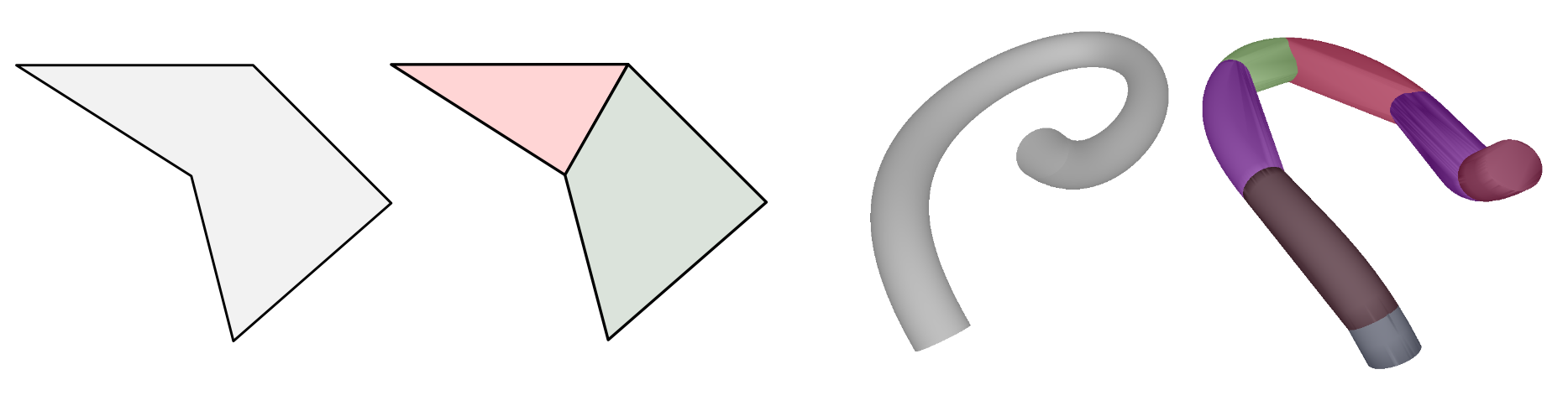
It is also possible to build a compound shape modelling the convex decomposition of a 3D triangle mesh or 2D polyline
using the ColliderBuilder::convex_decomposition(vertices, indices)Collider::convex_decomposition(vertices, indices)
Voxels
Voxel shapes are useful to represent 3D volumes made of small uniform cubes (voxels), such as Minecraft-like worlds or volumetric data. Unlike triangle meshes, voxel-based shapes can offer improved collision detection robustness and performance due to their regular structure.
A voxel shape is a shared shape constructed from a grid of occupied cells, e.g., with
r3VoxelsSharedShapeFromPoints which fills the cells containing the given points:
- Example 2D
- Example 3D
// A voxels shape from arbitrary points.
R2Vector points[] = {{0.0, 0.0}, {1.0, 1.0}, {-1.0, 1.0}};
R2SharedShape *shape = r2VoxelsSharedShapeFromPoints(r2Vector(1.0, 1.0), (R2VectorView){points, 3});
R2ColliderDesc collider = r2DefaultColliderDesc();
collider.shape.kind = R2_SHAPE_DESC_SHARED;
collider.shape.sharedShape = shape;
// A voxels shape from arbitrary points.
R3Vector points[] = {{0.0, 0.0, 0.0}, {1.0, 1.0, 1.0}};
R3SharedShape *shape = r3VoxelsSharedShapeFromPoints(r3Vector(1.0, 1.0, 1.0), (R3VectorView){points, 2});
R3ColliderDesc collider = r3DefaultColliderDesc();
collider.shape.kind = R3_SHAPE_DESC_SHARED;
collider.shape.sharedShape = shape;
You can also voxelize a mesh (a polyline in 2D, or a triangle mesh in 3D) with r3VoxelizedMeshSharedShape:
R2SharedShape *shape =
    r2VoxelizedMeshSharedShape((R2VectorView){mesh, 2}, (R2SurfaceElementView){indices, 2}, 0.2);
The voxels of a collider with a voxel shape can then be inspected with r3Collider_IsVoxels and
r3Collider_VoxelAtFlatId, and filled or cleared individually with r3Collider_SetVoxel.
Compound shapes
It is not recommended to use a triangle mesh or polyline for the shape of a collider attached to a dynamic rigid-body. The alternative is to use a compound shape to model a non-convex object as the union of multiple convex parts (which can be cuboids, balls, convex meshes, etc.) This is commonly known as a convex decomposition.
An alternative to using a compound shape is to attach multiple colliders to the same rigid-body: all the colliders will move with the rigid-body automatically, and the simulation quality (contact resolution, stability) is identical with both approaches. They differ in other ways, so pick based on how you use the object:
- Performance: a compound shape is a single collider, so the broad-phase handles one entry (with its own internal acceleration structure for the parts) instead of one entry per collider. With many parts (hundreds or more), a compound shape makes the physics step significantly cheaper, especially while the rigid-body is awake.
- Collision events: each collider generates its own individual collision start/stop events and can have its own friction, restitution, collision groups, or sensor status. A compound shape is a single collider: one set of events and properties for the whole shape.
- Mutability: adding or removing one collider from a rigid-body is easy and cheap, whereas adding or removing a part of a compound shape requires rebuilding the whole compound shape.
To build a compound shape, it is possible to directly provide the set of shapes as well as their position in the
compound shape's local space, as an array of R3CompoundShapeDesc given to a shape description with the
R3_SHAPE_DESC_COMPOUND kind (or to r3CompoundSharedShape):
R2CompoundShapeDesc parts[] = {{pos1, shape}, {pos2, shape}};
R2ColliderDesc collider = r2DefaultColliderDesc();
collider.shape.kind = R2_SHAPE_DESC_COMPOUND;
collider.shape.children = (R2CompoundShapeView){parts, 2};
It is also possible to build a compound shape modelling the convex decomposition of a 3D triangle mesh or 2D polyline
using the r3ConvexDecompositionSharedShape(vertices, indices) function. This will automatically create a compound
shape composed of multiple convex meshes obtained from the approximate convex decomposition of the triangle mesh (or
polyline in 2D) using the VHACD algorithm. Here are examples of a 2D concave
polygon decomposed into two convex parts as well as a 3D mesh with its approximate convex decomposition composed of 7
convex parts:
Voxels
Voxel shapes are useful to represent 3D volumes made of small uniform cubes (voxels), such as Minecraft-like worlds or volumetric data. Unlike triangle meshes, voxel-based shapes can offer improved collision detection robustness and performance due to their regular structure.
A voxel collider is constructed from a 3D grid of occupied cells, e.g., with Collider.voxels_from_points which fills
the cells containing the given points (or with Collider.voxels which takes the integer coordinates of the filled
cells directly):
# A voxels shape from arbitrary points.
shape = rp.Collider.voxels_from_points(
    (1.0, 1.0, 1.0),
    np.array([[0.0, 0.0, 0.0], [1.0, 1.0, 1.0]]),
)
You can also voxelize a triangle mesh with SharedShape.voxelized_mesh (or Collider.voxelized_mesh), where the
FillMode indicates whether only the voxels intersecting the surface of the mesh are filled (FillMode.SURFACE_ONLY)
or also the voxels inside of it (FillMode.flood_fill(), the default):
shape = rp.SharedShape.voxelized_mesh(mesh_vertices, mesh_indices, 0.2, rp.FillMode.flood_fill())
Compound shapes
It is not recommended to use a triangle mesh for the shape of a collider attached to a dynamic rigid-body. The alternative is to use a compound shape to model a non-convex object as the union of multiple convex parts (which can be cuboids, balls, convex meshes, etc.) This is commonly known as a convex decomposition.
An alternative to using a compound shape is to attach multiple colliders to the same rigid-body: all the colliders will move with the rigid-body automatically, and the simulation quality (contact resolution, stability) is identical with both approaches. They differ in other ways, so pick based on how you use the object:
- Performance: a compound shape is a single collider, so the broad-phase handles one entry (with its own internal acceleration structure for the parts) instead of one entry per collider. With many parts (hundreds or more), a compound shape makes the physics step significantly cheaper, especially while the rigid-body is awake.
- Collision events: each collider generates its own individual collision start/stop events and can have its own friction, restitution, collision groups, or sensor status. A compound shape is a single collider: one set of events and properties for the whole shape.
- Mutability: adding or removing one collider from a rigid-body is easy and cheap, whereas adding or removing a part of a compound shape requires rebuilding the whole compound shape.
To build a compound shape, it is possible to directly provide the set of shapes as well as their position in the
compound shape's local space, as a list of (Isometry3, SharedShape) pairs given to Collider.compound (or to
SharedShape.compound):
_ = rp.Collider.compound([(pos1, shape), (pos2, shape)])
It is also possible to build a compound shape modelling the convex decomposition of a triangle mesh using the
Collider.convex_decomposition(vertices, indices) constructor (or SharedShape.convex_decomposition). This will
automatically create a compound shape composed of multiple convex meshes obtained from the approximate convex
decomposition of the triangle mesh using the VHACD algorithm. Here are examples of
a 2D concave polygon decomposed into two convex parts as well as a 3D mesh with its approximate convex decomposition
composed of 7 convex parts:
Round shapes
Some shapes have round variants: RoundCuboid, RoundCylinder, RoundCone, RoundConvexPolygon and
RoundConvexPolyhedron. These are shapes to which is added a small thickness with round border:
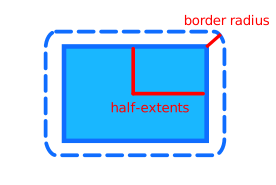
For algorithmic reasons, collision-detection involving round cylinders, round cones, round convex polygon or round convex polyhedron will be faster than collision-detection with their non-round counterparts. However, collision-detection with round-cuboids will be slower than collision-detection with regular cuboids.
Colliders with round shapes are built in a way very similar to their non-round
counterparts, e.g., ColliderBuilder::round_cuboidCollider::round_cuboidColliderDesc.roundCuboidr3RoundCuboidColliderDescCollider.round_cuboidborder_radiusborderRadiusborder_radiusborder_radius
The round shapes are created with the following functions:
r3RoundCuboidColliderDesc(half_extents, border_radius)for a round cuboid.r3RoundCylinderColliderDesc(half_height, radius, border_radius)for a round cylinder (3D only).r3RoundConeColliderDesc(half_height, radius, border_radius)for a round cone (3D only).r3RoundConvexHullSharedShape(points, border_radius)for the round convex hull of a set of points: a round convex polygon in 2D, or a round convex polyhedron in 3D.
The first three also have a shared shape version, e.g., r3RoundCuboidSharedShape.
The round shapes are created with the following constructors:
Collider.round_cuboid(hx, hy, hz, border_radius)for a round cuboid.Collider.round_cylinder(half_height, radius, border_radius)for a round cylinder.Collider.round_cone(half_height, radius, border_radius)for a round cone.Collider.round_triangle(a, b, c, border_radius)for a round triangle.Collider.round_convex_hull(points, border_radius)for the round convex hull of a set of points (a round convex polyhedron).Collider.round_convex_mesh(vertices, indices, border_radius)for a round convex polyhedron given by a mesh that is already convex.
All of them also have a SharedShape version, e.g., SharedShape.round_cuboid.
Mass properties
The mass properties of a rigid-body is computed as the sum of the mass-properties manually set by the user for the rigid-body, plus the mass-properties of the colliders attached to it. There are two ways to define the mass-properties of a collider:
- The easiest, automatic, way: by giving the collider a non-zero density (the default density is 1.0) or a non-zero mass. This will make sure the other mass-properties like the angular inertia tensor are computed automatically from the collider's shape.
- The manual way: by giving an explicit mass and angular inertia to the collider.
It is recommended to use the density-based or mass-based approaches as it will ensure the automatically-computed mass-properties are coherent with the geometric shape. Wrong mass-properties (especially the angular inertia part and center-of-mass location) may lead to odd behaviors. The manual approach is usually useful when modeling real-world objects for which you already know the real-world mass, center-of-mass, and angular inertia tensor.
ColliderBuilder::density,
ColliderBuilder::mass, or ColliderBuilder::mass_properties:ColliderMassProperties
component:ColliderDesc.setDensity,
ColliderDesc.setMass, or ColliderDesc.setMassProperties:massMode of its description to R3_MASS_DENSITY (the default), R3_MASS_TOTAL, or R3_MASS_PROPERTIES, and the corresponding density, mass, or massProperties field:ColliderBuilder.density, ColliderBuilder.mass, or ColliderBuilder.mass_properties:- Example 2D
- Example 3D
let rigid_body = RigidBodyBuilder::dynamic().build();
let rigid_body_handle = world.insert_body(rigid_body);
// First option: by setting the density of the collider (or we could just leave
//               its default value 1.0).
let collider = ColliderBuilder::cuboid(1.0, 2.0).density(2.0).build();
// Second option: by setting the mass of the collider.
let collider = ColliderBuilder::cuboid(1.0, 2.0).mass(0.8).build();
// Third option: by setting the mass-properties explicitly.
let collider = ColliderBuilder::cuboid(1.0, 2.0)
    .mass_properties(MassProperties::new(Vector::new(0.0, 1.0), 0.5, 0.3))
    .build();
// When the collider is attached, the rigid-body's mass and angular
// inertia is automatically updated to take the collider into account.
world.insert_collider(collider, Some(rigid_body_handle));
let rigid_body = RigidBodyBuilder::dynamic().build();
let rigid_body_handle = world.insert_body(rigid_body);
// First option: by setting the density of the collider (or we could just leave
//               its default value 1.0).
let collider = ColliderBuilder::cuboid(1.0, 2.0, 3.0).density(2.0).build();
// Second option: by setting the mass of the collider.
let collider = ColliderBuilder::cuboid(1.0, 2.0, 3.0).mass(0.8).build();
// Third option: by setting the mass-properties explicitly.
let collider = ColliderBuilder::cuboid(1.0, 2.0, 3.0)
    .mass_properties(MassProperties::new(
        Vector::new(0.0, 1.0, 0.0),
        0.5,
        Vector::new(0.3, 0.2, 0.1),
    ))
    .build();
// When the collider is attached, the rigid-body's mass and angular
// inertia is automatically updated to take the collider into account.
let collider_handle =
    world.insert_collider(collider, Some(rigid_body_handle));
They can also be modified after the creation of the collider with Collider::set_density, Collider::set_mass, or
Collider::set_mass_properties. Each of these methods (as well as the builder methods above) replaces the
mass-properties previously set by any of the others: for example, calling Collider::set_mass on a collider built with
ColliderBuilder::density makes its density be ignored. The mass-properties of the rigid-body the collider is attached
to are then updated automatically at the next simulation step (or immediately with
RigidBody::recompute_mass_properties_from_colliders).
- Example 2D
- Example 3D
// First option: by setting the density of the collider (or we could just leave
//               its default value 1.0).
let collider_mprops = ColliderMassProperties::Density(2.0);
// Second option: by setting the mass of the collider.
let collider_mprops = ColliderMassProperties::Mass(0.8);
// Third option: by setting the mass-properties explicitly.
let collider_mprops = ColliderMassProperties::MassProperties(MassProperties {
    local_center_of_mass: Vec2::new(0.0, 1.0),
    mass: 0.5,
    principal_inertia: 0.3,
});

// When the collider is attached, the rigid-body's mass and angular
// inertia will be automatically updated to take the collider into account.
commands
    .spawn(RigidBody::Dynamic)
    .insert(Collider::ball(0.5))
    .insert(collider_mprops);
// First option: by setting the density of the collider (or we could just leave
//               its default value 1.0).
let collider_mprops = ColliderMassProperties::Density(2.0);
// Second option: by setting the mass of the collider.
let collider_mprops = ColliderMassProperties::Mass(0.8);
// Third option: by setting the mass-properties explicitly.
let collider_mprops = ColliderMassProperties::MassProperties(MassProperties {
    local_center_of_mass: Vec3::new(0.0, 1.0, 2.0),
    mass: 0.5,
    principal_inertia_local_frame: Quat::IDENTITY,
    principal_inertia: Vec3::new(0.3, 0.4, 0.5),
});
// When the collider is attached, the rigid-body's mass and angular
// inertia will be automatically updated to take the collider into account.
commands
    .spawn(RigidBody::Dynamic)
    .insert(Collider::ball(0.5))
    .insert(collider_mprops);
The resulting volume, density, mass, and local mass-properties of a collider can be read from its
ReadColliderMassProperties component, inserted automatically with the Collider component. This component is updated
whenever the collider or its ColliderMassProperties change, and modifying it has no effect on the simulation.
- Example 2D
- Example 3D
let rigidBodyDesc = RAPIER.RigidBodyDesc.dynamic();
let rigidBody = world.createRigidBody(rigidBodyDesc);
// First option: by setting the density of the collider (or we could just leave
//               its default value 1.0).
let colliderDesc = RAPIER.ColliderDesc.cuboid(1.0, 2.0)
    .setDensity(2.0);
// Second option: by setting the mass of the collider.
let colliderDesc2 = RAPIER.ColliderDesc.cuboid(1.0, 2.0)
    .setMass(0.8);
// Third option: by setting the mass-properties explicitly.
let colliderDesc3 = RAPIER.ColliderDesc.cuboid(1.0, 2.0)
    .setMassProperties(0.5, { x: 0.0, y: 1.0 }, 0.3);
// When the collider is attached, the rigid-body's mass and angular
// inertia is automatically updated to take the collider into account.
let collider = world.createCollider(colliderDesc, rigidBody);
let rigidBodyDesc = RAPIER.RigidBodyDesc.dynamic();
let rigidBody = world.createRigidBody(rigidBodyDesc);
// First option: by setting the density of the collider (or we could just leave
//               its default value 1.0).
let colliderDesc = RAPIER.ColliderDesc.cuboid(1.0, 2.0, 1.0)
    .setDensity(2.0);
// Second option: by setting the mass of the collider.
let colliderDesc2 = RAPIER.ColliderDesc.cuboid(1.0, 2.0, 1.0)
    .setMass(0.8);
// Third option: by setting the mass-properties explicitly.
let colliderDesc3 = RAPIER.ColliderDesc.cuboid(1.0, 2.0, 1.0)
    .setMassProperties(0.5, { x: 0.0, y: 1.0, z: 0.0 }, { x: 0.3, y: 0.2, z: 0.1 }, { w: 1.0, x: 0.0, y: 0.0, z: 0.0 });
// When the collider is attached, the rigid-body's mass and angular
// inertia is automatically updated to take the collider into account.
let collider = world.createCollider(colliderDesc, rigidBody);
They can also be modified after the creation of the collider with Collider.setDensity, Collider.setMass, or
Collider.setMassProperties. Each of these methods (as well as the ColliderDesc methods above) replaces the
mass-properties previously set by any of the others: for example, calling Collider.setMass on a collider created
with ColliderDesc.setDensity makes its density be ignored. The mass-properties of the rigid-body the collider is
attached to are then updated automatically at the next simulation step (or immediately with
RigidBody.recomputeMassPropertiesFromColliders).
- Example 2D
- Example 3D
R2RigidBodyDesc rigid_body = r2DynamicRigidBodyDesc();
R2RigidBodyHandle rigid_body_handle = r2InsertRigidBody(world, &rigid_body);
// First option: by setting the density of the collider (or we could just leave
//               its default value 1.0).
R2ColliderDesc collider = r2CuboidColliderDesc(r2Vector(1.0, 2.0));
collider.density = 2.0;
// Second option: by setting the mass of the collider.
collider = r2CuboidColliderDesc(r2Vector(1.0, 2.0));
collider.massMode = R2_MASS_TOTAL;
collider.mass = 0.8;
// Third option: by setting the mass-properties explicitly.
collider = r2CuboidColliderDesc(r2Vector(1.0, 2.0));
collider.massMode = R2_MASS_PROPERTIES;
collider.massProperties = (R2MassProperties){
    .local_com = r2Vector(0.0, 1.0),
    .mass = 0.5,
    .principal_inertia = 0.3,
};
// When the collider is attached, the rigid-body's mass and angular
// inertia is automatically updated to take the collider into account.
r2InsertCollider(rigid_body_handle, &collider);
R3RigidBodyDesc rigid_body = r3DynamicRigidBodyDesc();
R3RigidBodyHandle rigid_body_handle = r3InsertRigidBody(world, &rigid_body);
// First option: by setting the density of the collider (or we could just leave
//               its default value 1.0).
R3ColliderDesc collider = r3CuboidColliderDesc(r3Vector(1.0, 2.0, 3.0));
collider.density = 2.0;
// Second option: by setting the mass of the collider.
collider = r3CuboidColliderDesc(r3Vector(1.0, 2.0, 3.0));
collider.massMode = R3_MASS_TOTAL;
collider.mass = 0.8;
// Third option: by setting the mass-properties explicitly.
collider = r3CuboidColliderDesc(r3Vector(1.0, 2.0, 3.0));
collider.massMode = R3_MASS_PROPERTIES;
collider.massProperties = (R3MassProperties){
    .local_com = r3Vector(0.0, 1.0, 0.0),
    .mass = 0.5,
    .principal_inertia = r3Vector(0.3, 0.2, 0.1),
    // The identity rotation: the principal inertia axes are the local axes.
    .principal_inertia_local_frame = {0.0, 0.0, 0.0, 1.0},
};
// When the collider is attached, the rigid-body's mass and angular
// inertia is automatically updated to take the collider into account.
R3ColliderHandle collider_handle = r3InsertCollider(rigid_body_handle, &collider);
The explicit mass-properties are given by a R3MassProperties: the center-of-mass local_com in the collider's local
space, the mass, and the principal_inertia (a scalar in 2D, or the three principal angular inertia in 3D, along
the axes given by the principal_inertia_local_frame rotation).
They can also be modified after the creation of the collider with r3Collider_SetDensity, r3Collider_SetMass, or
r3Collider_SetMassProperties. Each of these functions (as well as the massMode of the description) replaces the
mass-properties previously set by any of the others: for example, calling r3Collider_SetMass on a collider created
with a density makes its density be ignored. The mass-properties of the rigid-body the collider is attached to are
then updated automatically at the next simulation step (or immediately with
r3RigidBody_RecomputeMassPropertiesFromColliders). The resulting volume, density, mass, and local mass-properties of
a collider can be read with r3Collider_Volume, r3Collider_Density, r3Collider_Mass, and
r3Collider_MassProperties.
rigid_body_handle = world.add_body(rp.RigidBody.dynamic())
# First option: by setting the density of the collider (or we could just leave
#               its default value 1.0).
collider = rp.Collider.cuboid(1.0, 2.0, 3.0).density(2.0).build()
# Second option: by setting the mass of the collider.
collider = rp.Collider.cuboid(1.0, 2.0, 3.0).mass(0.8).build()
# Third option: by setting the mass-properties explicitly.
collider = (
    rp.Collider.cuboid(1.0, 2.0, 3.0)
    .mass_properties(
        rp.MassProperties(
            local_com=(0.0, 1.0, 0.0),
            mass=0.5,
            principal_inertia=(0.3, 0.2, 0.1),
        )
    )
    .build()
)
# When the collider is attached, the rigid-body's mass and angular
# inertia is automatically updated to take the collider into account.
world.add_collider(collider, parent=rigid_body_handle)
The explicit mass-properties are given by a MassProperties: the center-of-mass local_com in the collider's local
space, the mass, and the three principal_inertia (the principal angular inertia, along the axes given by the
optional principal_inertia_local_frame rotation).
They can also be modified after the creation of the collider by assigning its density, mass, or
mass_properties property. Each of these properties (as well as the builder methods above) replaces the
mass-properties previously set by any of the others: for example, assigning the mass of a collider built with
ColliderBuilder.density makes its density be ignored. The mass-properties of the rigid-body the collider is attached
to are then updated automatically at the next simulation step (or immediately with
RigidBody.recompute_mass_properties_from_colliders(world.colliders)). The resulting volume, density, mass, and local
mass-properties of a collider can be read from its volume, density, mass, and mass_properties properties.
Position
The position of a collider represents its location (translation) in 2D or 3D world-space as well as its orientation (rotation).
Transform component.Pose type).R3Vector) and its rotational part (R3Rotation) as an unit quaternion (in 3D) or an angle (in 2D). Both are combined into a pose (the R3Pose type).Vec3) and its rotational part as an unit quaternion (Rotation3). Both are combined into a pose (the Isometry3 type).
Please read carefully the paragraph after the next example. It explains how the collider position (and the action of setting this position) behaves differently when it is attached to a rigid-body.
It is possible to set this position when the collider is created or after its creation:
- Example 2D
- Example 3D
/* Set the collider position when the collider is created. */
let collider = ColliderBuilder::ball(0.5)
    .translation(Vector::new(1.0, 2.0))
    .rotation(0.4)
    // Set both translation and rotation at once.
    .position(Pose::new(Vector::new(1.0, 2.0), 0.4))
    .build();
/* Set the collider position after the collider creation. */
let collider = &mut world.colliders[collider_handle];
collider.set_translation(Vector::new(1.0, 2.0));
collider.set_rotation(Rotation::new(0.4));
// Set both the translation and rotation at once.
collider.set_position(Pose::new(Vector::new(1.0, 2.0), 0.4));
assert_eq!(collider.translation(), Vector::new(1.0, 2.0));
assert_eq!(collider.rotation().angle(), 0.4);
/* Set the collider position when the collider is created. */
let collider = ColliderBuilder::ball(0.5)
    .translation(Vector::new(1.0, 2.0, 3.0))
    .rotation(Vector::new(0.1, 0.2, 0.4))
    // Set both translation and rotation at once.
    .position(Pose::new(
        Vector::new(1.0, 2.0, 3.0),
        Vector::new(0.1, 0.2, 0.4),
    ))
    .build();
/* Set the collider position after the collider creation. */
let collider = &mut world.colliders[collider_handle];
collider.set_translation(Vector::new(1.0, 2.0, 3.0));
collider.set_rotation(Rotation::from_scaled_axis(Vector::new(0.1, 0.2, 0.4)));
// Set both the translation and rotation at once.
collider.set_position(Pose::new(
    Vector::new(1.0, 2.0, 3.0),
    Vector::new(0.1, 0.2, 0.4),
));
assert_eq!(collider.translation(), Vector::new(1.0, 2.0, 3.0));
assert_eq!(
    collider.rotation().to_scaled_axis(),
    Vector::new(0.1, 0.2, 0.4)
);
- Example 2D
- Example 3D
/* Set the collider position when the collider is created. */
commands
    .spawn(Collider::cuboid(0.5, 0.5))
    .insert(Transform::from_xyz(1.0, 2.0, 0.0));
/* Set the collider position inside of a system. */
fn modify_collider_position(mut positions: Query<&mut Transform, With<Collider>>) {
    for mut position in positions.iter_mut() {
        position.translation.x = 2.0;
    }
}
/* Set the collider position when the collider is created. */
commands
    .spawn(Collider::cuboid(0.5, 0.5, 0.5))
    .insert(Transform::from_xyz(1.0, 2.0, 3.0));
/* Set the collider position inside of a system. */
fn modify_collider_position(mut positions: Query<&mut Transform, With<Collider>>) {
    for mut position in positions.iter_mut() {
        position.translation.x = 2.0;
    }
}
- Example 2D
- Example 3D
/* Set the collider position when the collider is created. */
let colliderDesc = RAPIER.ColliderDesc.ball(0.5)
    .setTranslation(1.0, 2.0)
    .setRotation(0.4);
let collider = world.createCollider(colliderDesc);
/* Set the collider position after the collider creation. */
collider.setTranslation({ x: 1.0, y: 2.0 });
collider.setRotation(0.4);
/* Set the collider position when the collider is created. */
let colliderDesc = RAPIER.ColliderDesc.ball(0.5)
    .setTranslation(1.0, 2.0, 3.0)
    .setRotation({ w: 1.0, x: 0.0, y: 0.0, z: 0.0 });
let collider = world.createCollider(colliderDesc);
/* Set the collider position after the collider creation. */
collider.setTranslation({ x: 1.0, y: 2.0, z: 3.0 });
collider.setRotation({ w: 1.0, x: 0.0, y: 0.0, z: 0.0 });
- Example 2D
- Example 3D
/* Set the collider position when the collider is created. */
R2ColliderDesc collider = r2BallColliderDesc(0.5);
collider.position.translation = r2Vector(1.0, 2.0);
collider.position.rotation = r2Rotation(0.4);
// Set both translation and rotation at once.
collider.position = r2Pose(r2Vector(1.0, 2.0), r2Rotation(0.4));
/* Set the collider position after the collider creation. */
r2Collider_SetTranslation(collider_handle, r2Vector(1.0, 2.0));
r2Collider_SetRotation(collider_handle, r2Rotation(0.4));
// Set both the translation and rotation at once.
r2Collider_SetPosition(collider_handle, r2Pose(r2Vector(1.0, 2.0), r2Rotation(0.4)));
R2Vector translation = r2Collider_Translation(collider_handle);
assert(translation.x == 1.0 && translation.y == 2.0);
assert(fabs(r2Collider_Rotation(collider_handle).angle - 0.4) < 1.0e-6);
/* Set the collider position when the collider is created. */
R3ColliderDesc collider = r3BallColliderDesc(0.5);
collider.position.translation = r3Vector(1.0, 2.0, 3.0);
collider.position.rotation = r3RotationFromAxisAngle(r3Vector(0.0, 0.0, 1.0), 0.4);
// Set both translation and rotation at once.
collider.position =
    r3Pose(r3Vector(1.0, 2.0, 3.0), r3RotationFromAxisAngle(r3Vector(0.0, 0.0, 1.0), 0.4));
/* Set the collider position after the collider creation. */
R3Rotation rotation = r3RotationFromAxisAngle(r3Vector(0.0, 0.0, 1.0), 0.4);
r3Collider_SetTranslation(collider_handle, r3Vector(1.0, 2.0, 3.0));
r3Collider_SetRotation(collider_handle, rotation);
// Set both the translation and rotation at once.
r3Collider_SetPosition(collider_handle, r3Pose(r3Vector(1.0, 2.0, 3.0), rotation));
R3Vector translation = r3Collider_Translation(collider_handle);
assert(translation.x == 1.0 && translation.y == 2.0 && translation.z == 3.0);
# Set the collider position when the collider is created.
collider = (
    rp.Collider.ball(0.5)
    .translation((1.0, 2.0, 3.0))
    .rotation((0.1, 0.2, 0.4))
    # Set both translation and rotation at once.
    .position(rp.Isometry3((1.0, 2.0, 3.0), rp.Rotation3.from_scaled_axis((0.1, 0.2, 0.4))))
    .build()
)
# Set the collider position after the collider creation.
collider = world.colliders[collider_handle]
collider.translation = (1.0, 2.0, 3.0)
collider.rotation = rp.Rotation3.from_scaled_axis((0.1, 0.2, 0.4))
# Set both the translation and rotation at once.
collider.position = rp.Isometry3((1.0, 2.0, 3.0), rp.Rotation3.from_scaled_axis((0.1, 0.2, 0.4)))
assert collider.translation == (1.0, 2.0, 3.0)
assert (collider.rotation.scaled_axis - (0.1, 0.2, 0.4)).norm() < 1.0e-6
If a collider is attached to a rigid-body, its position is automatically updated by the physics pipeline when a rigid-body is moved by the physics pipeline. If a change to the rigid-body position is made by the user then the collider position will be updated during the next timestep.
Transform will
modify the position of the collider relative to the rigid-body it is attached to (if the collider is on the same
entity as the rigid-body, its Transform is the one of the rigid-body):r3Collider_SetPosition, r3Collider_SetTranslation, or r3Collider_SetRotation) will have no lasting effect. Instead, it is possible to set the position of the collider relative to the rigid-body it is attached to: this is the position field of its description, which can be modified after its creation with r3Collider_SetPositionWrtParent:position, translation, or rotation property) will have no lasting effect. Instead, it is possible to set the position of the collider relative to the rigid-body it is attached to: this is the position given to its builder, which can be modified after its creation by assigning its position_wrt_parent property (or only its translation or rotation part, with the translation_wrt_parent or rotation_wrt_parent property):- Example 2D
- Example 3D
let rigid_body = RigidBodyBuilder::dynamic().build();
let rigid_body_handle = world.insert_body(rigid_body);
let collider = ColliderBuilder::ball(0.5)
    .translation(Vector::new(1.0, 2.0))
    .build();
// Attach the collider to the rigid-body. The collider's position wrt. the rigid-body
// is automatically set to the collider current position when this method is called.
let attached_collider_handle = world.insert_collider(collider, Some(rigid_body_handle));
/* Set the collider position wrt. its parent after the collider creation. */
let collider = &mut world.colliders[attached_collider_handle];
collider.set_position_wrt_parent(Pose::translation(1.0, 2.0));
assert_eq!(
    collider.position_wrt_parent().unwrap().translation,
    Vector::new(1.0, 2.0)
);
let rigid_body = RigidBodyBuilder::dynamic().build();
let rigid_body_handle = world.insert_body(rigid_body);
let collider = ColliderBuilder::ball(0.5)
    .translation(Vector::new(1.0, 2.0, 3.0))
    .build();
// Attach the collider to the rigid-body. The collider's position wrt. the rigid-body
// is automatically set to the collider current position when this method is called.
let attached_collider_handle = world.insert_collider(collider, Some(rigid_body_handle));
/* Set the collider position wrt. its parent after the collider creation. */
let collider = &mut world.colliders[attached_collider_handle];
collider.set_position_wrt_parent(Pose::translation(1.0, 2.0, 3.0));
assert_eq!(
    collider.position_wrt_parent().unwrap().translation,
    Vector::new(1.0, 2.0, 3.0)
);
- Example 2D
- Example 3D
// Attach the collider to the rigid-body. The collider is attached as its
// children, so the collider’s `Transform` components sets its position
// relative to the parent rigid-body.
commands
    .spawn((RigidBody::Dynamic, GlobalTransform::default()))
    .with_children(|children| {
        children
            .spawn(Collider::cuboid(0.5, 0.5))
            .insert(Transform::from_xyz(1.0, 2.0, 0.0));
    });
// Attach the collider to the rigid-body. The collider is attached as its
// children, so the collider’s `Transform` components sets its position
// relative to the parent rigid-body.
commands
    .spawn(RigidBody::Dynamic)
    .with_children(|children| {
        children
            .spawn(Collider::cuboid(0.5, 0.5, 0.5))
            .insert(Transform::from_xyz(1.0, 2.0, 0.0));
    });
- Example 2D
- Example 3D
let rigidBodyDesc = RAPIER.RigidBodyDesc.dynamic();
let rigidBody = world.createRigidBody(rigidBodyDesc);
let colliderDesc = RAPIER.ColliderDesc.ball(0.5)
    .setTranslation(1.0, 2.0);
// Attach the collider to the rigid-body. The collider's position wrt. the rigid-body
// is automatically set to the collider current position when this method is called.
let collider = world.createCollider(colliderDesc, rigidBody);
/* Set the collider position wrt. its parent after the collider creation. */
collider.setTranslationWrtParent({ x: 1.0, y: 2.0 });
let rigidBodyDesc = RAPIER.RigidBodyDesc.dynamic();
let rigidBody = world.createRigidBody(rigidBodyDesc);
let colliderDesc = RAPIER.ColliderDesc.ball(0.5)
    .setTranslation(1.0, 2.0, 3.0);
// Attach the collider to the rigid-body. The collider's position wrt. the rigid-body
// is automatically set to the collider current position when this method is called.
let collider = world.createCollider(colliderDesc, rigidBody);
/* Set the collider position wrt. its parent after the collider creation. */
collider.setTranslationWrtParent({ x: 1.0, y: 2.0, z: 3.0 });
- Example 2D
- Example 3D
R2RigidBodyDesc rigid_body = r2DynamicRigidBodyDesc();
R2RigidBodyHandle rigid_body_handle = r2InsertRigidBody(world, &rigid_body);
R2ColliderDesc collider = r2BallColliderDesc(0.5);
collider.position.translation = r2Vector(1.0, 2.0);
// Attach the collider to the rigid-body. The description's position is
// the collider's position wrt. the rigid-body.
R2ColliderHandle collider_handle = r2InsertCollider(rigid_body_handle, &collider);
/* Set the collider position wrt. its parent after the collider creation. */
r2Collider_SetPositionWrtParent(collider_handle, r2TranslationPose(r2Vector(1.0, 2.0)));
R2Vector translation = r2Collider_PositionWrtParent(collider_handle).translation;
assert(translation.x == 1.0 && translation.y == 2.0);
R3RigidBodyDesc rigid_body = r3DynamicRigidBodyDesc();
R3RigidBodyHandle rigid_body_handle = r3InsertRigidBody(world, &rigid_body);
R3ColliderDesc collider = r3BallColliderDesc(0.5);
collider.position.translation = r3Vector(1.0, 2.0, 3.0);
// Attach the collider to the rigid-body. The description's position is
// the collider's position wrt. the rigid-body.
R3ColliderHandle collider_handle = r3InsertCollider(rigid_body_handle, &collider);
/* Set the collider position wrt. its parent after the collider creation. */
r3Collider_SetPositionWrtParent(collider_handle, r3TranslationPose(r3Vector(1.0, 2.0, 3.0)));
R3Vector translation = r3Collider_PositionWrtParent(collider_handle).translation;
assert(translation.x == 1.0 && translation.y == 2.0 && translation.z == 3.0);
rigid_body_handle = world.add_body(rp.RigidBody.dynamic())
collider = rp.Collider.ball(0.5).translation((1.0, 2.0, 3.0)).build()
# Attach the collider to the rigid-body. The collider's position wrt. the rigid-body
# is automatically set to the collider current position when this method is called.
attached_collider_handle = world.add_collider(collider, parent=rigid_body_handle)
# Set the collider position wrt. its parent after the collider creation.
collider = world.colliders[attached_collider_handle]
collider.position_wrt_parent = rp.Isometry3.from_translation(1.0, 2.0, 3.0)
assert collider.position_wrt_parent.translation == (1.0, 2.0, 3.0)
Friction
Friction is a force that opposes the relative tangential motion between two rigid-bodies with colliders in contact. This force has a direction orthogonal to the contact normal and opposite to the relative rigid-body motion at the contact point. Following the Coulomb friction model, the maximum magnitude of this force is the magnitude of the force along the contact normal multiplied by a friction coefficient. A friction coefficient of 0 implies no friction at all (completely sliding contact) and a coefficient greater or equal to 1 implies a very strong friction. Values greater than 1 are allowed.
Rapier does not make any distinction between the fixed and dynamic friction coefficients currently.
Each collider has its own friction coefficient. This means that when two colliders are in contact, we need to apply a
rule that combines the friction coefficients of these two colliders into a single coefficient that will be used for
the contact. This rule is described by CoefficientCombineRule enumR3_COMBINE_* constants
CoefficientCombineRule::AverageCoefficientCombineRule.AverageR3_COMBINE_AVERAGECoefficientCombineRule.AVERAGECoefficientCombineRule::MinCoefficientCombineRule.MinR3_COMBINE_MINCoefficientCombineRule.MINCoefficientCombineRule::MultiplyCoefficientCombineRule.MultiplyR3_COMBINE_MULTIPLYCoefficientCombineRule.MULTIPLYCoefficientCombineRule::MaxCoefficientCombineRule.MaxR3_COMBINE_MAXCoefficientCombineRule.MAX
CoefficientCombineRule::ClampedSum: the sum of the two coefficients, clamped to , is used for the contact.CoefficientCombineRule::GeometricMean: the square root of the product of the two coefficients is used for the contact. It is stricter than the average (any coefficient of zero results in zero) but less aggressive than the product.
R3_COMBINE_CLAMPED_SUM: the sum of the two coefficients, clamped to , is used for the contact.R3_COMBINE_GEOMETRIC_MEAN: the square root of the product of the two coefficients is used for the contact. It is stricter than the average (any coefficient of zero results in zero) but less aggressive than the product.
CoefficientCombineRule.CLAMPED_SUM: the sum of the two coefficients, clamped to , is used for the contact.CoefficientCombineRule.GEOMETRIC_MEAN: the square root of the product of the two coefficients is used for the contact. It is stricter than the average (any coefficient of zero results in zero) but less aggressive than the product.
By default, the AverageR3_COMBINE_AVERAGEGeometricMean > ClampedSum > Max > Multiply > Min > Average.R3_COMBINE_GEOMETRIC_MEAN > R3_COMBINE_CLAMPED_SUM > R3_COMBINE_MAX > R3_COMBINE_MULTIPLY > R3_COMBINE_MIN > R3_COMBINE_AVERAGE, i.e., the rule with the greatest value wins.
For example if one collider with the Multiply friction combine rule is in contact with a collider with the Average friction
combine rule, then the Multiply rule will be applied for the friction coefficient of this contact (i.e. the coefficients
of both colliders will be multiplied to obtain the coefficient used by the contact).
The CoefficientCombineRule
The friction coefficient and friction combine rule can both be set when the collider is created or after its creation:
/* Set the friction coefficient and friction combine rule
when the collider is created. */
let collider = ColliderBuilder::ball(0.5)
    .friction(0.7)
    .friction_combine_rule(CoefficientCombineRule::Min)
    .build();
/* Set the friction coefficient and friction combine rule
after the collider creation. */
let collider = &mut world.colliders[collider_handle];
collider.set_friction(0.7);
collider.set_friction_combine_rule(CoefficientCombineRule::Min);
assert_eq!(collider.friction(), 0.7);
assert_eq!(
    collider.friction_combine_rule(),
    CoefficientCombineRule::Min
);
/* Set the friction coefficient and friction combine rule
when the collider is created. */
commands.spawn(Collider::ball(0.5)).insert(Friction {
    coefficient: 0.7,
    combine_rule: CoefficientCombineRule::Min,
});
/* Set the friction coefficient and friction combine rule
inside of a system. */
fn modify_collider_friction(mut frictions: Query<&mut Friction>) {
    for mut friction in frictions.iter_mut() {
        friction.coefficient = 0.7;
        friction.combine_rule = CoefficientCombineRule::Min;
    }
}
/* Set the friction coefficient and friction combine rule
  when the collider is created. */
let colliderDesc = RAPIER.ColliderDesc.ball(0.5)
    .setFriction(0.7)
    .setFrictionCombineRule(RAPIER.CoefficientCombineRule.Min);
let collider = world.createCollider(colliderDesc);
/* Set the friction coefficient and friction combine rule
   after the collider creation. */
collider.setFriction(0.7);
collider.setFrictionCombineRule(RAPIER.CoefficientCombineRule.Min);
/* Set the friction coefficient and friction combine rule
when the collider is created. */
R2ColliderDesc collider = r2BallColliderDesc(0.5);
collider.friction = 0.7;
collider.frictionCombineRule = R2_COMBINE_MIN;
/* Set the friction coefficient and friction combine rule
after the collider creation. */
r2Collider_SetFriction(collider_handle, 0.7);
r2Collider_SetFrictionCombineRule(collider_handle, R2_COMBINE_MIN);
assert(r2Collider_Friction(collider_handle) == (R2Real)0.7);
assert(r2Collider_FrictionCombineRule(collider_handle) == R2_COMBINE_MIN);
# Set the friction coefficient and friction combine rule
# when the collider is created.
collider = (
    rp.Collider.ball(0.5)
    .friction(0.7)
    .friction_combine_rule(rp.CoefficientCombineRule.MIN)
    .build()
)
# Set the friction coefficient and friction combine rule
# after the collider creation.
collider = world.colliders[collider_handle]
collider.friction = 0.7
collider.friction_combine_rule = rp.CoefficientCombineRule.MIN
assert math.isclose(collider.friction, 0.7, rel_tol=1.0e-6)
assert collider.friction_combine_rule == rp.CoefficientCombineRule.MIN
Restitution
Restitution controls how elastic (aka. bouncy) a contact is. The elasticity of a contact is controlled by the restitution coefficient. A restitution coefficient set to 1 (fully elastic contact) implies that the exit velocity at a contact has the same magnitude as the entry velocity along the contact normal: it is as if you drop a bouncing ball and it gets back to the same height after the bounce. A restitution coefficient set to 0 implies that the exit velocity at a contact will be zero along the contact normal: it's as if you drop a ball but it doesn't bounce at all.
The friction and restitution coefficients are both managed in very similar ways: with the CoefficientCombineRule
Each collider has its own restitution coefficient. This means that when two colliders are in contact, we need to apply a
rule that combines the restitution coefficients of these two colliders into a single coefficient that will be used for
the contact. This rule is described by CoefficientCombineRule enumR3_COMBINE_* constants
CoefficientCombineRule::AverageCoefficientCombineRule.AverageR3_COMBINE_AVERAGECoefficientCombineRule.AVERAGECoefficientCombineRule::MinCoefficientCombineRule.MinR3_COMBINE_MINCoefficientCombineRule.MINCoefficientCombineRule::MultiplyCoefficientCombineRule.MultiplyR3_COMBINE_MULTIPLYCoefficientCombineRule.MULTIPLYCoefficientCombineRule::MaxCoefficientCombineRule.MaxR3_COMBINE_MAXCoefficientCombineRule.MAX
CoefficientCombineRule::ClampedSum: the sum of the two coefficients, clamped to , is used for the contact.CoefficientCombineRule::GeometricMean: the square root of the product of the two coefficients is used for the contact. It is stricter than the average (a coefficient of zero results in zero) but less aggressive than the product.
R3_COMBINE_CLAMPED_SUM: the sum of the two coefficients, clamped to , is used for the contact.R3_COMBINE_GEOMETRIC_MEAN: the square root of the product of the two coefficients is used for the contact. It is stricter than the average (a coefficient of zero results in zero) but less aggressive than the product.
CoefficientCombineRule.CLAMPED_SUM: the sum of the two coefficients, clamped to , is used for the contact.CoefficientCombineRule.GEOMETRIC_MEAN: the square root of the product of the two coefficients is used for the contact. It is stricter than the average (a coefficient of zero results in zero) but less aggressive than the product.
By default, the AverageR3_COMBINE_AVERAGEGeometricMean > ClampedSum > Max > Multiply > Min > Average.R3_COMBINE_GEOMETRIC_MEAN > R3_COMBINE_CLAMPED_SUM > R3_COMBINE_MAX > R3_COMBINE_MULTIPLY > R3_COMBINE_MIN > R3_COMBINE_AVERAGE, i.e., the rule with the greatest value wins.
For example if one collider with the Multiply restitution combine rule is in contact with a collider with the Average restitution
combine rule, then the Multiply rule will be applied for the restitution coefficient of this contact (i.e. the coefficients
of both colliders will be multiplied to obtain the coefficient used by the contact).
The CoefficientCombineRule
The restitution coefficient and restitution combine rule can both be set when the collider is created or after its creation:
/* Set the restitution coefficient and restitution combine rule
when the collider is created. */
let collider = ColliderBuilder::ball(0.5)
    .restitution(0.7)
    .restitution_combine_rule(CoefficientCombineRule::Min)
    .build();
/* Set the restitution coefficient and restitution combine rule
after the collider creation. */
let collider = &mut world.colliders[collider_handle];
collider.set_restitution(0.7);
collider.set_restitution_combine_rule(CoefficientCombineRule::Min);
assert_eq!(collider.restitution(), 0.7);
assert_eq!(
    collider.restitution_combine_rule(),
    CoefficientCombineRule::Min
);
/* Set the restitution coefficient and restitution combine rule
when the collider is created. */
commands.spawn(Collider::ball(0.5)).insert(Restitution {
    coefficient: 0.7,
    combine_rule: CoefficientCombineRule::Min,
});
/* Set the restitution coefficient and restitution combine rule
inside of a system. */
fn modify_collider_restitution(mut restitutions: Query<&mut Restitution>) {
    for mut restitution in restitutions.iter_mut() {
        restitution.coefficient = 0.7;
        restitution.combine_rule = CoefficientCombineRule::Min;
    }
}
/* Set the restitution coefficient and restitution combine rule
  when the collider is created. */
let colliderDesc = RAPIER.ColliderDesc.ball(0.5)
    .setRestitution(0.7)
    .setRestitutionCombineRule(RAPIER.CoefficientCombineRule.Min);
let collider = world.createCollider(colliderDesc);
/* Set the restitution coefficient and restitution combine rule
   after the collider creation. */
collider.setRestitution(0.7);
collider.setRestitutionCombineRule(RAPIER.CoefficientCombineRule.Min);
/* Set the restitution coefficient and restitution combine rule
when the collider is created. */
R2ColliderDesc collider = r2BallColliderDesc(0.5);
collider.restitution = 0.7;
collider.restitutionCombineRule = R2_COMBINE_MIN;
/* Set the restitution coefficient and restitution combine rule
after the collider creation. */
r2Collider_SetRestitution(collider_handle, 0.7);
r2Collider_SetRestitutionCombineRule(collider_handle, R2_COMBINE_MIN);
assert(r2Collider_Restitution(collider_handle) == (R2Real)0.7);
assert(r2Collider_RestitutionCombineRule(collider_handle) == R2_COMBINE_MIN);
# Set the restitution coefficient and restitution combine rule
# when the collider is created.
collider = (
    rp.Collider.ball(0.5)
    .restitution(0.7)
    .restitution_combine_rule(rp.CoefficientCombineRule.MIN)
    .build()
)
# Set the restitution coefficient and restitution combine rule
# after the collider creation.
collider = world.colliders[collider_handle]
collider.restitution = 0.7
collider.restitution_combine_rule = rp.CoefficientCombineRule.MIN
assert math.isclose(collider.restitution, 0.7, rel_tol=1.0e-6)
assert collider.restitution_combine_rule == rp.CoefficientCombineRule.MIN
Contact skin
The contact skin of a collider acts as if the collider was enlarged by a skin of the given thickness: the objects touching it are kept that much further apart. The default is zero, i.e., no skin at all.
A non-zero contact skin can improve the performances and, in some cases, the stability of the simulation, because the contacts will have more room to prevent penetrations. However, as a result it leaves a small gap between the colliding objects, equal to the sum of their skins. Therefore the skin should be small enough for that gap to remain invisible, or to be hidden by the rendering assets. The contact skin is especially relevant when using non-convex shapes made of thin features like triangle meshes and polylines.
/* Set the contact skin when the collider is created. */
let collider = ColliderBuilder::ball(0.5).contact_skin(0.01).build();
/* Set the contact skin after the collider creation. */
let collider = &mut world.colliders[collider_handle];
collider.set_contact_skin(0.01);
assert_eq!(collider.contact_skin(), 0.01);
/* Set the contact skin when the collider is created. */
commands.spawn((Collider::ball(0.5), ContactSkin(0.01)));
/* Set the contact skin inside of a system. */
fn modify_collider_contact_skin(mut contact_skins: Query<&mut ContactSkin>) {
    for mut contact_skin in contact_skins.iter_mut() {
        contact_skin.0 = 0.01;
    }
}
/* Set the contact skin when the collider is created. */
let skinColliderDesc = RAPIER.ColliderDesc.ball(0.5).setContactSkin(0.01);
let skinCollider = world.createCollider(skinColliderDesc);
/* Set the contact skin after the collider creation. */
skinCollider.setContactSkin(0.01);
/* Set the contact skin when the collider is created. */
R2ColliderDesc collider = r2BallColliderDesc(0.5);
collider.contactSkin = 0.01;
/* Set the contact skin after the collider creation. */
r2Collider_SetContactSkin(collider_handle, 0.01);
assert(r2Collider_ContactSkin(collider_handle) == (R2Real)0.01);
# Set the contact skin when the collider is created.
collider = rp.Collider.ball(0.5).contact_skin(0.01).build()
# Set the contact skin after the collider creation.
collider = world.colliders[collider_handle]
collider.contact_skin = 0.01
assert math.isclose(collider.contact_skin, 0.01, rel_tol=1.0e-6)
Collision groups and solver groups
The most efficient way of preventing some pairs of colliders from interacting with each other is to use collision groups or solver groups. Each collider is given:
- A
collision_groupsfor filtering what pair of colliders should have their contacts (or intersection test if at least one of the colliders is a sensor) computed by the narrow-phase. This filtering happens right after the broad-phase, at the beginning of the narrow phase. - A
solver_groupsfor filtering what pair of colliders should have their contact forces computed. This filtering happens at the end of the narrow-phase, before the constraints solver.
In other words, the solver_groups is here to prevent contact forces from being computed between some colliders, whereas the
collision_groups will also prevent the contact themselves (and contact events) from being computed. The
collision_groups should be preferred most of the time because it skips more computations. The solver_groups is only
useful if you really want the contact information to be computed but not the forces, for example so that you can apply your
own forces based on these contacts.
A collision group or solver group is described as a pair of bit masks:
- The groups membership indicates what groups the collider is part of (one bit per group).
- The groups filter indicates what groups the collider can interact with (one bit per group).
Because the membership and filter bit masks are u32 there is a total of 32 groups. By default all bits are set to
1: the collider is part of every group, and can interact with every group.
The collision groups and solver groups (the collisionGroups and solverGroups fields of the collider description)
are given by a R3InteractionGroups structure containing both bit masks, as memberships and filter, as well as a
test_mode explained at the end of this section.
Because the memberships and filter bit masks are uint32_t there is a total of 32 groups. By default all bits
are set to 1: the collider is part of every group, and can interact with every group.
The membership and filter are both 16-bit bit masks packed into a single 32-bits value. The 16 left-most bits
contain the memberships whereas the 16 right-most bits contain the filter.
The collision groups and solver groups are given by an InteractionGroups containing both bit masks, as its
memberships and filter attributes, as well as a test_mode explained at the end of this section. Each bit mask is
a Group, built by combining the Group.GROUP_0 to Group.GROUP_31 flags with the | operator.
Because the memberships and filter bit masks are 32-bits there is a total of 32 groups. By default all bits are set
to 1 (Group.ALL): the collider is part of every group, and can interact with every group.
For example, let's say we want our collider A to be part of the groups [0, 2, 3] and to be able to interact
with the groups [2], then its groups membership is 0b1101 and its groups filter is
0b0100.0b1101 = 0xD and its groups filter is 0b0100 = 0x4.0b1101 (i.e., Group.GROUP_0 | Group.GROUP_2 | Group.GROUP_3) and its groups filter is 0b0100 (i.e., Group.GROUP_2).0b0000_0000_0000_1101 = 0x000D and its groups filter is 0b0000_0000_0000_0100 = 0x0004. The
corresponding packed bit mask is 0x000D0004.
/* Set the collision groups and solver groups when the collider is created. */
let collider = ColliderBuilder::ball(0.5)
    .collision_groups(InteractionGroups::new(
        Group::GROUP_1 | Group::GROUP_3 | Group::GROUP_4,
        Group::GROUP_3,
        InteractionTestMode::And,
    ))
    .solver_groups(InteractionGroups::new(
        Group::GROUP_1 | Group::GROUP_2,
        Group::GROUP_1 | Group::GROUP_2 | Group::GROUP_4,
        InteractionTestMode::And,
    ))
    .build();
/* Set the collision groups and solver groups after the collider creation. */
let collider = &mut world.colliders[collider_handle];
collider.set_collision_groups(InteractionGroups::new(
    Group::GROUP_1 | Group::GROUP_3 | Group::GROUP_4,
    Group::GROUP_3,
    InteractionTestMode::And,
));
collider.set_solver_groups(InteractionGroups::new(
    Group::GROUP_1 | Group::GROUP_2,
    Group::GROUP_1 | Group::GROUP_2 | Group::GROUP_4,
    InteractionTestMode::And,
));
assert_eq!(
    collider.collision_groups(),
    InteractionGroups::new(
        Group::GROUP_1 | Group::GROUP_3 | Group::GROUP_4,
        Group::GROUP_3,
        InteractionTestMode::And
    )
);
assert_eq!(
    collider.solver_groups(),
    InteractionGroups::new(
        Group::GROUP_1 | Group::GROUP_2,
        Group::GROUP_1 | Group::GROUP_2 | Group::GROUP_4,
        InteractionTestMode::And
    )
);
/* Set the collision and/or solver groups when the collider is created. */
commands
    .spawn(Collider::ball(0.5))
    .insert(
        CollisionGroups::new(
            Group::GROUP_1 | Group::GROUP_3 | Group::GROUP_4,
            Group::GROUP_3,
        )
        // Optional: `InteractionTestMode::And` is the default test mode.
        .with_test_mode(InteractionTestMode::And),
    )
    .insert(SolverGroups::new(
        Group::GROUP_1 | Group::GROUP_2,
        Group::GROUP_1 | Group::GROUP_2 | Group::GROUP_4,
    ));
/* Set the collision and/or solver groups inside of a system. */
fn modify_collider_groups(
    mut collision_groups: Query<&mut CollisionGroups>,
    mut solver_groups: Query<&mut SolverGroups>,
) {
    for mut collision_groups in collision_groups.iter_mut() {
        collision_groups.memberships = Group::GROUP_1 | Group::GROUP_3 | Group::GROUP_4;
        collision_groups.filters = Group::GROUP_3;
    }

    for mut solver_groups in solver_groups.iter_mut() {
        solver_groups.memberships = Group::GROUP_1 | Group::GROUP_2;
        solver_groups.filters = Group::GROUP_1 | Group::GROUP_2 | Group::GROUP_4;
    }
}
/* Set the collision groups and solver groups when the collider is created. */
let colliderDesc = RAPIER.ColliderDesc.ball(0.5)
    .setCollisionGroups(0x000D0004)
    .setSolverGroups(0x00500010);
let collider = world.createCollider(colliderDesc);
/* Set the collision groups and solver groups after the collider creation. */
collider.setCollisionGroups(0x000D0004);
collider.setSolverGroups(0x000D0004);
/* Set the collision groups and solver groups when the collider is created. */
R2ColliderDesc collider = r2BallColliderDesc(0.5);
collider.collisionGroups = (R2InteractionGroups){
    .memberships = (1u << 0) | (1u << 2) | (1u << 3), // Groups 0, 2, and 3.
    .filter = 1u << 2,                                // Group 2.
    .test_mode = R2_GROUPS_AND,
};
collider.solverGroups = (R2InteractionGroups){
    .memberships = (1u << 0) | (1u << 1),             // Groups 0 and 1.
    .filter = (1u << 0) | (1u << 1) | (1u << 3),      // Groups 0, 1, and 3.
    .test_mode = R2_GROUPS_AND,
};
/* Set the collision groups and solver groups after the collider creation. */
R2InteractionGroups collision_groups = {
    .memberships = (1u << 0) | (1u << 2) | (1u << 3), // Groups 0, 2, and 3.
    .filter = 1u << 2,                                // Group 2.
    .test_mode = R2_GROUPS_AND,
};
R2InteractionGroups solver_groups = {
    .memberships = (1u << 0) | (1u << 1),             // Groups 0 and 1.
    .filter = (1u << 0) | (1u << 1) | (1u << 3),      // Groups 0, 1, and 3.
    .test_mode = R2_GROUPS_AND,
};
r2Collider_SetCollisionGroups(collider_handle, collision_groups);
r2Collider_SetSolverGroups(collider_handle, solver_groups);
assert(r2Collider_CollisionGroups(collider_handle).memberships == collision_groups.memberships);
assert(r2Collider_SolverGroups(collider_handle).filter == solver_groups.filter);
# Set the collision groups and solver groups when the collider is created.
collider = (
    rp.Collider.ball(0.5)
    .collision_groups(
        rp.InteractionGroups(
            memberships=rp.Group.GROUP_1 | rp.Group.GROUP_3 | rp.Group.GROUP_4,
            filter=rp.Group.GROUP_3,
            test_mode=rp.InteractionTestMode.AND,
        )
    )
    .solver_groups(
        rp.InteractionGroups(
            memberships=rp.Group.GROUP_1 | rp.Group.GROUP_2,
            filter=rp.Group.GROUP_1 | rp.Group.GROUP_2 | rp.Group.GROUP_4,
            test_mode=rp.InteractionTestMode.AND,
        )
    )
    .build()
)
# Set the collision groups and solver groups after the collider creation.
collider = world.colliders[collider_handle]
collision_groups = rp.InteractionGroups(
    memberships=rp.Group.GROUP_1 | rp.Group.GROUP_3 | rp.Group.GROUP_4,
    filter=rp.Group.GROUP_3,
    test_mode=rp.InteractionTestMode.AND,
)
solver_groups = rp.InteractionGroups(
    memberships=rp.Group.GROUP_1 | rp.Group.GROUP_2,
    filter=rp.Group.GROUP_1 | rp.Group.GROUP_2 | rp.Group.GROUP_4,
    test_mode=rp.InteractionTestMode.AND,
)
collider.collision_groups = collision_groups
collider.solver_groups = solver_groups
assert collider.collision_groups == collision_groups
assert collider.solver_groups == solver_groups
After the broad-phase detects that two colliders A and B may start being in contact, the narrow-phase will check the collision
groups of both colliders to see if it needs to compute contacts. The check operates as follows:
- If the collider
Ais not member of any collision group in the filter ofB, then no contact is computed. - If the collider
Bis not member of any collision group in the filter ofA, then no contact is computed. - The exact bit-wise check is the following:
   (A.collision_groups().memberships & B.collision_groups().filter) != 0
&& (B.collision_groups().memberships & A.collision_groups().filter) != 0
   ((A.collisionGroups() >> 16) & (B.collisionGroups() & 0xffff)) != 0
&& ((B.collisionGroups() >> 16) & (A.collisionGroups() & 0xffff)) != 0
   (r3Collider_CollisionGroups(a).memberships & r3Collider_CollisionGroups(b).filter) != 0
&& (r3Collider_CollisionGroups(b).memberships & r3Collider_CollisionGroups(a).filter) != 0
    (a.collision_groups.memberships & b.collision_groups.filter).bits != 0
and (b.collision_groups.memberships & a.collision_groups.filter).bits != 0
This test is also performed by InteractionGroups.test, e.g., a.collision_groups.test(b.collision_groups).
If this test succeeds, then the narrow-phase will compute the contacts. Then it will check the solver groups of both
colliders, using the same kind of tests as described before but using the solver_groups instead of collision_groups.
If the test succeeds then the constraints solver will compute forces for these contacts. Otherwise, it won't.
This is the behavior of the default InteractionTestMode::And test mode. If both colliders use the
InteractionTestMode::Or test mode (set with CollisionGroups::with_test_mode or SolverGroups::with_test_mode),
then satisfying only one of these two conditions is enough for the contacts (or forces) to be computed.
This is the behavior of the default R3_GROUPS_AND test mode (the test_mode field of R3InteractionGroups). If
both colliders use the R3_GROUPS_OR test mode, then satisfying only one of these two conditions is enough for the
contacts (or forces) to be computed.
This is the behavior of the default InteractionTestMode.AND test mode (the test_mode of InteractionGroups). If
both colliders use the InteractionTestMode.OR test mode, then satisfying only one of these two conditions is enough
for the contacts (or forces) to be computed.
Active collision types
By default, collision-detection is completely disabled between two colliders when both are attached to non-dynamic bodies.
Sometimes, it can be useful to enable collision-detection between, e.g., a collider attached to a kinematic rigid-body
and a collider attached to a fixed rigid-body. This can be done by modifying the collider's ActiveCollisionTypesR3_COLLISION_TYPES_* flags
/* Set the active collision types when the collider is created. */
let collider = ColliderBuilder::ball(0.5)
    .active_collision_types(
        ActiveCollisionTypes::default() | ActiveCollisionTypes::KINEMATIC_FIXED,
    )
    .build();
/* Set the active collision types after the collider creation. */
let collider = &mut world.colliders[collider_handle];
collider.set_active_collision_types(
    ActiveCollisionTypes::default() | ActiveCollisionTypes::KINEMATIC_FIXED,
);
assert!(collider
    .active_collision_types()
    .contains(ActiveCollisionTypes::DYNAMIC_KINEMATIC));
assert!(collider
    .active_collision_types()
    .contains(ActiveCollisionTypes::KINEMATIC_FIXED));
/* Set the active collision types when the collider is created. */
commands
    .spawn(Collider::ball(0.5))
    .insert(ActiveCollisionTypes::default() | ActiveCollisionTypes::KINEMATIC_STATIC);
/* Set the active collision types inside of a system. */
fn modify_collider_active_collision_types(mut active_types: Query<&mut ActiveCollisionTypes>) {
    for mut active_types in active_types.iter_mut() {
        *active_types = ActiveCollisionTypes::default() | ActiveCollisionTypes::KINEMATIC_STATIC;
    }
}
/* Set the active collision types when the collider is created. */
let colliderDesc = RAPIER.ColliderDesc.ball(0.5)
    .setActiveCollisionTypes(RAPIER.ActiveCollisionTypes.DEFAULT |
        RAPIER.ActiveCollisionTypes.KINEMATIC_FIXED);
let collider = world.createCollider(colliderDesc);
/* Set the active collision types after the collider creation. */
collider.setActiveCollisionTypes(RAPIER.ActiveCollisionTypes.DEFAULT |
    RAPIER.ActiveCollisionTypes.KINEMATIC_FIXED);
/* Set the active collision types when the collider is created. */
R2ColliderDesc collider = r2BallColliderDesc(0.5);
collider.activeCollisionTypes = R2_COLLISION_TYPES_DEFAULT | R2_COLLISION_TYPES_KINEMATIC_FIXED;
/* Set the active collision types after the collider creation. */
r2Collider_SetActiveCollisionTypes(collider_handle,
                                   R2_COLLISION_TYPES_DEFAULT | R2_COLLISION_TYPES_KINEMATIC_FIXED);
assert(r2Collider_ActiveCollisionTypes(collider_handle) & R2_COLLISION_TYPES_DYNAMIC_KINEMATIC);
assert(r2Collider_ActiveCollisionTypes(collider_handle) & R2_COLLISION_TYPES_KINEMATIC_FIXED);
# Set the active collision types when the collider is created.
collider = (
    rp.Collider.ball(0.5)
    .active_collision_types(
        rp.ActiveCollisionTypes.default_types() | rp.ActiveCollisionTypes.KINEMATIC_FIXED
    )
    .build()
)
# Set the active collision types after the collider creation.
collider = world.colliders[collider_handle]
collider.active_collision_types = (
    rp.ActiveCollisionTypes.default_types() | rp.ActiveCollisionTypes.KINEMATIC_FIXED
)
assert collider.active_collision_types.contains(rp.ActiveCollisionTypes.DYNAMIC_KINEMATIC)
assert collider.active_collision_types.contains(rp.ActiveCollisionTypes.KINEMATIC_FIXED)
To enable collision-detection between kinematic bodies and fixed bodies (as well as dynamic bodies), set its active collision types to:
ActiveCollisionTypes::default() | ActiveCollisionTypes::KINEMATIC_FIXED
ActiveCollisionTypes::default() | ActiveCollisionTypes::KINEMATIC_STATIC
RAPIER.ActiveCollisionTypes.DEFAULT | RAPIER.ActiveCollisionTypes.KINEMATIC_FIXED
R3_COLLISION_TYPES_DEFAULT | R3_COLLISION_TYPES_KINEMATIC_FIXED
rp.ActiveCollisionTypes.default_types() | rp.ActiveCollisionTypes.KINEMATIC_FIXED
Active events
Event handlers are user-defined callbacks used to be
notified when two colliders start/stop touching. By default no collision event is generated by
the narrow-phase. In order to enable a collision event for a pair of colliders, at
least one of the involved colliders must have the corresponding event set as active. An event is activated for a collider
by setting its corresponding active events bit to 1:
- Setting the
ActiveEvents::COLLISION_EVENTSActiveEvents.COLLISION_EVENTSR3_COLLISION_EVENTSActiveEvents.COLLISION_EVENTS
The active events of a collider can be set when the collider is created or after its creation:
/* Set the active events when the collider is created. */
let collider = ColliderBuilder::ball(0.5)
    .active_events(ActiveEvents::COLLISION_EVENTS)
    .build();
/* Set the active events after the collider creation. */
let collider = &mut world.colliders[collider_handle];
collider.set_active_events(ActiveEvents::COLLISION_EVENTS);
assert!(collider
    .active_events()
    .contains(ActiveEvents::COLLISION_EVENTS));
/* Set the active events when the collider is created. */
commands
    .spawn(Collider::ball(0.5))
    .insert(ActiveEvents::COLLISION_EVENTS);
/* Set the active events inside of a system. */
fn modify_collider_active_events(mut active_events: Query<&mut ActiveEvents>) {
    for mut active_events in active_events.iter_mut() {
        *active_events = ActiveEvents::COLLISION_EVENTS;
    }
}
/* Set the active events when the collider is created. */
let colliderDesc = RAPIER.ColliderDesc.ball(0.5)
    .setActiveEvents(RAPIER.ActiveEvents.COLLISION_EVENTS);
let collider = world.createCollider(colliderDesc);
/* Set the active events after the collider creation. */
collider.setActiveEvents(RAPIER.ActiveEvents.COLLISION_EVENTS);
/* Set the active events when the collider is created. */
R2ColliderDesc collider = r2BallColliderDesc(0.5);
collider.activeEvents = R2_COLLISION_EVENTS;
/* Set the active events after the collider creation. */
r2Collider_SetActiveEvents(collider_handle, R2_COLLISION_EVENTS);
assert(r2Collider_ActiveEvents(collider_handle) & R2_COLLISION_EVENTS);
# Set the active events when the collider is created.
collider = rp.Collider.ball(0.5).active_events(rp.ActiveEvents.COLLISION_EVENTS).build()
# Set the active events after the collider creation.
collider = world.colliders[collider_handle]
collider.active_events = rp.ActiveEvents.COLLISION_EVENTS
assert collider.active_events.contains(rp.ActiveEvents.COLLISION_EVENTS)
Active hooks
Physics hooks are user-defined callbacks used to filter-out some contact
pairs, or modify contacts, based on arbitrary user code. In order to enable a physics hook for a pair of colliders, at
least one of the involved colliders must have the corresponding hook set as active. A hook is activated for a collider
by setting its corresponding active hooks bit to 1:
- Setting the
ActiveHooks::FILTER_CONTACT_PAIRActiveHooks.FILTER_CONTACT_PAIRR3_FILTER_CONTACT_PAIRSActiveHooks.FILTER_CONTACT_PAIR - Setting the
ActiveHooks::FILTER_INTERSECTION_PAIRActiveHooks.FILTER_INTERSECTION_PAIRR3_FILTER_INTERSECTION_PAIRActiveHooks.FILTER_INTERSECTION_PAIR- Setting the ActiveHooks::MODIFY_SOLVER_CONTACTSbit to 1 enables the manual contact modification for all the contact manifolds involving the collider.- Setting the R3_MODIFY_SOLVER_CONTACTSbit to 1 enables the manual contact modification for all the contact manifolds involving the collider.- Setting the ActiveHooks.MODIFY_SOLVER_CONTACTSbit to 1 enables the manual contact modification for all the contact manifolds involving the collider.
The active hooks of a collider can be set when the collider is created or after its creationr3Step as a R3PhysicsHooks, see physics hooks)physics_hooks property of the PhysicsWorld, see physics hooks)
/* Set the active hooks when the collider is created. */
let collider = ColliderBuilder::ball(0.5)
    .active_hooks(ActiveHooks::FILTER_CONTACT_PAIRS | ActiveHooks::MODIFY_SOLVER_CONTACTS)
    .build();
/* Set the active hooks after the collider creation. */
let collider = &mut world.colliders[collider_handle];
collider
    .set_active_hooks(ActiveHooks::FILTER_CONTACT_PAIRS | ActiveHooks::MODIFY_SOLVER_CONTACTS);
assert!(collider
    .active_hooks()
    .contains(ActiveHooks::FILTER_CONTACT_PAIRS));
assert!(collider
    .active_hooks()
    .contains(ActiveHooks::MODIFY_SOLVER_CONTACTS));
/* Set the active hooks when the collider is created. */
commands
    .spawn(Collider::ball(0.5))
    .insert(ActiveHooks::FILTER_CONTACT_PAIRS | ActiveHooks::MODIFY_SOLVER_CONTACTS);
/* Set the active hooks inside of a system. */
fn modify_collider_active_hooks(mut active_hooks: Query<&mut ActiveHooks>) {
    for mut active_hooks in active_hooks.iter_mut() {
        *active_hooks = ActiveHooks::FILTER_CONTACT_PAIRS | ActiveHooks::MODIFY_SOLVER_CONTACTS;
    }
}
/* Set the active hooks when the collider is created. */
let colliderDesc = RAPIER.ColliderDesc.ball(0.5)
    .setActiveHooks(RAPIER.ActiveHooks.FILTER_CONTACT_PAIRS);
let collider = world.createCollider(colliderDesc);
/* Set the active hooks after the collider creation. */
collider.setActiveHooks(RAPIER.ActiveHooks.FILTER_CONTACT_PAIRS);
/* Set the active hooks when the collider is created. */
R2ColliderDesc collider = r2BallColliderDesc(0.5);
collider.activeHooks = R2_FILTER_CONTACT_PAIRS | R2_MODIFY_SOLVER_CONTACTS;
/* Set the active hooks after the collider creation. */
r2Collider_SetActiveHooks(collider_handle, R2_FILTER_CONTACT_PAIRS | R2_MODIFY_SOLVER_CONTACTS);
assert(r2Collider_ActiveHooks(collider_handle) & R2_FILTER_CONTACT_PAIRS);
assert(r2Collider_ActiveHooks(collider_handle) & R2_MODIFY_SOLVER_CONTACTS);
# Set the active hooks when the collider is created.
collider = (
    rp.Collider.ball(0.5)
    .active_hooks(rp.ActiveHooks.FILTER_CONTACT_PAIRS | rp.ActiveHooks.MODIFY_SOLVER_CONTACTS)
    .build()
)
# Set the active hooks after the collider creation.
collider = world.colliders[collider_handle]
collider.active_hooks = rp.ActiveHooks.FILTER_CONTACT_PAIRS | rp.ActiveHooks.MODIFY_SOLVER_CONTACTS
assert collider.active_hooks.contains(rp.ActiveHooks.FILTER_CONTACT_PAIRS)
assert collider.active_hooks.contains(rp.ActiveHooks.MODIFY_SOLVER_CONTACTS)
User-data
Each collider can be given a user-defined data of type u128. This integer can have any value
and is never used/modified by the physics-engine. This can for example be useful to add some custom data for personalized
contact filtering/modification.
This user-data can be set when the collider is created or after its creation:
/* Set the user-data when the collider is created. */
let collider = ColliderBuilder::ball(0.5).user_data(42).build();
/* Set the user-data after the collider creation. */
let collider = &mut world.colliders[collider_handle];
collider.user_data = 42;
assert_eq!(collider.user_data, 42);
User-data
Each collider can be given a user-defined data of type R3UserData: a 128-bits integer split into its low and
high 64-bits halves. This integer can have any value and is never used/modified by the physics-engine. This can for
example be useful to store the index (or the address) of the game object the collider belongs to, or to add some
custom data for personalized contact filtering/modification. Keep in mind that
Rapier doesn't own anything encoded in the user-data: if it stores a pointer, the pointed data must be managed by your
application.
This user-data can be set when the collider is created or after its creation:
/* Set the user-data when the collider is created. */
R2ColliderDesc collider = r2BallColliderDesc(0.5);
collider.userData = (R2UserData){.low = 42, .high = 0};
/* Set the user-data after the collider creation. */
r2Collider_SetUserData(collider_handle, (R2UserData){.low = 42, .high = 0});
assert(r2Collider_UserData(collider_handle).low == 42);
User-data
Each collider can be given a user-defined data: a Python int stored as a 128-bits unsigned integer (i.e., between
0 and ). This integer can have any value and is never used/modified by the physics-engine. This can for
example be useful to store the index of the game object the collider belongs to, or to add some custom data for
personalized contact filtering/modification.
This user-data can be set when the collider is created or after its creation:
# Set the user-data when the collider is created.
collider = rp.Collider.ball(0.5).user_data(42).build()
# Set the user-data after the collider creation.
collider = world.colliders[collider_handle]
collider.user_data = 42
assert collider.user_data == 42