Getting started
Bevy is an efficient, simple-to-use, and fast-to-compile data-driven game engine written in Rust. It is based on the ECS (Entity-Component-System) paradigm and allows the definition of plugins, i.e., sets of components, systems, and resources that share a common objective.
The bevy_rapier2d and bevy_rapier3d
crates integrate Rapier to Bevy using its plugin system. Note that the development version of bevy_rapier
tracks the main branch of Bevy, whereas each release of bevy_rapier targets one specific release of Bevy: make
sure to pick the version of bevy_rapier matching the version of Bevy you are using.
The following features are enabled by default:
debug-render-2d/debug-render-3d: enables the debug-renderer pluginRapierDebugRenderPlugin, which draws what the physics engine sees with Bevy's gizmos.bevy_rapier2denablesdebug-render-2dandbevy_rapier3denablesdebug-render-3d. Both crates also have adebug-renderfeature, which is an alias of the one matching their dimension.picking-backend: enables theRapierPickingPlugin, a backend ofbevy_pickingbased on ray-casts against the colliders.async-collider: enables theAsyncColliderandAsyncSceneCollidercomponents (3D only) which compute colliders from Bevy meshes, or from the meshes of a Bevy scene, once they are loaded.to-bevy-mesh: enables the conversion of a collider shape into a BevyMesh, e.g., withMesh::try_from(&collider).
Note that these default features pull some rendering-related parts of Bevy. A headless application (e.g. a game server)
can disable them with default-features = false.
To get the best of bevy_rapier multiple features can be enabled optionally:
parallel: enables parallelism of the physics pipeline with therayoncrate.simd8: widens the SIMD of the solver from 4 to 8 lanes. Note that the compiler only emits actual 256-bit instructions on an AVX-enabled target (e.g. withRUSTFLAGS="-C target-cpu=native"); otherwise the 8-lanes path will be much slower (it will be emulated as two 128-bit halves).serde-serialize: enables serialization of the physics contexts withserde.enhanced-determinism: enables cross-platform determinism (assuming the rest of your code is also deterministic) across all 32-bit and 64-bit platforms that implements the IEEE 754-2008 standard strictly. This includes most modern processors as well as WASM targets. It cannot be enabled at the same time assimd8.block-solver: couples the two normal constraints of a contact pair into a single 2x2 solve.fem: adds an alternative FEM solver for the soft-bodies, selected body by body.profiler: enables the internal profiler of Rapier, which gives the time spent by each stage of a timestep. This is needed for the timings measured by theRapierDiagnosticsPlugin, except for the total step time.unsync-callbacks: drops theSyncrequirement from the callbacks of Rapier. As a side effect, this removes the thread-pool API, thereforeRapierConfiguration::num_threadsis ignored.solver-bounds-checks: adds bounds-checks to some unchecked accesses of the constraints solver. This is only meant for debugging.rapier-debug-render: enables the debug-render pipeline of Rapier alone, without the Bevy rendering dependencies, e.g., to implement your ownDebugRenderBackend.urdf,mjcf, andmeshloader(3D only): enable the scene loaders of robots described by URDF or MJCF files, and of colliders built from mesh files.
Cargo example
To use these crates, the first step is to add a dependency to your Cargo.toml:
- Example 2D
- Example 3D
[dependencies]
# TODO: Replace the * by the latest version numbers.
bevy = "*"
bevy_rapier2d = "*"
[dependencies]
# TODO: Replace the * by the latest version numbers.
bevy = "*"
bevy_rapier3d = "*"
If you need to enable some Rapier features like parallelism, serialization, or determinism, you can enable them on bevy_rapier directly.
- Example 2D
- Example 3D
[dependencies]
# TODO: Replace the * by the latest version numbers.
bevy = "*"
bevy_rapier2d = { version = "*", features = [ "parallel", "serde-serialize" ] }
[dependencies]
# TODO: Replace the * by the latest version numbers.
bevy = "*"
bevy_rapier3d = { version = "*", features = [ "parallel", "serde-serialize" ] }
Basic simulation example
Here is a basic example of main.rs file. This creates a ball bouncing on a fixed ground. Details about the
elements used in this examples are given in subsequent pages of this guide.
The use bevy_rapier2d::prelude::* or use bevy_rapier3d::prelude::* will import all the most common types
needed to work with bevy_rapier.
- Example 2D
- Example 3D
use bevy::prelude::*;
use bevy_rapier2d::prelude::*;

fn main() {
    App::new()
        .add_plugins(DefaultPlugins)
        .add_plugins(RapierPhysicsPlugin::<NoUserData>::pixels_per_meter(100.0))
        .add_plugins(RapierDebugRenderPlugin::default())
        .add_systems(Startup, setup_graphics)
        .add_systems(Startup, setup_physics)
        .add_systems(Update, print_ball_altitude)
        .run();
}

fn setup_graphics(mut commands: Commands) {
    // Add a camera so we can see the debug-render.
    commands.spawn(Camera2d::default());
}

fn setup_physics(mut commands: Commands) {
    /* Create the ground. */
    commands
        .spawn(Collider::cuboid(500.0, 50.0))
        .insert(Transform::from_xyz(0.0, -100.0, 0.0));

    /* Create the bouncing ball. */
    commands
        .spawn(RigidBody::Dynamic)
        .insert(Collider::ball(50.0))
        .insert(Restitution::coefficient(0.7))
        .insert(Transform::from_xyz(0.0, 400.0, 0.0));
}

fn print_ball_altitude(positions: Query<&Transform, With<RigidBody>>) {
    for transform in positions.iter() {
        println!("Ball altitude: {}", transform.translation.y);
    }
}
use bevy::prelude::*;
use bevy_rapier3d::prelude::*;

fn main() {
    App::new()
        .add_plugins(DefaultPlugins)
        .add_plugins(RapierPhysicsPlugin::<NoUserData>::default())
        .add_plugins(RapierDebugRenderPlugin::default())
        .add_systems(Startup, setup_graphics)
        .add_systems(Startup, setup_physics)
        .add_systems(Update, print_ball_altitude)
        .run();
}

fn setup_graphics(mut commands: Commands) {
    // Add a camera so we can see the debug-render.
    commands.spawn((
        Camera3d::default(),
        Transform::from_xyz(-3.0, 3.0, 10.0).looking_at(Vec3::ZERO, Vec3::Y),
    ));
}

fn setup_physics(mut commands: Commands) {
    /* Create the ground. */
    commands
        .spawn(Collider::cuboid(100.0, 0.1, 100.0))
        .insert(Transform::from_xyz(0.0, -2.0, 0.0));

    /* Create the bouncing ball. */
    commands
        .spawn(RigidBody::Dynamic)
        .insert(Collider::ball(0.5))
        .insert(Restitution::coefficient(0.7))
        .insert(Transform::from_xyz(0.0, 4.0, 0.0));
}

fn print_ball_altitude(positions: Query<&Transform, With<RigidBody>>) {
    for transform in positions.iter() {
        println!("Ball altitude: {}", transform.translation.y);
    }
}
Plugins
The RapierPhysicsPlugin is the plugin responsible for the physics simulation. Its type parameter selects the
physics hooks of the simulation (NoUserData when you don't need
any). When it is added to the app, it spawns the default physics context (see the
simulation structures page), and adds the systems synchronizing the components of your
entities with Rapier, stepping the simulation, and writing the results back into the components. Its constructors and
builder methods control how this is set up:
RapierPhysicsPlugin::pixels_per_meter(2D only) andRapierPhysicsPlugin::with_length_unitset the length unit of the default physics context.RapierPhysicsPlugin::in_fixed_scheduleandRapierPhysicsPlugin::in_schedulerun the physics systems inFixedUpdateor in any other schedule instead ofPostUpdate.RapierPhysicsPlugin::with_custom_initializationchanges the initial parameters of the default physics context (see the integration parameters page), or disables its creation (see the multiple physics contexts page).RapierPhysicsPlugin::with_default_system_setup(false)doesn't add the physics systems at all, so you can add them yourself (e.g. to split them across different schedules) withRapierPhysicsPlugin::get_systems.
Other plugins are provided for optional features:
RapierDebugRenderPluginenables the debug-renderer.RapierDiagnosticsPluginmeasures the simulation (step time, number of bodies, colliders, contacts, etc.) with Bevy's diagnostics. See the diagnostics section.RapierPickingPluginenables the picking backend (with thepicking-backendfeature).MjcfPlugindrives the actuators of the models loaded from MJCF files (3D only, with themjcffeature). See the scene loaders page.
For example, the following runs the physics in FixedUpdate (which is generally what a game with networking or
replays needs, since the simulation then advances at the same rate whatever the frame rate), with the debug-renderer
and the diagnostics enabled:
- Example 2D
- Example 3D
App::new()
    .add_plugins(DefaultPlugins)
    // Advance the simulation by the same dt at each run of the `FixedUpdate` schedule
    // (which runs 64 times per second by default).
    .insert_resource(TimestepMode::Fixed {
        dt: 1.0 / 64.0,
        substeps: 1,
    })
    .add_plugins((
        // 100 pixels make one meter, and the physics systems run in `FixedUpdate` instead
        // of `PostUpdate`.
        RapierPhysicsPlugin::<NoUserData>::pixels_per_meter(100.0).in_fixed_schedule(),
        // Draw what the physics engine sees.
        RapierDebugRenderPlugin::default(),
        // Measure the simulation with Bevy's diagnostics (must run in the physics schedule).
        RapierDiagnosticsPlugin::default().in_schedule(FixedUpdate),
    ))
App::new()
    .add_plugins(DefaultPlugins)
    // Advance the simulation by the same dt at each run of the `FixedUpdate` schedule
    // (which runs 64 times per second by default).
    .insert_resource(TimestepMode::Fixed {
        dt: 1.0 / 64.0,
        substeps: 1,
    })
    .add_plugins((
        // Run the physics systems in `FixedUpdate` instead of `PostUpdate`.
        RapierPhysicsPlugin::<NoUserData>::default().in_fixed_schedule(),
        // Draw what the physics engine sees.
        RapierDebugRenderPlugin::default(),
        // Measure the simulation with Bevy's diagnostics (must run in the physics schedule).
        RapierDiagnosticsPlugin::default().in_schedule(FixedUpdate),
    ))
When the physics runs in FixedUpdate, it is recommended to use a TimestepMode::Fixed timestep mode, so each run of
the schedule advances the simulation by the same amount of time. See the
integration parameters page for details about the timestep modes.
The debug renderer
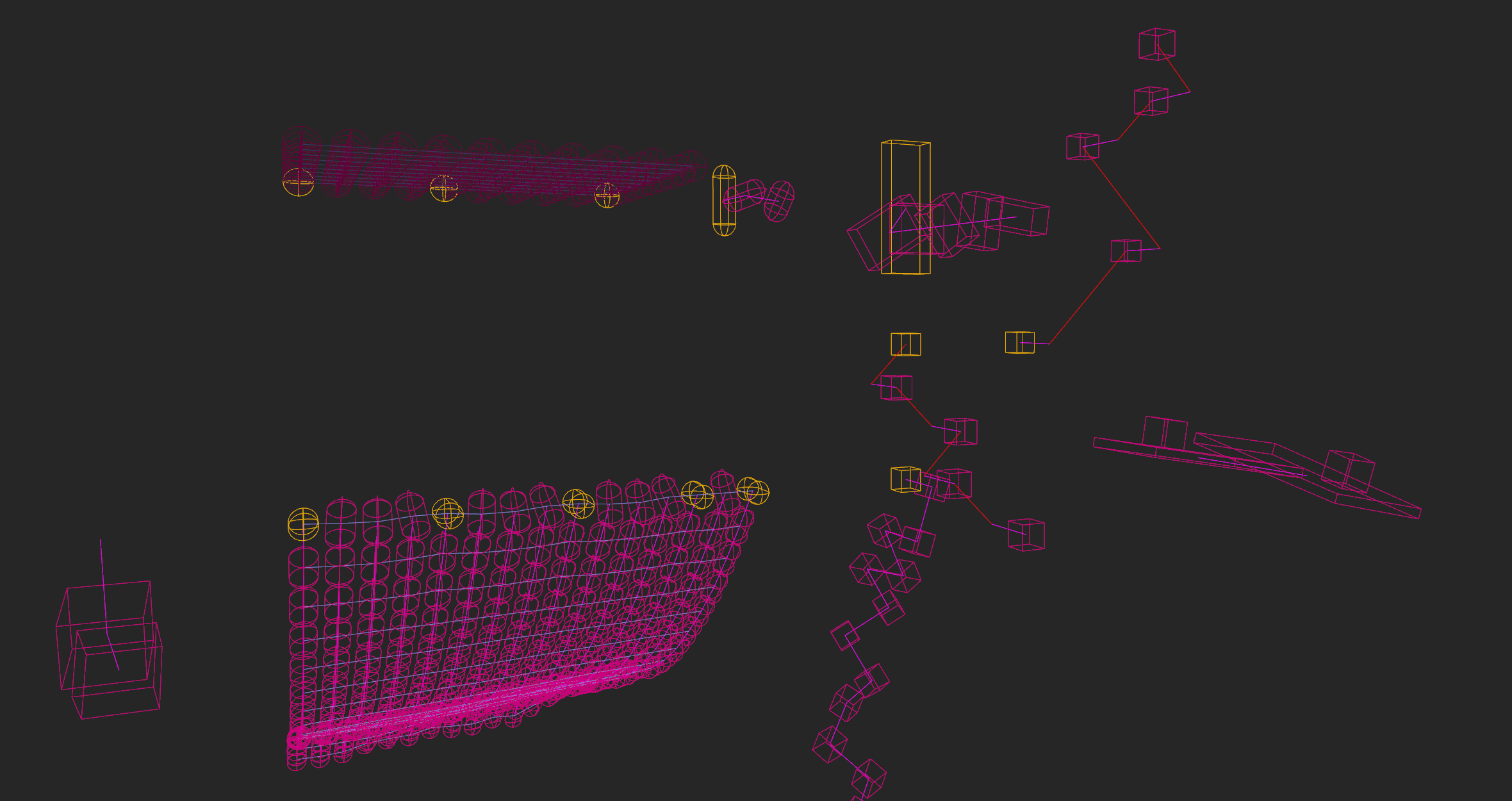
The bevy_rapier plugin comes with a debug-renderer to help visualize exactly what the physics-engine sees. This
can help fixing some bugs like colliders not being properly aligned with your graphics representation.
The debug-renderer is enabled by:
- Enabling the
debug-render-2dordebug-render-3dcargo feature of bevy_rapier (they are enabled by default). - Adding the plugin
RapierDebugRenderPluginto the Bevy app.
What it draws can be configured, as described in the debug-renderer page.