Soft-bodies
For a high-level overview of the methods behind our soft-body implementation, see our blog-post.
Rigid-bodies can't deform in any way, which is precisely what makes them cheap and easy to control. Soft-bodies, aka. deformable bodies, are made for everything that must bend, stretch, or squash: ropes, cloth, jelly, balloons, the chassis of a car denting on impact, etc. They live in the same world as the rigid-bodies and the colliders, and interact with all the other features of the engine with little to no restriction:
- Any kind of impulse joint can be attached to a soft-body through its soft frames, which allows the definition of links between two soft-bodies, between a soft-body and a rigid-body, or between a soft-body and a multibody.
- Deformable colliders, as well as rigid ones, can be attached to a soft-body, sensors included.
- A detailed mesh can follow the deformations of a coarser simulated lattice (skinning).
- Parts of a soft-body can be controlled kinematically.
- A soft-body can deform permanently (plasticity), and tear apart (tearing).
In Bevy, a soft-body is an entity with a SoftBody component, and most of its properties are
controlled by components too. The conventions linking the entity to the soft-body (its transform, the rigid-bodies and
the colliders it stands for, etc.) are detailed in the
soft-bodies and entities section. Note that the
FEM solver requires the fem feature of bevy_rapier.
The FEM solver requires the library to be built with the fem feature (see
building the C bindings).
The Python bindings are 3D only: whenever the following sections mention 2D bodies (their triangle cells, the area they enclose, or the constructors existing only in 2D), only the 3D counterpart applies. Note that the particles and the elements of a soft-body are read as NumPy arrays, and can be given either as NumPy arrays or as sequences of tuples.
Definition of a soft-body
A rigid-body is a single moving frame: the position and the velocity of any of its points follow from one translation and one rotation. This is precisely what a deformable body can't be, because its parts must be able to move (somewhat) independently of each other. Instead, a soft-body is made of particles, aka. mass points, i.e., points without any orientation, each having 2 degrees of freedom in 2D and 3 in 3D. The more particles a body is made of, the more detailed its deformations can be, and the more expensive it is to simulate.
The particles are kept together by a lattice made of up to three kinds of elements:
- The particles are the only mandatory element, i.e., the positions the
SoftBodyBuilderSoftBodyBuilder(wrapped by theSoftBodycomponent)SoftBodyDescR3SoftBodyDescSoftBodyBuilder - The edges (
edgessetEdgesedgesedgesbend_edgessetBendEdgesbendEdgesbend_edgesdihedralssetDihedralsdihedralsdihedrals - The cells (
cellssetCellscellscells
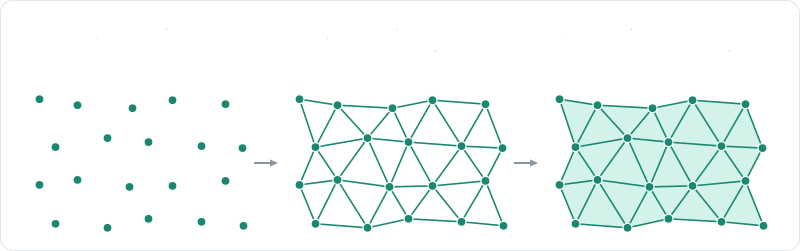
Two more concepts describe how the body interacts with the rest of the world. The surface
(surfacesetSurfacesurfacesurfacewiresetWirewire, 3DwireskinsetSkinskinVertices and skinIndicesskin
Every element can be given manually to the soft-body (E, 2) for the edges and (C, 4) for the cells), or as sequences of tuples, and replace the elements generated by the constructor (see also add_edges).
Creation and insertion
A soft-body is described by a SoftBodyBuilderSoftBodyBuilder (wrapped by the SoftBody
component)SoftBodyDescR3SoftBodyDescSoftBodyBuilderclothTube)SoftBody class, e.g., SoftBody.cloth)
| Constructor | Dimension | Lattice |
|---|---|---|
rope | 2D, 3D | Structural and bending edges between the particles of a line. |
cloth, cloth_anisotropic, cloth_tube | 3D | Structural, shear and bending edges, with a triangle surface. |
grid | 2D | Triangle cells filling a rectangle. |
cuboid | 3D | Tetrahedral cells filling a box. |
polygon, disk | 2D | A closed boundary preserving its area. |
sphere | 3D | A closed surface preserving its volume, with dihedral bending constraints. |
trimesh, polyline | 2D, 3D (trimesh), 2D (polyline) | The vertices and edges of a mesh, held by shape matching. |
volumetric | 2D, 3D | Cells filling a closed mesh. |
| Constructor | Dimension | Lattice |
|---|---|---|
r3DefaultSoftBodyDesc, then r3SoftBodyDesc_SetParticles | 2D, 3D | No element at all: only the given particles. |
r3RopeSoftBodyDesc | 2D, 3D | Structural and bending edges between the particles of a line. |
r3ClothSoftBodyDesc, r3ClothAnisotropicSoftBodyDesc, r3ClothTubeSoftBodyDesc | 3D | Structural, shear and bending edges, with a triangle surface. |
r2GridSoftBodyDesc | 2D | Triangle cells filling a rectangle. |
r3CuboidSoftBodyDesc | 3D | Tetrahedral cells filling a box. |
r2PolygonSoftBodyDesc, r2DiskSoftBodyDesc | 2D | A closed boundary preserving its area. |
r3SphereSoftBodyDesc | 3D | A closed surface preserving its volume, with dihedral bending constraints. |
r3SoftBodyDesc_SetSurfaceMesh | 2D (segments), 3D (triangles) | The vertices and edges of a mesh, held by shape matching. |
r2SoftBodyDesc_SetTrimesh | 2D | The vertices and edges of a triangle mesh, held by shape matching. |
r3VolumetricSoftBodyDesc | 2D, 3D | Cells filling a closed mesh. |
The constructors return a description initialized with the default values of every other field, which can then be
modified before its insertion. The ones existing in a single dimension are only given with their prefix in that
dimension, e.g., there is no r3GridSoftBodyDesc.
| Constructor | Lattice |
|---|---|
SoftBodyBuilder(positions) | No element at all: only the given particles. |
SoftBody.rope | Structural and bending edges between the particles of a line. |
SoftBody.cloth, SoftBody.cloth_anisotropic, SoftBody.cloth_tube | Structural, shear and bending edges, with a triangle surface. |
SoftBody.cuboid | Tetrahedral cells filling a box. |
SoftBody.sphere | A closed surface preserving its volume, with dihedral bending constraints. |
SoftBody.trimesh | The vertices and edges of a triangle mesh, held by shape matching. |
SoftBody.volumetric, SoftBody.volumetric_with | Cells filling a closed mesh. |
Every constructor returns a SoftBodyBuilder, which setters return a modified copy of the
builder so they can be chained. These setters can also be given as keyword arguments of the constructors, e.g.,
SoftBody.rope(a, b, 20, particle_mass=0.1, pinned_particles=[0]).
The SoftBody component provides shortcuts for most of these constructors (SoftBody::rope,
SoftBody::cloth, SoftBody::cuboid, SoftBody::grid, SoftBody::volumetric, etc.), which positions are expressed in
the local frame of the entity: the cuboid, sphere, grid, and disk shortcuts are centered at its origin. The
other constructors are used with SoftBody::new(SoftBodyBuilder::...), and the methods of the builder are chained with
SoftBody::map, e.g., SoftBody::rope(a, b, 20).map(|b| b.particle_mass(0.1)).
The volumetric constructorr3VolumetricSoftBodyDesc constructorvolumetric_with: the size of the cells, how much the cover is smoothed and subdivided around the boundary in
3D, i.e., how closely it follows the mesh, and whether the surface alone is covered, leaving the interior
empty.R3VolumeMeshParameters, initialized by r3NewVolumeMeshParameters from the size of the cells: in 2D, min_angle is the minimum angle of the triangles, whereas in 3D, cover_smoothing and cover_subdivisions control how much the cover is smoothed and subdivided around the boundary, i.e., how closely it follows the mesh, and enclosure whether the surface alone is covered (1), leaving the interior empty. Note that the mesh is only filled by the insertion, which reports an error if the mesh isn't closed or encloses nothing at that cell size.volumetric_with, which takes a VolumeMeshParameters: the size of the cells (cell_size), how much the cover is smoothed (cover_smoothing) and subdivided (cover_subdivisions) around the boundary, i.e., how closely it follows the mesh, and whether the surface alone is covered (enclosure set to MeshEnclosure.CRUST), leaving the interior empty. Both constructors raise a MeshConversionError if the mesh isn't closed, or encloses nothing at that cell size.
- Example 2D
- Example 3D
// Fill a closed, counter-clockwise polyline with triangle cells of about 0.2 in size.
let vertices = vec![
    Vector::new(-0.5, -0.25),
    Vector::new(0.5, -0.25),
    Vector::new(0.5, 0.25),
    Vector::new(-0.5, 0.25),
];
let indices = vec![[0, 1], [1, 2], [2, 3], [3, 0]];
let block = SoftBodyBuilder::volumetric(&vertices, &indices, 0.2)
    .expect("the polyline must be closed and enclose some area")
    .translated(Vector::new(-3.0, 1.0));
let _block_handle = world.insert_soft_body(block);
// Fill a closed, outward-oriented triangle mesh with tetrahedral cells of about 0.2 in size.
let (vertices, indices) = Cuboid::new(Vector::new(0.5, 0.25, 0.25)).to_trimesh();
let block = SoftBodyBuilder::volumetric(&vertices, &indices, 0.2)
    .expect("the mesh must be closed and enclose some volume")
    .translated(Vector::new(-3.0, 1.0, 0.0));
let _block_handle = world.insert_soft_body(block);
- Example 2D
- Example 3D
// Fill a closed, counter-clockwise polyline (here a rectangle) with triangle cells of about
// 0.2 in size.
let boxVertices = new Float32Array([-0.5, -0.25, 0.5, -0.25, 0.5, 0.25, -0.5, 0.25]);
let boxIndices = new Uint32Array([0, 1, 1, 2, 2, 3, 3, 0]);
let blockDesc = RAPIER.SoftBodyDesc.volumetric(boxVertices, boxIndices, 0.2);
let block = world.createSoftBody(blockDesc.setTranslation({ x: -3.0, y: 1.0 }));
// Fill a closed, outward-oriented triangle mesh (here a box) with tetrahedral cells of
// about 0.2 in size.
let boxVertices = new Float32Array([
    -0.5, -0.25, -0.25, 0.5, -0.25, -0.25, 0.5, 0.25, -0.25, -0.5, 0.25, -0.25,
    -0.5, -0.25, 0.25, 0.5, -0.25, 0.25, 0.5, 0.25, 0.25, -0.5, 0.25, 0.25,
]);
let boxIndices = new Uint32Array([
    0, 2, 1, 0, 3, 2, 4, 5, 6, 4, 6, 7, 0, 1, 5, 0, 5, 4,
    3, 7, 6, 3, 6, 2, 0, 4, 7, 0, 7, 3, 1, 2, 6, 1, 6, 5,
]);
let blockDesc = RAPIER.SoftBodyDesc.volumetric(boxVertices, boxIndices, 0.2);
let block = world.createSoftBody(blockDesc.setTranslation({ x: -3.0, y: 1.0, z: 0.0 }));
- Example 2D
- Example 3D
// Fill a closed, counter-clockwise polyline with triangle cells of about 0.2 in size.
let vertices = vec![
    Vec2::new(-0.5, -0.25),
    Vec2::new(0.5, -0.25),
    Vec2::new(0.5, 0.25),
    Vec2::new(-0.5, 0.25),
];
let indices = vec![[0, 1], [1, 2], [2, 3], [3, 0]];
let block = SoftBody::volumetric(&vertices, &indices, 0.2)
    .expect("the polyline must be closed and enclose some area");
commands.spawn((Transform::from_xyz(-3.0, 1.0, 0.0), block));
// Fill a closed, outward-oriented triangle mesh with tetrahedral cells of about 0.2 in size.
let (vertices, indices) = CuboidShape::new(Vec3::new(0.5, 0.25, 0.25)).to_trimesh();
let block = SoftBody::volumetric(&vertices, &indices, 0.2)
    .expect("the mesh must be closed and enclose some volume");
commands.spawn((Transform::from_xyz(-3.0, 1.0, 0.0), block));
- Example 2D
- Example 3D
// Fill a closed, counter-clockwise polyline with triangle cells of about 0.2 in size.
const R2Vector vertices[] = {
    r2Vector(-0.5, -0.25),
    r2Vector(0.5, -0.25),
    r2Vector(0.5, 0.25),
    r2Vector(-0.5, 0.25),
};
const R2Edge indices[] = {{0, 1}, {1, 2}, {2, 3}, {3, 0}};
R2SoftBodyDesc block = r2VolumetricSoftBodyDesc((R2VectorView){vertices, 4}, (R2EdgeView){indices, 4},
                                                r2NewVolumeMeshParameters(0.2));
block.translation = r2Vector(-3.0, 1.0);
// The polyline is only read during the insertion, which fails if it isn't closed.
R2SoftBodyHandle block_handle = r2InsertSoftBody(world, &block);
// Fill a closed, outward-oriented triangle mesh with tetrahedral cells of about 0.2 in size.
// The triangle mesh of a cuboid (the subdivision counts only matter for curved shapes).
R3SharedShape *cuboid = r3CuboidSharedShape(r3Vector(0.5, 0.25, 0.25));
R3TriMeshData *mesh = r3SharedShape_ToTrimesh(cuboid, 0, 0);
size_t num_vertices = r3TriMeshData_Vertices(mesh, NULL, 0);
size_t num_indices = r3TriMeshData_Indices(mesh, NULL, 0);
R3Vector *vertices = malloc(num_vertices * sizeof(R3Vector));
R3Triangle *triangles = malloc(num_indices * sizeof(uint32_t));
r3TriMeshData_Vertices(mesh, vertices, num_vertices);
r3TriMeshData_Indices(mesh, (uint32_t *)triangles, num_indices);

R3SoftBodyDesc block = r3VolumetricSoftBodyDesc((R3VectorView){vertices, num_vertices},
                                                (R3TriangleView){triangles, num_indices / 3},
                                                r3NewVolumeMeshParameters(0.2));
block.translation = r3Vector(-3.0, 1.0, 0.0);
// The mesh is only read during the insertion, which fails if it isn't closed.
R3SoftBodyHandle block_handle = r3InsertSoftBody(world, &block);
free(vertices);
free(triangles);
r3FreeTriMeshData(mesh);
r3FreeSharedShape(cuboid);
# Fill a closed, outward-oriented triangle mesh with tetrahedral cells of about 0.2 in size;
# this raises a `MeshConversionError` if the mesh isn't closed or encloses no volume.
vertices, indices = rp.Cuboid((0.5, 0.25, 0.25)).to_trimesh()
block = rp.SoftBody.volumetric(vertices, indices, 0.2).translated((-3.0, 1.0, 0.0))
block_handle = world.add_soft_body(block)

# The same, with the meshing parameters spelled out: the cover of the mesh is subdivided
# once around its boundary, then smoothed, so it follows the mesh more closely.
params = rp.VolumeMeshParameters(0.2, cover_subdivisions=1, cover_smoothing=4)
smooth_block = rp.SoftBody.volumetric_with(vertices, indices, params)
smooth_block_handle = world.add_soft_body(smooth_block.translated((-3.0, 2.0, 0.0)))
The pinned_particlessetPinnedParticlespinnedpinned_particlessoftnesssetSoftnessmaterial, e.g., the same softness for every constraint with r3UniformSoftBodyMaterialsoftnessparticle_masssetParticleMassparticleMassparticle_massmasssetMasstotalMassmassmassessetMassesmassesmassesparticle_radiussetParticleRadiusparticleRadiusparticle_radiusself_contactssetSelfContactsselfContactsself_contactslinear_dampingsetLinearDampinglinearDampinglinear_dampinggravity_scalesetGravityScalegravityScalegravity_scaleSoftBodyParticleSettings::dominance_groupsetDominanceGroupdominanceGroupSoftBodyParticleSettings.dominance_group, given with particle_settingscan_sleepsetCanSleepcanSleepcan_sleepPhysicsWorld::insert_soft_bodySoftBody componentWorld.createSoftBodyr3InsertSoftBodyPhysicsWorld.add_soft_body
- Example 2D
- Example 3D
// A world with a ground.
let mut world = PhysicsWorld::new();
world.insert_collider(ColliderBuilder::cuboid(10.0, 0.1), None);

// Builder for a rope of 20 particles between two points.
let _ = SoftBodyBuilder::rope(Vector::new(0.0, 3.0), Vector::new(2.0, 3.0), 20);
// Builder for a grid of `nx` by `ny` particles filled with triangle cells.
let _ = SoftBodyBuilder::grid(Vector::new(3.0, 1.0), Vector::new(1.0, 1.0), 6, 6);
// Builder for a disk: a ring of particles holding its area (a pressurized blob).
let _ = SoftBodyBuilder::disk(Vector::new(0.0, 3.0), 0.8, 24);
// Builder for a closed polygon of particles holding its area.
let _ = SoftBodyBuilder::polygon(vec![
    Vector::new(5.0, 4.0),
    Vector::new(7.0, 4.0),
    Vector::new(7.0, 6.0),
    Vector::new(5.0, 6.0),
]);
let n = 20;
let sheet = SoftBodyBuilder::grid(Vector::new(-3.0, 3.0), Vector::new(1.0, 1.0), n, n)
    // Particles held in place.
    .pinned_particles([0, (n - 1) as u32])
    // A uniform softness (natural frequency in Hz, damping ratio) for every constraint.
    .softness(SpringCoefficients::new(30.0, 1.0))
    // The mass of each particle.
    // Default: 1.0
    .particle_mass(0.05)
    // The thickness of the particles, for collisions.
    // Default: 0.01
    .particle_radius(0.05)
    // The template of the body's colliders: its shape is replaced by the deformable surface.
    .surface_collider(ColliderBuilder::ball(0.05).friction(0.8))
    // Whether the body may fall asleep.
    // Default: true
    .can_sleep(true);
// Insert the soft body: this creates its hidden root rigid body and its colliders.
let sheet_handle = world.insert_soft_body(sheet);
// A world with a ground.
let mut world = PhysicsWorld::new();
world.insert_collider(ColliderBuilder::cuboid(10.0, 0.1, 10.0), None);

// Builder for a rope of 20 particles between two points.
let _ = SoftBodyBuilder::rope(Vector::new(0.0, 3.0, 0.0), Vector::new(2.0, 3.0, 0.0), 20);
// Builder for a cloth: `nu` by `nv` particles, particle `(i, j)` at `origin + i * du + j * dv`.
let _ = SoftBodyBuilder::cloth(
    Vector::new(-1.0, 2.0, -1.0),
    Vector::new(0.1, 0.0, 0.0),
    Vector::new(0.0, 0.0, 0.1),
    20,
    20,
);
// Builder for a box of `nx * ny * nz` particles filled with tetrahedral cells.
let _ = SoftBodyBuilder::cuboid(Vector::new(3.0, 1.0, 0.0), Vector::splat(0.5), 4, 4, 4);
// Builder for a hollow sphere holding its volume (a balloon).
let _ = SoftBodyBuilder::sphere(Vector::new(0.0, 3.0, 3.0), 0.8, 2);
// Builder over raw particle positions; the elements are added by the setters.
let n = 20;
let cloth = SoftBodyBuilder::cloth(
    Vector::new(-1.0, 2.0, -1.0),
    Vector::new(0.1, 0.0, 0.0),
    Vector::new(0.0, 0.0, 0.1),
    n,
    n,
)
// Particles held in place.
.pinned_particles([0, (n - 1) as u32, (n * (n - 1)) as u32, (n * n - 1) as u32])
// A uniform softness (natural frequency in Hz, damping ratio) for every constraint.
.softness(SpringCoefficients::new(30.0, 1.0))
// The mass of each particle.
// Default: 1.0
.particle_mass(0.05)
// The thickness of the particles, for collisions.
// Default: 0.01
.particle_radius(0.02)
// The template of the body's colliders: its shape is replaced by the deformable surface.
.surface_collider(ColliderBuilder::ball(0.05).friction(0.8))
// Whether the surface collides with itself.
// Default: false
.self_contacts(true)
// Whether the body may fall asleep.
// Default: true
.can_sleep(true);
// Insert the soft body: this creates its hidden root rigid body and its colliders.
let cloth_handle = world.insert_soft_body(cloth);
- Example 2D
- Example 3D
// The world that will contain our soft bodies.
let world = new RAPIER.World({ x: 0.0, y: -9.81 });
world.createCollider(RAPIER.ColliderDesc.cuboid(10.0, 0.1));

// Description of a rope of 20 particles between two points.
let example1 = RAPIER.SoftBodyDesc.rope({ x: 0.0, y: 3.0 }, { x: 2.0, y: 3.0 }, 20);
// Description of a grid of `nx` by `ny` particles filled with triangle cells.
let example2 = RAPIER.SoftBodyDesc.grid({ x: 3.0, y: 1.0 }, { x: 1.0, y: 1.0 }, 6, 6);
// Description of a disk: a ring of particles holding its area (a pressurized blob).
let example3 = RAPIER.SoftBodyDesc.disk({ x: 0.0, y: 3.0 }, 0.8, 24);
// Description of a closed polygon of particles holding its area.
let example4 = RAPIER.SoftBodyDesc.polygon([5.0, 4.0, 7.0, 4.0, 7.0, 6.0, 5.0, 6.0]);
// Description over raw particle positions; the elements are added by the setters.
let example5 = new RAPIER.SoftBodyDesc([0.0, 1.0, 1.0, 1.0]).setEdges([0, 1]);

let n = 20;
let sheetDesc = RAPIER.SoftBodyDesc.grid({ x: -3.0, y: 3.0 }, { x: 1.0, y: 1.0 }, n, n)
    // Particles held in place.
    .setPinnedParticles([0, n - 1])
    // A uniform softness (natural frequency in Hz, damping ratio) for every constraint.
    .setSoftness(30.0, 1.0)
    // The mass of each particle.
    // Default: 1.0
    .setParticleMass(0.05)
    // The thickness of the particles, for collisions.
    // Default: 0.01
    .setParticleRadius(0.05)
    // The template of the body's colliders: its shape is replaced by the deformable surface.
    .setSurfaceCollider(RAPIER.ColliderDesc.ball(0.05).setFriction(0.8))
    // Whether the body may fall asleep.
    // Default: true
    .setCanSleep(true);
// Create the soft body: this creates its hidden root rigid body and its colliders.
let sheet = world.createSoftBody(sheetDesc);
// The integer handle of the soft body can be read from the `handle` field.
let sheetHandle = sheet.handle;
// The world that will contain our soft bodies.
let world = new RAPIER.World({ x: 0.0, y: -9.81, z: 0.0 });
world.createCollider(RAPIER.ColliderDesc.cuboid(10.0, 0.1, 10.0));

// Description of a rope of 20 particles between two points.
let example1 = RAPIER.SoftBodyDesc.rope({ x: 0.0, y: 3.0, z: 0.0 }, { x: 2.0, y: 3.0, z: 0.0 }, 20);
// Description of a cloth: `nu` by `nv` particles, particle `(i, j)` at `origin + i * du + j * dv`.
let example2 = RAPIER.SoftBodyDesc.cloth(
    { x: -1.0, y: 2.0, z: -1.0 }, { x: 0.1, y: 0.0, z: 0.0 }, { x: 0.0, y: 0.0, z: 0.1 }, 20, 20,
);
// Description of a box of `nx * ny * nz` particles filled with tetrahedral cells.
let example3 = RAPIER.SoftBodyDesc.cuboid({ x: 3.0, y: 1.0, z: 0.0 }, { x: 0.5, y: 0.5, z: 0.5 }, 4, 4, 4);
// Description of a hollow sphere holding its volume (a balloon).
let example4 = RAPIER.SoftBodyDesc.sphere({ x: 0.0, y: 3.0, z: 3.0 }, 0.8, 2);
// Description over raw particle positions; the elements are added by the setters.
let example5 = new RAPIER.SoftBodyDesc([0.0, 1.0, 0.0, 1.0, 1.0, 0.0]).setEdges([0, 1]);

let n = 20;
let clothDesc = RAPIER.SoftBodyDesc.cloth(
    { x: -1.0, y: 2.0, z: -1.0 }, { x: 0.1, y: 0.0, z: 0.0 }, { x: 0.0, y: 0.0, z: 0.1 }, n, n,
)
    // Particles held in place.
    .setPinnedParticles([0, n - 1, n * (n - 1), n * n - 1])
    // A uniform softness (natural frequency in Hz, damping ratio) for every constraint.
    .setSoftness(30.0, 1.0)
    // The mass of each particle.
    // Default: 1.0
    .setParticleMass(0.05)
    // The thickness of the particles, for collisions.
    // Default: 0.01
    .setParticleRadius(0.02)
    // The template of the body's colliders: its shape is replaced by the deformable surface.
    .setSurfaceCollider(RAPIER.ColliderDesc.ball(0.05).setFriction(0.8))
    // Whether the surface collides with itself.
    // Default: false
    .setSelfContacts(true)
    // Whether the body may fall asleep.
    // Default: true
    .setCanSleep(true);
// Create the soft body: this creates its hidden root rigid body and its colliders.
let cloth = world.createSoftBody(clothDesc);
// The integer handle of the soft body can be read from the `handle` field.
let clothHandle = cloth.handle;
- Example 2D
- Example 3D
// A ground.
commands.spawn((
    Transform::from_xyz(0.0, -0.1, 0.0),
    Collider::cuboid(10.0, 0.1),
));

// A rope of 20 particles between two points (in the local frame of the entity).
let _ = SoftBody::rope(Vec2::ZERO, Vec2::new(2.0, 0.0), 20);
// A grid of `nx` by `ny` particles filled with triangle cells, centered on the entity.
let _ = SoftBody::grid(Vec2::new(1.0, 1.0), 6, 6);
// A disk: a ring of particles holding its area (a pressurized blob), centered on the entity.
let _ = SoftBody::disk(0.8, 24);
// A closed polygon of particles holding its area.
let _ = SoftBody::polygon(vec![
    Vec2::new(0.0, 0.0),
    Vec2::new(2.0, 0.0),
    Vec2::new(2.0, 2.0),
    Vec2::new(0.0, 2.0),
]);
// Any constructor of the Rapier builder can be used too.
let _ = SoftBody::new(SoftBodyBuilder::grid(Vec2::ZERO, Vec2::new(1.0, 0.5), 6, 3));

let n = 20;
commands.spawn((
    Sheet,
    // The particles are placed by the transform of the entity when the soft-body is
    // created. Then, the entity follows the center of mass of the particles.
    Transform::from_xyz(-3.0, 3.0, 0.0),
    SoftBody::grid(Vec2::new(1.0, 1.0), n, n).map(|builder| {
        // Particles held in place.
        builder
            .pinned_particles([0, (n - 1) as u32])
            // A uniform softness (frequency in Hz, damping ratio) for every constraint.
            .softness(SpringCoefficients::new(30.0, 1.0))
            // The mass of each particle.
            // Default: 1.0
            .particle_mass(0.05)
            // The thickness of the particles, for collisions.
            // Default: 0.01
            .particle_radius(0.05)
            // Whether the body may fall asleep.
            // Default: true
            .can_sleep(true)
    }),
    // The collider components of the entity configure the colliders of its surface.
    Friction::coefficient(0.8),
    // Render the soft-body with a mesh kept in sync with its particles.
    SoftBodyMeshSync::default(),
    MeshMaterial2d(materials.add(Color::srgb(0.8, 0.2, 0.2))),
));
// A ground.
commands.spawn((
    Transform::from_xyz(0.0, -0.1, 0.0),
    Collider::cuboid(10.0, 0.1, 10.0),
));

// A rope of 20 particles between two points (in the local frame of the entity).
let _ = SoftBody::rope(Vec3::ZERO, Vec3::new(2.0, 0.0, 0.0), 20);
// A cloth: `nu` by `nv` particles, particle `(i, j)` at `origin + i * du + j * dv`.
let _ = SoftBody::cloth(Vec3::ZERO, Vec3::X * 0.1, Vec3::Z * 0.1, 20, 20);
// A box of `nx * ny * nz` particles filled with tetrahedral cells, centered on the entity.
let _ = SoftBody::cuboid(Vec3::splat(0.5), 4, 4, 4);
// A hollow sphere holding its volume (a balloon), centered on the entity.
let _ = SoftBody::sphere(0.8, 2);
// Any constructor of the Rapier builder can be used too.
let _ = SoftBody::new(SoftBodyBuilder::cloth_tube(
    Vec3::ZERO,
    Vec3::Y,
    0.3,
    0.3,
    12,
    10,
));

let n = 20;
let corners = [0, (n - 1) as u32, (n * (n - 1)) as u32, (n * n - 1) as u32];
let cloth = commands
    .spawn((
        Cloth,
        // The particles are placed by the transform of the entity when the soft-body is
        // created. Then, the entity follows the center of mass of the particles.
        Transform::from_xyz(-1.0, 2.0, -1.0),
        SoftBody::cloth(Vec3::ZERO, Vec3::X * 0.1, Vec3::Z * 0.1, n, n).map(|builder| {
            // Particles held in place.
            builder
                .pinned_particles(corners)
                // A uniform softness (frequency in Hz, damping ratio) for every constraint.
                .softness(SpringCoefficients::new(30.0, 1.0))
                // The mass of each particle.
                // Default: 1.0
                .particle_mass(0.05)
                // The thickness of the particles, for collisions.
                // Default: 0.01
                .particle_radius(0.02)
                // Whether the surface collides with itself.
                // Default: false
                .self_contacts(true)
                // Whether the body may fall asleep.
                // Default: true
                .can_sleep(true)
        }),
        // The collider components of the entity configure the colliders of its surface.
        Friction::coefficient(0.8),
        // Render the soft-body with a mesh kept in sync with its particles.
        SoftBodyMeshSync::default(),
        MeshMaterial3d(materials.add(StandardMaterial {
            base_color: Color::srgb(0.8, 0.2, 0.2),
            double_sided: true,
            cull_mode: None,
            ..default()
        })),
    ))
    .id();
- Example 2D
- Example 3D
// A world with a ground.
R2World *world = r2NewWorld();
R2ColliderDesc ground = r2CuboidColliderDesc(r2Vector(10.0, 0.1));
r2InsertColliderWithoutParent(world, &ground);

// Description of a rope of 20 particles between two points.
R2SoftBodyDesc rope = r2RopeSoftBodyDesc(r2Vector(0.0, 3.0), r2Vector(2.0, 3.0), 20);
// Description of a grid of `nx` by `ny` particles filled with triangle cells.
R2SoftBodyDesc grid = r2GridSoftBodyDesc(r2Vector(3.0, 1.0), r2Vector(1.0, 1.0), 6, 6);
// Description of a disk: a ring of particles holding its area (a pressurized blob).
R2SoftBodyDesc disk = r2DiskSoftBodyDesc(r2Vector(0.0, 3.0), 0.8, 24);
// Description of a closed polygon of particles holding its area.
const R2Vector polygon_points[] = {
    r2Vector(5.0, 4.0),
    r2Vector(7.0, 4.0),
    r2Vector(7.0, 6.0),
    r2Vector(5.0, 6.0),
};
R2SoftBodyDesc polygon = r2PolygonSoftBodyDesc((R2VectorView){polygon_points, 4});

const uint32_t n = 20;
R2SoftBodyDesc sheet = r2GridSoftBodyDesc(r2Vector(-3.0, 3.0), r2Vector(1.0, 1.0), n, n);
// Particles held in place.
const uint32_t pinned[] = {0, n - 1};
sheet.pinned = (R2IndexView){pinned, 2};
// A uniform softness (natural frequency in Hz, damping ratio) for every constraint.
sheet.material = r2UniformSoftBodyMaterial((R2SpringCoefficients){30.0, 1.0});
// The mass of each particle.
// Default: 1.0
sheet.particleMass = 0.05;
// The thickness of the particles, for collisions.
// Default: disabled, i.e., the radius computed by the constructor.
sheet.particleRadius = (R2OptionalReal){1, 0.05};
// The template of the body's colliders: its shape is replaced by the deformable surface.
sheet.collider = r2BallColliderDesc(0.05);
sheet.collider.friction = 0.8;
// Whether the body may fall asleep.
// Default: 1
sheet.canSleep = 1;
// Insert the soft-body: this creates its hidden root rigid-body and its colliders.
R2SoftBodyHandle sheet_handle = r2InsertSoftBody(world, &sheet);
// A world with a ground.
R3World *world = r3NewWorld();
R3ColliderDesc ground = r3CuboidColliderDesc(r3Vector(10.0, 0.1, 10.0));
r3InsertColliderWithoutParent(world, &ground);

// Description of a rope of 20 particles between two points.
R3SoftBodyDesc rope = r3RopeSoftBodyDesc(r3Vector(0.0, 3.0, 0.0), r3Vector(2.0, 3.0, 0.0), 20);
// Description of a cloth: `nu` by `nv` particles, particle `(i, j)` at `origin + i * du + j * dv`.
const uint32_t n = 20;
R3SoftBodyDesc cloth =
    r3ClothSoftBodyDesc(r3Vector(-1.0, 2.0, -1.0), r3Vector(0.1, 0.0, 0.0), r3Vector(0.0, 0.0, 0.1), n, n);
// Description of a box of `nx * ny * nz` particles filled with tetrahedral cells.
R3SoftBodyDesc box = r3CuboidSoftBodyDesc(r3Vector(3.0, 1.0, 0.0), r3Vector(0.5, 0.5, 0.5), 4, 4, 4);
// Description of a hollow sphere holding its volume (a balloon).
R3SoftBodyDesc balloon = r3SphereSoftBodyDesc(r3Vector(0.0, 3.0, 3.0), 0.8, 2);

// Any field of a description can be modified before its insertion.
// Particles held in place.
const uint32_t pinned[] = {0, n - 1, n * (n - 1), n * n - 1};
cloth.pinned = (R3IndexView){pinned, 4};
// A uniform softness (natural frequency in Hz, damping ratio) for every constraint.
cloth.material = r3UniformSoftBodyMaterial((R3SpringCoefficients){30.0, 1.0});
// The mass of each particle.
// Default: 1.0
cloth.particleMass = 0.05;
// The thickness of the particles, for collisions.
// Default: disabled, i.e., the radius computed by the constructor.
cloth.particleRadius = (R3OptionalReal){1, 0.02};
// The template of the body's colliders: its shape is replaced by the deformable surface.
cloth.collider = r3BallColliderDesc(0.05);
cloth.collider.friction = 0.8;
// Whether the surface collides with itself.
// Default: 0
cloth.selfContacts = 1;
// Whether the body may fall asleep.
// Default: 1
cloth.canSleep = 1;
// Insert the soft-body: this creates its hidden root rigid-body and its colliders.
R3SoftBodyHandle cloth_handle = r3InsertSoftBody(world, &cloth);
# A world with a ground.
world = rp.PhysicsWorld(gravity=(0.0, -9.81, 0.0))
world.add_collider(rp.Collider.cuboid(10.0, 0.1, 10.0))

# Builder for a rope of 20 particles between two points.
_ = rp.SoftBody.rope((0.0, 3.0, 0.0), (2.0, 3.0, 0.0), 20)
# Builder for a cloth: `nu` by `nv` particles, particle `(i, j)` at `origin + i * du + j * dv`.
_ = rp.SoftBody.cloth((-1.0, 2.0, -1.0), (0.1, 0.0, 0.0), (0.0, 0.0, 0.1), 20, 20)
# Builder for a box of `nx * ny * nz` particles filled with tetrahedral cells.
_ = rp.SoftBody.cuboid((3.0, 1.0, 0.0), (0.5, 0.5, 0.5), 4, 4, 4)
# Builder for a hollow sphere holding its volume (a balloon).
_ = rp.SoftBody.sphere((0.0, 3.0, 3.0), 0.8, 2)
# Builder over raw particle positions; the elements are added by the setters.
_ = rp.SoftBodyBuilder([(0.0, 3.0, 0.0), (1.0, 3.0, 0.0)]).edges([(0, 1)])
n = 20
cloth = (
    rp.SoftBody.cloth((-1.0, 2.0, -1.0), (0.1, 0.0, 0.0), (0.0, 0.0, 0.1), n, n)
    # Particles held in place.
    .pinned_particles([0, n - 1, n * (n - 1), n * n - 1])
    # A uniform softness (natural frequency in Hz, damping ratio) for every constraint.
    .softness(rp.SpringCoefficients(30.0, 1.0))
    # The mass of each particle.
    # Default: 1.0
    .particle_mass(0.05)
    # The thickness of the particles, for collisions.
    # Default: 0.01
    .particle_radius(0.02)
    # The template of the body's colliders: its shape is replaced by the deformable surface.
    .surface_collider(rp.Collider.ball(0.05).friction(0.8))
    # Whether the surface collides with itself.
    # Default: False
    .self_contacts(True)
    # Whether the body may fall asleep.
    # Default: True
    .can_sleep(True)
)
# The setters can also be given as keyword arguments of the constructors.
_ = rp.SoftBody.rope((0.0, 3.0, 0.0), (2.0, 3.0, 0.0), 20, particle_mass=0.1, pinned_particles=[0])
# Insert the soft body: this creates its hidden root rigid body and its colliders.
cloth_handle = world.add_soft_body(cloth)
The collider given to SoftBodyBuilder::surface_colliderSoftBodyDesc.setSurfaceCollidercollider field of the descriptionSoftBodyBuilder.surface_colliderno_surface_collidersetNoSurfaceCollidercollisionEnabled set to 0no_surface_colliderFriction, Restitution, CollisionGroups, ActiveEvents, Sensor,
etc.) override the properties of that template, exactly like for a Collider: their later modifications are applied to
the colliders of the surface as well, and removing one of them restores the value of the template (the particle radius
for the ContactSkin).
Two appendappendr3SoftBodyDesc_SetAppended (each appended description keeps its own particles, masses, and elements, whereas every other setting comes from the description it is appended to)appendadd_edgesaddEdgesr3SoftBodyDesc_SetAddedEdgesadd_edges
Soft-body set
Like the rigid-bodies and the colliders, the soft-bodies of a simulation are stored inside of a set: the SoftBodySet.
The examples of this page use the PhysicsWorld, a façade owning all the sets of one simulation, but the sets can also
be used directly. Note that the insertion of a soft-body (SoftBodySet::insert) needs the rigid-body set and the
collider set as well, because a soft-body owns the rigid-body standing for it and the colliders of its surface:
- Example 2D
- Example 3D
// The sets can also be used directly, without the `PhysicsWorld` façade.
let mut soft_body_set = SoftBodySet::new();
let mut rigid_body_set = RigidBodySet::new();
let mut collider_set = ColliderSet::new();
let rope = SoftBodyBuilder::rope(Vector::new(0.0, 3.0), Vector::new(2.0, 3.0), 20);
let rope_handle = soft_body_set.insert(rope, &mut rigid_body_set, &mut collider_set);
let soft_body = &soft_body_set[rope_handle];
assert_eq!(soft_body.num_particles(), 20);
// The sets can also be used directly, without the `PhysicsWorld` façade.
let mut soft_body_set = SoftBodySet::new();
let mut rigid_body_set = RigidBodySet::new();
let mut collider_set = ColliderSet::new();
let rope = SoftBodyBuilder::rope(Vector::new(0.0, 3.0, 0.0), Vector::new(2.0, 3.0, 0.0), 20);
let rope_handle = soft_body_set.insert(rope, &mut rigid_body_set, &mut collider_set);
let soft_body = &soft_body_set[rope_handle];
assert_eq!(soft_body.num_particles(), 20);
A soft-body is created by inserting a SoftBody component on an entity. This component only wraps the Rapier
SoftBodyBuilder of the body, and it is read only once: the plugin creates the Rapier soft-body during the next physics
update, then inserts its RapierSoftBodyHandle on the entity, as well as a SoftBodyState component updated after each
step with the (mass-weighted) center of mass of the body, whether it is sleeping, its number of particles, etc.
Therefore modifying the SoftBody component afterwards has no effect: the body is controlled at runtime by the other
soft-body components (SoftBodyMaterial, SoftBodyPinnedParticles, etc.) described in the next sections. Adding the
SoftBodyDisabled component disables the soft-body until it is removed, and despawning the entity (or removing its
SoftBody component) removes the soft-body from the simulation.
The positions of the particles given to the builder are expressed in the local frame of the entity: they are
transformed by its GlobalTransform when the soft-body is created. After that, the particles live in world-space, and
the plugin drives the Transform of the entity: it follows the pose of the root body
of the soft-body, i.e., its translation follows the centroid of the free particles, and its rotation is the one best
fitting the particles onto their rest shape (the identity when the soft-body is created), whereas its scale is kept.
The colliders of the children of the soft-body entity are attached to the root body, so these children follow the body
as a whole. Whatever must follow a specific part of the body is better attached to a
cluster entity.
The soft-body entity also stands for the rigid-body and the colliders the engine creates for it:
- It is mapped to the root body of the soft-body, so it can be used like any rigid-body entity by the impulse joints.
- The colliders of its surface carry the bits of the entity in their user-data, so the collision events, the contact pairs, and the scene queries report the soft-body entity itself as the collider entity.
- Its collider components (
Friction,Restitution,CollisionGroups,SolverGroups,ActiveEvents,ActiveHooks,ActiveCollisionTypes,ContactForceEventThreshold,ContactSkin, andSensor) configure the colliders of its surface exactly like for aCollider: they are applied when the soft-body is created and whenever they change, and removing one of them restores the value of the collider template of the builder. These colliders are given byRapierRigidBodySet::soft_body_colliders.
Finally, the Rapier soft-bodies are stored in the soft_bodies set of the RapierRigidBodySet component of the physics
context, next to the rigid-bodies. The Rapier soft-body type is re-exported as RapierSoftBody (and its material as
RapierSoftBodyMaterial) to avoid any confusion with the components. They are accessed with the ReadRapierContext and
WriteRapierContext system parameters, which provide shortcuts for the most common operations: soft_body gives the
Rapier soft-body of an entity, soft_body_entity gives the entity of a soft-body handle, soft_body_particle_positions
and soft_body_center_of_mass read its state, and soft_body_mut gives mutable access to the soft-body of an entity:
- Example 2D
- Example 3D
fn read_soft_bodies(context: ReadRapierContext, sheet: Single<Entity, With<Sheet>>) -> Result {
    let context = context.single()?;
    // The Rapier soft-bodies live in the `RapierRigidBodySet` of the context, together with the
    // map from their entity to their handle (also given by their `RapierSoftBodyHandle`).
    let Some(handle) = context.rigidbody_set.entity2soft_body().get(&*sheet) else {
        return Ok(()); // Not created yet.
    };
    let soft_body: &RapierSoftBody = &context.rigidbody_set.soft_bodies[*handle];
    // Shortcuts are provided for the most common operations.
    assert_eq!(context.soft_body_entity(*handle), Some(*sheet));
    assert_eq!(
        context.soft_body_particle_positions(*sheet).unwrap().len(),
        soft_body.num_particles()
    );
    let _center = context.soft_body_center_of_mass(*sheet);
    // The colliders of its surface, configured by its collider components.
    let surface_colliders = context
        .rigidbody_set
        .soft_body_colliders(&context.colliders.colliders, *sheet)
        .unwrap_or_default();
    for handle in surface_colliders {
        let _friction = context.colliders.colliders[handle].friction();
    }
    Ok(())
}
fn read_soft_bodies(context: ReadRapierContext, cloth: Single<Entity, With<Cloth>>) -> Result {
    let context = context.single()?;
    // The Rapier soft-bodies live in the `RapierRigidBodySet` of the context, together with the
    // map from their entity to their handle (also given by their `RapierSoftBodyHandle`).
    let Some(handle) = context.rigidbody_set.entity2soft_body().get(&*cloth) else {
        return Ok(()); // Not created yet.
    };
    let soft_body: &RapierSoftBody = &context.rigidbody_set.soft_bodies[*handle];
    // Shortcuts are provided for the most common operations.
    assert_eq!(context.soft_body_entity(*handle), Some(*cloth));
    assert_eq!(
        context.soft_body_particle_positions(*cloth).unwrap().len(),
        soft_body.num_particles()
    );
    let _center = context.soft_body_center_of_mass(*cloth);
    // The colliders of its surface, configured by its collider components.
    let surface_colliders = context
        .rigidbody_set
        .soft_body_colliders(&context.colliders.colliders, *cloth)
        .unwrap_or_default();
    for handle in surface_colliders {
        let _friction = context.colliders.colliders[handle].friction();
    }
    Ok(())
}
The properties covered by a component should be modified through that component rather than through soft_body_mut.
The components are applied again whenever they change, so, e.g., a material set with RapierSoftBody::set_material is
replaced by the SoftBodyMaterial of the entity the next time this component is modified.
The SoftBodyMeshSync component (from the to-bevy-mesh feature, enabled by default) renders the soft-body with a mesh
kept in sync with its particles. The plugin generates the mesh and inserts it as a Mesh3d (3D) or Mesh2d (2D)
component, updates its vertices after each step, and rebuilds it whenever the topology of the body changes, e.g., after
a tear. Its vertices are expressed in the frame of the Transform of the entity, and the
material must be added by you, as shown in the creation example. In 3D, the
mesh is the skin of the body if it has one, else its surface (or its boundary triangles), or a line list of its edges
for a body without any surface, e.g., a rope. In 2D, it is made of its cells, or of its boundary segments (or of its
edges). The meshes of the deformable colliders bound to the body are never
part of it.
The soft-bodies are owned by the world, next to the rigid-bodies and the colliders, and are identified by their
R3SoftBodyHandle. There is no separate set to manage: r3InsertSoftBody creates the soft-body as well as the
rigid-body standing for it and the colliders of its surface, and r3FreeWorld frees all of them. The number of
soft-bodies of the world is given by r3SoftBodyCount, and their handles by r3SoftBodyHandles. A handle becomes
invalid once its soft-body is removed, which is checked by r3SoftBody_Contains. Conversely, the soft-body a
rigid-body stands for (its root body, or the proxy of one of its
clusters) is given by r3RigidBody_SoftBody, which returns an invalid handle for any
other rigid-body:
- Example 2D
- Example 3D
// The world owns every soft-body: their number and their handles can be read at any time.
R2SoftBodyDesc rope_desc = r2RopeSoftBodyDesc(r2Vector(0.0, 3.0), r2Vector(2.0, 3.0), 20);
R2SoftBodyHandle rope_handle = r2InsertSoftBody(world, &rope_desc);
size_t num_soft_bodies = r2SoftBodyCount(world);
R2SoftBodyHandle *soft_bodies = malloc(num_soft_bodies * sizeof(R2SoftBodyHandle));
r2SoftBodyHandles(world, soft_bodies, num_soft_bodies);
for (size_t i = 0; i < num_soft_bodies; i++) {
    printf("Soft-body %u has %zu particles.\n", soft_bodies[i].index,
           r2SoftBody_NumParticles(soft_bodies[i]));
}
free(soft_bodies);
// Whether a handle still refers to a soft-body of the world.
assert(r2SoftBody_Contains(rope_handle));
// The soft-body a rigid-body stands for (its root body, or the proxy of one of its clusters).
R2SoftBodyHandle owner = r2RigidBody_SoftBody(r2SoftBody_RootBody(rope_handle));
assert(owner.index == rope_handle.index && owner.generation == rope_handle.generation);
// The world owns every soft-body: their number and their handles can be read at any time.
R3SoftBodyDesc rope_desc = r3RopeSoftBodyDesc(r3Vector(0.0, 3.0, 0.0), r3Vector(2.0, 3.0, 0.0), 20);
R3SoftBodyHandle rope_handle = r3InsertSoftBody(world, &rope_desc);
size_t num_soft_bodies = r3SoftBodyCount(world);
R3SoftBodyHandle *soft_bodies = malloc(num_soft_bodies * sizeof(R3SoftBodyHandle));
r3SoftBodyHandles(world, soft_bodies, num_soft_bodies);
for (size_t i = 0; i < num_soft_bodies; i++) {
    printf("Soft-body %u has %zu particles.\n", soft_bodies[i].index,
           r3SoftBody_NumParticles(soft_bodies[i]));
}
free(soft_bodies);
// Whether a handle still refers to a soft-body of the world.
assert(r3SoftBody_Contains(rope_handle));
// The soft-body a rigid-body stands for (its root body, or the proxy of one of its clusters).
R3SoftBodyHandle owner = r3RigidBody_SoftBody(r3SoftBody_RootBody(rope_handle));
assert(owner.index == rope_handle.index && owner.generation == rope_handle.generation);
The state of the body as a whole can be read at any time as well: its number of particles (r3SoftBody_NumParticles),
its total mass (r3SoftBody_Mass), its mass-weighted center of mass (r3SoftBody_CenterOfMass), the area (2D) or the
volume (3D) it currently encloses and its rest value (r3SoftBody_Volume, r3SoftBody_RestVolume), and whether it is
sleeping (r3SoftBody_IsSleeping, see also r3SoftBody_WakeUp). Finally, a soft-body can be disabled until it is
enabled again with r3SoftBody_SetEnabled.
Like the rigid-bodies and the colliders, the soft-bodies of a simulation are stored inside of a set: the SoftBodySet,
given by PhysicsWorld.soft_bodies. The examples of this page use the PhysicsWorld, which owns all the sets of one
simulation, but the sets can also be used directly (a PhysicsPipeline then simulates the soft-bodies of the set given
as its soft_bodies argument). Note that the insertion of a soft-body (SoftBodySet.insert) needs the rigid-body set
and the collider set as well, because a soft-body owns the rigid-body standing for it and the colliders of its surface:
# The sets can also be used directly, without the `PhysicsWorld` façade.
soft_body_set = rp.SoftBodySet()
rigid_body_set = rp.RigidBodySet()
collider_set = rp.ColliderSet()
rope = rp.SoftBody.rope((0.0, 3.0, 0.0), (2.0, 3.0, 0.0), 20)
rope_handle = soft_body_set.insert(rope, rigid_body_set, collider_set)
soft_body = soft_body_set[rope_handle]
assert soft_body.num_particles == 20
# The state of the body as a whole.
print("Mass:", soft_body.mass, "center of mass:", soft_body.center_of_mass)
print("Sleeping:", soft_body.is_sleeping)
# Every soft body of the set.
for handle, soft_body in soft_body_set:
    print(handle, soft_body.num_particles)
The set supports len(), in, indexing by a SoftBodyHandle, and iteration over (handle, soft_body) pairs. The
SoftBody objects it gives are live views: reading or modifying one of them reads or modifies the soft-body stored in
the set, and using one of them after its soft-body was removed raises an InvalidHandle error. On the other hand, the objects describing its particles, elements, and
clusters (e.g., the SoftBodyParticle given by particle) are snapshots, which don't follow the simulation.
The state of the body as a whole can be read at any time as well: its number of particles (num_particles), its total
mass (mass), its mass-weighted center of mass (center_of_mass), the volume it currently encloses and its rest value
(volume, rest_volume), and whether it is sleeping (is_sleeping, see also wake_up). A soft-body can also be
disabled until it is enabled again with set_enabled. Conversely, the soft-body a rigid-body stands for (its
root body, or the proxy of one of its clusters) is
given by the soft_body property of that RigidBody, which is None for any other rigid-body.
Soft-bodies and entities
Like the rigid-bodies and the colliders, the soft-bodies of a simulation are stored inside of a set: the SoftBodySet.
The examples of this page use the PhysicsWorld, a façade owning all the sets of one simulation, but the sets can also
be used directly. Note that the insertion of a soft-body (SoftBodySet::insert) needs the rigid-body set and the
collider set as well, because a soft-body owns the rigid-body standing for it and the colliders of its surface:
- Example 2D
- Example 3D
// The sets can also be used directly, without the `PhysicsWorld` façade.
let mut soft_body_set = SoftBodySet::new();
let mut rigid_body_set = RigidBodySet::new();
let mut collider_set = ColliderSet::new();
let rope = SoftBodyBuilder::rope(Vector::new(0.0, 3.0), Vector::new(2.0, 3.0), 20);
let rope_handle = soft_body_set.insert(rope, &mut rigid_body_set, &mut collider_set);
let soft_body = &soft_body_set[rope_handle];
assert_eq!(soft_body.num_particles(), 20);
// The sets can also be used directly, without the `PhysicsWorld` façade.
let mut soft_body_set = SoftBodySet::new();
let mut rigid_body_set = RigidBodySet::new();
let mut collider_set = ColliderSet::new();
let rope = SoftBodyBuilder::rope(Vector::new(0.0, 3.0, 0.0), Vector::new(2.0, 3.0, 0.0), 20);
let rope_handle = soft_body_set.insert(rope, &mut rigid_body_set, &mut collider_set);
let soft_body = &soft_body_set[rope_handle];
assert_eq!(soft_body.num_particles(), 20);
A soft-body is created by inserting a SoftBody component on an entity. This component only wraps the Rapier
SoftBodyBuilder of the body, and it is read only once: the plugin creates the Rapier soft-body during the next physics
update, then inserts its RapierSoftBodyHandle on the entity, as well as a SoftBodyState component updated after each
step with the (mass-weighted) center of mass of the body, whether it is sleeping, its number of particles, etc.
Therefore modifying the SoftBody component afterwards has no effect: the body is controlled at runtime by the other
soft-body components (SoftBodyMaterial, SoftBodyPinnedParticles, etc.) described in the next sections. Adding the
SoftBodyDisabled component disables the soft-body until it is removed, and despawning the entity (or removing its
SoftBody component) removes the soft-body from the simulation.
The positions of the particles given to the builder are expressed in the local frame of the entity: they are
transformed by its GlobalTransform when the soft-body is created. After that, the particles live in world-space, and
the plugin drives the Transform of the entity: it follows the pose of the root body
of the soft-body, i.e., its translation follows the centroid of the free particles, and its rotation is the one best
fitting the particles onto their rest shape (the identity when the soft-body is created), whereas its scale is kept.
The colliders of the children of the soft-body entity are attached to the root body, so these children follow the body
as a whole. Whatever must follow a specific part of the body is better attached to a
cluster entity.
The soft-body entity also stands for the rigid-body and the colliders the engine creates for it:
- It is mapped to the root body of the soft-body, so it can be used like any rigid-body entity by the impulse joints.
- The colliders of its surface carry the bits of the entity in their user-data, so the collision events, the contact pairs, and the scene queries report the soft-body entity itself as the collider entity.
- Its collider components (
Friction,Restitution,CollisionGroups,SolverGroups,ActiveEvents,ActiveHooks,ActiveCollisionTypes,ContactForceEventThreshold,ContactSkin, andSensor) configure the colliders of its surface exactly like for aCollider: they are applied when the soft-body is created and whenever they change, and removing one of them restores the value of the collider template of the builder. These colliders are given byRapierRigidBodySet::soft_body_colliders.
Finally, the Rapier soft-bodies are stored in the soft_bodies set of the RapierRigidBodySet component of the physics
context, next to the rigid-bodies. The Rapier soft-body type is re-exported as RapierSoftBody (and its material as
RapierSoftBodyMaterial) to avoid any confusion with the components. They are accessed with the ReadRapierContext and
WriteRapierContext system parameters, which provide shortcuts for the most common operations: soft_body gives the
Rapier soft-body of an entity, soft_body_entity gives the entity of a soft-body handle, soft_body_particle_positions
and soft_body_center_of_mass read its state, and soft_body_mut gives mutable access to the soft-body of an entity:
- Example 2D
- Example 3D
fn read_soft_bodies(context: ReadRapierContext, sheet: Single<Entity, With<Sheet>>) -> Result {
    let context = context.single()?;
    // The Rapier soft-bodies live in the `RapierRigidBodySet` of the context, together with the
    // map from their entity to their handle (also given by their `RapierSoftBodyHandle`).
    let Some(handle) = context.rigidbody_set.entity2soft_body().get(&*sheet) else {
        return Ok(()); // Not created yet.
    };
    let soft_body: &RapierSoftBody = &context.rigidbody_set.soft_bodies[*handle];
    // Shortcuts are provided for the most common operations.
    assert_eq!(context.soft_body_entity(*handle), Some(*sheet));
    assert_eq!(
        context.soft_body_particle_positions(*sheet).unwrap().len(),
        soft_body.num_particles()
    );
    let _center = context.soft_body_center_of_mass(*sheet);
    // The colliders of its surface, configured by its collider components.
    let surface_colliders = context
        .rigidbody_set
        .soft_body_colliders(&context.colliders.colliders, *sheet)
        .unwrap_or_default();
    for handle in surface_colliders {
        let _friction = context.colliders.colliders[handle].friction();
    }
    Ok(())
}
fn read_soft_bodies(context: ReadRapierContext, cloth: Single<Entity, With<Cloth>>) -> Result {
    let context = context.single()?;
    // The Rapier soft-bodies live in the `RapierRigidBodySet` of the context, together with the
    // map from their entity to their handle (also given by their `RapierSoftBodyHandle`).
    let Some(handle) = context.rigidbody_set.entity2soft_body().get(&*cloth) else {
        return Ok(()); // Not created yet.
    };
    let soft_body: &RapierSoftBody = &context.rigidbody_set.soft_bodies[*handle];
    // Shortcuts are provided for the most common operations.
    assert_eq!(context.soft_body_entity(*handle), Some(*cloth));
    assert_eq!(
        context.soft_body_particle_positions(*cloth).unwrap().len(),
        soft_body.num_particles()
    );
    let _center = context.soft_body_center_of_mass(*cloth);
    // The colliders of its surface, configured by its collider components.
    let surface_colliders = context
        .rigidbody_set
        .soft_body_colliders(&context.colliders.colliders, *cloth)
        .unwrap_or_default();
    for handle in surface_colliders {
        let _friction = context.colliders.colliders[handle].friction();
    }
    Ok(())
}
The properties covered by a component should be modified through that component rather than through soft_body_mut.
The components are applied again whenever they change, so, e.g., a material set with RapierSoftBody::set_material is
replaced by the SoftBodyMaterial of the entity the next time this component is modified.
The SoftBodyMeshSync component (from the to-bevy-mesh feature, enabled by default) renders the soft-body with a mesh
kept in sync with its particles. The plugin generates the mesh and inserts it as a Mesh3d (3D) or Mesh2d (2D)
component, updates its vertices after each step, and rebuilds it whenever the topology of the body changes, e.g., after
a tear. Its vertices are expressed in the frame of the Transform of the entity, and the
material must be added by you, as shown in the creation example. In 3D, the
mesh is the skin of the body if it has one, else its surface (or its boundary triangles), or a line list of its edges
for a body without any surface, e.g., a rope. In 2D, it is made of its cells, or of its boundary segments (or of its
edges). The meshes of the deformable colliders bound to the body are never
part of it.
The soft-bodies are owned by the world, next to the rigid-bodies and the colliders, and are identified by their
R3SoftBodyHandle. There is no separate set to manage: r3InsertSoftBody creates the soft-body as well as the
rigid-body standing for it and the colliders of its surface, and r3FreeWorld frees all of them. The number of
soft-bodies of the world is given by r3SoftBodyCount, and their handles by r3SoftBodyHandles. A handle becomes
invalid once its soft-body is removed, which is checked by r3SoftBody_Contains. Conversely, the soft-body a
rigid-body stands for (its root body, or the proxy of one of its
clusters) is given by r3RigidBody_SoftBody, which returns an invalid handle for any
other rigid-body:
- Example 2D
- Example 3D
// The world owns every soft-body: their number and their handles can be read at any time.
R2SoftBodyDesc rope_desc = r2RopeSoftBodyDesc(r2Vector(0.0, 3.0), r2Vector(2.0, 3.0), 20);
R2SoftBodyHandle rope_handle = r2InsertSoftBody(world, &rope_desc);
size_t num_soft_bodies = r2SoftBodyCount(world);
R2SoftBodyHandle *soft_bodies = malloc(num_soft_bodies * sizeof(R2SoftBodyHandle));
r2SoftBodyHandles(world, soft_bodies, num_soft_bodies);
for (size_t i = 0; i < num_soft_bodies; i++) {
    printf("Soft-body %u has %zu particles.\n", soft_bodies[i].index,
           r2SoftBody_NumParticles(soft_bodies[i]));
}
free(soft_bodies);
// Whether a handle still refers to a soft-body of the world.
assert(r2SoftBody_Contains(rope_handle));
// The soft-body a rigid-body stands for (its root body, or the proxy of one of its clusters).
R2SoftBodyHandle owner = r2RigidBody_SoftBody(r2SoftBody_RootBody(rope_handle));
assert(owner.index == rope_handle.index && owner.generation == rope_handle.generation);
// The world owns every soft-body: their number and their handles can be read at any time.
R3SoftBodyDesc rope_desc = r3RopeSoftBodyDesc(r3Vector(0.0, 3.0, 0.0), r3Vector(2.0, 3.0, 0.0), 20);
R3SoftBodyHandle rope_handle = r3InsertSoftBody(world, &rope_desc);
size_t num_soft_bodies = r3SoftBodyCount(world);
R3SoftBodyHandle *soft_bodies = malloc(num_soft_bodies * sizeof(R3SoftBodyHandle));
r3SoftBodyHandles(world, soft_bodies, num_soft_bodies);
for (size_t i = 0; i < num_soft_bodies; i++) {
    printf("Soft-body %u has %zu particles.\n", soft_bodies[i].index,
           r3SoftBody_NumParticles(soft_bodies[i]));
}
free(soft_bodies);
// Whether a handle still refers to a soft-body of the world.
assert(r3SoftBody_Contains(rope_handle));
// The soft-body a rigid-body stands for (its root body, or the proxy of one of its clusters).
R3SoftBodyHandle owner = r3RigidBody_SoftBody(r3SoftBody_RootBody(rope_handle));
assert(owner.index == rope_handle.index && owner.generation == rope_handle.generation);
The state of the body as a whole can be read at any time as well: its number of particles (r3SoftBody_NumParticles),
its total mass (r3SoftBody_Mass), its mass-weighted center of mass (r3SoftBody_CenterOfMass), the area (2D) or the
volume (3D) it currently encloses and its rest value (r3SoftBody_Volume, r3SoftBody_RestVolume), and whether it is
sleeping (r3SoftBody_IsSleeping, see also r3SoftBody_WakeUp). Finally, a soft-body can be disabled until it is
enabled again with r3SoftBody_SetEnabled.
Like the rigid-bodies and the colliders, the soft-bodies of a simulation are stored inside of a set: the SoftBodySet,
given by PhysicsWorld.soft_bodies. The examples of this page use the PhysicsWorld, which owns all the sets of one
simulation, but the sets can also be used directly (a PhysicsPipeline then simulates the soft-bodies of the set given
as its soft_bodies argument). Note that the insertion of a soft-body (SoftBodySet.insert) needs the rigid-body set
and the collider set as well, because a soft-body owns the rigid-body standing for it and the colliders of its surface:
# The sets can also be used directly, without the `PhysicsWorld` façade.
soft_body_set = rp.SoftBodySet()
rigid_body_set = rp.RigidBodySet()
collider_set = rp.ColliderSet()
rope = rp.SoftBody.rope((0.0, 3.0, 0.0), (2.0, 3.0, 0.0), 20)
rope_handle = soft_body_set.insert(rope, rigid_body_set, collider_set)
soft_body = soft_body_set[rope_handle]
assert soft_body.num_particles == 20
# The state of the body as a whole.
print("Mass:", soft_body.mass, "center of mass:", soft_body.center_of_mass)
print("Sleeping:", soft_body.is_sleeping)
# Every soft body of the set.
for handle, soft_body in soft_body_set:
    print(handle, soft_body.num_particles)
The set supports len(), in, indexing by a SoftBodyHandle, and iteration over (handle, soft_body) pairs. The
SoftBody objects it gives are live views: reading or modifying one of them reads or modifies the soft-body stored in
the set, and using one of them after its soft-body was removed raises an InvalidHandle error. On the other hand, the objects describing its particles, elements, and
clusters (e.g., the SoftBodyParticle given by particle) are snapshots, which don't follow the simulation.
The state of the body as a whole can be read at any time as well: its number of particles (num_particles), its total
mass (mass), its mass-weighted center of mass (center_of_mass), the volume it currently encloses and its rest value
(volume, rest_volume), and whether it is sleeping (is_sleeping, see also wake_up). A soft-body can also be
disabled until it is enabled again with set_enabled. Conversely, the soft-body a rigid-body stands for (its
root body, or the proxy of one of its clusters) is
given by the soft_body property of that RigidBody, which is None for any other rigid-body.
Soft-bodies of the world
Like the rigid-bodies and the colliders, the soft-bodies of a simulation are stored inside of a set: the SoftBodySet.
The examples of this page use the PhysicsWorld, a façade owning all the sets of one simulation, but the sets can also
be used directly. Note that the insertion of a soft-body (SoftBodySet::insert) needs the rigid-body set and the
collider set as well, because a soft-body owns the rigid-body standing for it and the colliders of its surface:
- Example 2D
- Example 3D
// The sets can also be used directly, without the `PhysicsWorld` façade.
let mut soft_body_set = SoftBodySet::new();
let mut rigid_body_set = RigidBodySet::new();
let mut collider_set = ColliderSet::new();
let rope = SoftBodyBuilder::rope(Vector::new(0.0, 3.0), Vector::new(2.0, 3.0), 20);
let rope_handle = soft_body_set.insert(rope, &mut rigid_body_set, &mut collider_set);
let soft_body = &soft_body_set[rope_handle];
assert_eq!(soft_body.num_particles(), 20);
// The sets can also be used directly, without the `PhysicsWorld` façade.
let mut soft_body_set = SoftBodySet::new();
let mut rigid_body_set = RigidBodySet::new();
let mut collider_set = ColliderSet::new();
let rope = SoftBodyBuilder::rope(Vector::new(0.0, 3.0, 0.0), Vector::new(2.0, 3.0, 0.0), 20);
let rope_handle = soft_body_set.insert(rope, &mut rigid_body_set, &mut collider_set);
let soft_body = &soft_body_set[rope_handle];
assert_eq!(soft_body.num_particles(), 20);
A soft-body is created by inserting a SoftBody component on an entity. This component only wraps the Rapier
SoftBodyBuilder of the body, and it is read only once: the plugin creates the Rapier soft-body during the next physics
update, then inserts its RapierSoftBodyHandle on the entity, as well as a SoftBodyState component updated after each
step with the (mass-weighted) center of mass of the body, whether it is sleeping, its number of particles, etc.
Therefore modifying the SoftBody component afterwards has no effect: the body is controlled at runtime by the other
soft-body components (SoftBodyMaterial, SoftBodyPinnedParticles, etc.) described in the next sections. Adding the
SoftBodyDisabled component disables the soft-body until it is removed, and despawning the entity (or removing its
SoftBody component) removes the soft-body from the simulation.
The positions of the particles given to the builder are expressed in the local frame of the entity: they are
transformed by its GlobalTransform when the soft-body is created. After that, the particles live in world-space, and
the plugin drives the Transform of the entity: it follows the pose of the root body
of the soft-body, i.e., its translation follows the centroid of the free particles, and its rotation is the one best
fitting the particles onto their rest shape (the identity when the soft-body is created), whereas its scale is kept.
The colliders of the children of the soft-body entity are attached to the root body, so these children follow the body
as a whole. Whatever must follow a specific part of the body is better attached to a
cluster entity.
The soft-body entity also stands for the rigid-body and the colliders the engine creates for it:
- It is mapped to the root body of the soft-body, so it can be used like any rigid-body entity by the impulse joints.
- The colliders of its surface carry the bits of the entity in their user-data, so the collision events, the contact pairs, and the scene queries report the soft-body entity itself as the collider entity.
- Its collider components (
Friction,Restitution,CollisionGroups,SolverGroups,ActiveEvents,ActiveHooks,ActiveCollisionTypes,ContactForceEventThreshold,ContactSkin, andSensor) configure the colliders of its surface exactly like for aCollider: they are applied when the soft-body is created and whenever they change, and removing one of them restores the value of the collider template of the builder. These colliders are given byRapierRigidBodySet::soft_body_colliders.
Finally, the Rapier soft-bodies are stored in the soft_bodies set of the RapierRigidBodySet component of the physics
context, next to the rigid-bodies. The Rapier soft-body type is re-exported as RapierSoftBody (and its material as
RapierSoftBodyMaterial) to avoid any confusion with the components. They are accessed with the ReadRapierContext and
WriteRapierContext system parameters, which provide shortcuts for the most common operations: soft_body gives the
Rapier soft-body of an entity, soft_body_entity gives the entity of a soft-body handle, soft_body_particle_positions
and soft_body_center_of_mass read its state, and soft_body_mut gives mutable access to the soft-body of an entity:
- Example 2D
- Example 3D
fn read_soft_bodies(context: ReadRapierContext, sheet: Single<Entity, With<Sheet>>) -> Result {
    let context = context.single()?;
    // The Rapier soft-bodies live in the `RapierRigidBodySet` of the context, together with the
    // map from their entity to their handle (also given by their `RapierSoftBodyHandle`).
    let Some(handle) = context.rigidbody_set.entity2soft_body().get(&*sheet) else {
        return Ok(()); // Not created yet.
    };
    let soft_body: &RapierSoftBody = &context.rigidbody_set.soft_bodies[*handle];
    // Shortcuts are provided for the most common operations.
    assert_eq!(context.soft_body_entity(*handle), Some(*sheet));
    assert_eq!(
        context.soft_body_particle_positions(*sheet).unwrap().len(),
        soft_body.num_particles()
    );
    let _center = context.soft_body_center_of_mass(*sheet);
    // The colliders of its surface, configured by its collider components.
    let surface_colliders = context
        .rigidbody_set
        .soft_body_colliders(&context.colliders.colliders, *sheet)
        .unwrap_or_default();
    for handle in surface_colliders {
        let _friction = context.colliders.colliders[handle].friction();
    }
    Ok(())
}
fn read_soft_bodies(context: ReadRapierContext, cloth: Single<Entity, With<Cloth>>) -> Result {
    let context = context.single()?;
    // The Rapier soft-bodies live in the `RapierRigidBodySet` of the context, together with the
    // map from their entity to their handle (also given by their `RapierSoftBodyHandle`).
    let Some(handle) = context.rigidbody_set.entity2soft_body().get(&*cloth) else {
        return Ok(()); // Not created yet.
    };
    let soft_body: &RapierSoftBody = &context.rigidbody_set.soft_bodies[*handle];
    // Shortcuts are provided for the most common operations.
    assert_eq!(context.soft_body_entity(*handle), Some(*cloth));
    assert_eq!(
        context.soft_body_particle_positions(*cloth).unwrap().len(),
        soft_body.num_particles()
    );
    let _center = context.soft_body_center_of_mass(*cloth);
    // The colliders of its surface, configured by its collider components.
    let surface_colliders = context
        .rigidbody_set
        .soft_body_colliders(&context.colliders.colliders, *cloth)
        .unwrap_or_default();
    for handle in surface_colliders {
        let _friction = context.colliders.colliders[handle].friction();
    }
    Ok(())
}
The properties covered by a component should be modified through that component rather than through soft_body_mut.
The components are applied again whenever they change, so, e.g., a material set with RapierSoftBody::set_material is
replaced by the SoftBodyMaterial of the entity the next time this component is modified.
The SoftBodyMeshSync component (from the to-bevy-mesh feature, enabled by default) renders the soft-body with a mesh
kept in sync with its particles. The plugin generates the mesh and inserts it as a Mesh3d (3D) or Mesh2d (2D)
component, updates its vertices after each step, and rebuilds it whenever the topology of the body changes, e.g., after
a tear. Its vertices are expressed in the frame of the Transform of the entity, and the
material must be added by you, as shown in the creation example. In 3D, the
mesh is the skin of the body if it has one, else its surface (or its boundary triangles), or a line list of its edges
for a body without any surface, e.g., a rope. In 2D, it is made of its cells, or of its boundary segments (or of its
edges). The meshes of the deformable colliders bound to the body are never
part of it.
The soft-bodies are owned by the world, next to the rigid-bodies and the colliders, and are identified by their
R3SoftBodyHandle. There is no separate set to manage: r3InsertSoftBody creates the soft-body as well as the
rigid-body standing for it and the colliders of its surface, and r3FreeWorld frees all of them. The number of
soft-bodies of the world is given by r3SoftBodyCount, and their handles by r3SoftBodyHandles. A handle becomes
invalid once its soft-body is removed, which is checked by r3SoftBody_Contains. Conversely, the soft-body a
rigid-body stands for (its root body, or the proxy of one of its
clusters) is given by r3RigidBody_SoftBody, which returns an invalid handle for any
other rigid-body:
- Example 2D
- Example 3D
// The world owns every soft-body: their number and their handles can be read at any time.
R2SoftBodyDesc rope_desc = r2RopeSoftBodyDesc(r2Vector(0.0, 3.0), r2Vector(2.0, 3.0), 20);
R2SoftBodyHandle rope_handle = r2InsertSoftBody(world, &rope_desc);
size_t num_soft_bodies = r2SoftBodyCount(world);
R2SoftBodyHandle *soft_bodies = malloc(num_soft_bodies * sizeof(R2SoftBodyHandle));
r2SoftBodyHandles(world, soft_bodies, num_soft_bodies);
for (size_t i = 0; i < num_soft_bodies; i++) {
    printf("Soft-body %u has %zu particles.\n", soft_bodies[i].index,
           r2SoftBody_NumParticles(soft_bodies[i]));
}
free(soft_bodies);
// Whether a handle still refers to a soft-body of the world.
assert(r2SoftBody_Contains(rope_handle));
// The soft-body a rigid-body stands for (its root body, or the proxy of one of its clusters).
R2SoftBodyHandle owner = r2RigidBody_SoftBody(r2SoftBody_RootBody(rope_handle));
assert(owner.index == rope_handle.index && owner.generation == rope_handle.generation);
// The world owns every soft-body: their number and their handles can be read at any time.
R3SoftBodyDesc rope_desc = r3RopeSoftBodyDesc(r3Vector(0.0, 3.0, 0.0), r3Vector(2.0, 3.0, 0.0), 20);
R3SoftBodyHandle rope_handle = r3InsertSoftBody(world, &rope_desc);
size_t num_soft_bodies = r3SoftBodyCount(world);
R3SoftBodyHandle *soft_bodies = malloc(num_soft_bodies * sizeof(R3SoftBodyHandle));
r3SoftBodyHandles(world, soft_bodies, num_soft_bodies);
for (size_t i = 0; i < num_soft_bodies; i++) {
    printf("Soft-body %u has %zu particles.\n", soft_bodies[i].index,
           r3SoftBody_NumParticles(soft_bodies[i]));
}
free(soft_bodies);
// Whether a handle still refers to a soft-body of the world.
assert(r3SoftBody_Contains(rope_handle));
// The soft-body a rigid-body stands for (its root body, or the proxy of one of its clusters).
R3SoftBodyHandle owner = r3RigidBody_SoftBody(r3SoftBody_RootBody(rope_handle));
assert(owner.index == rope_handle.index && owner.generation == rope_handle.generation);
The state of the body as a whole can be read at any time as well: its number of particles (r3SoftBody_NumParticles),
its total mass (r3SoftBody_Mass), its mass-weighted center of mass (r3SoftBody_CenterOfMass), the area (2D) or the
volume (3D) it currently encloses and its rest value (r3SoftBody_Volume, r3SoftBody_RestVolume), and whether it is
sleeping (r3SoftBody_IsSleeping, see also r3SoftBody_WakeUp). Finally, a soft-body can be disabled until it is
enabled again with r3SoftBody_SetEnabled.
Like the rigid-bodies and the colliders, the soft-bodies of a simulation are stored inside of a set: the SoftBodySet,
given by PhysicsWorld.soft_bodies. The examples of this page use the PhysicsWorld, which owns all the sets of one
simulation, but the sets can also be used directly (a PhysicsPipeline then simulates the soft-bodies of the set given
as its soft_bodies argument). Note that the insertion of a soft-body (SoftBodySet.insert) needs the rigid-body set
and the collider set as well, because a soft-body owns the rigid-body standing for it and the colliders of its surface:
# The sets can also be used directly, without the `PhysicsWorld` façade.
soft_body_set = rp.SoftBodySet()
rigid_body_set = rp.RigidBodySet()
collider_set = rp.ColliderSet()
rope = rp.SoftBody.rope((0.0, 3.0, 0.0), (2.0, 3.0, 0.0), 20)
rope_handle = soft_body_set.insert(rope, rigid_body_set, collider_set)
soft_body = soft_body_set[rope_handle]
assert soft_body.num_particles == 20
# The state of the body as a whole.
print("Mass:", soft_body.mass, "center of mass:", soft_body.center_of_mass)
print("Sleeping:", soft_body.is_sleeping)
# Every soft body of the set.
for handle, soft_body in soft_body_set:
    print(handle, soft_body.num_particles)
The set supports len(), in, indexing by a SoftBodyHandle, and iteration over (handle, soft_body) pairs. The
SoftBody objects it gives are live views: reading or modifying one of them reads or modifies the soft-body stored in
the set, and using one of them after its soft-body was removed raises an InvalidHandle error. On the other hand, the objects describing its particles, elements, and
clusters (e.g., the SoftBodyParticle given by particle) are snapshots, which don't follow the simulation.
The state of the body as a whole can be read at any time as well: its number of particles (num_particles), its total
mass (mass), its mass-weighted center of mass (center_of_mass), the volume it currently encloses and its rest value
(volume, rest_volume), and whether it is sleeping (is_sleeping, see also wake_up). A soft-body can also be
disabled until it is enabled again with set_enabled. Conversely, the soft-body a rigid-body stands for (its
root body, or the proxy of one of its clusters) is
given by the soft_body property of that RigidBody, which is None for any other rigid-body.
Soft-body set
Like the rigid-bodies and the colliders, the soft-bodies of a simulation are stored inside of a set: the SoftBodySet.
The examples of this page use the PhysicsWorld, a façade owning all the sets of one simulation, but the sets can also
be used directly. Note that the insertion of a soft-body (SoftBodySet::insert) needs the rigid-body set and the
collider set as well, because a soft-body owns the rigid-body standing for it and the colliders of its surface:
- Example 2D
- Example 3D
// The sets can also be used directly, without the `PhysicsWorld` façade.
let mut soft_body_set = SoftBodySet::new();
let mut rigid_body_set = RigidBodySet::new();
let mut collider_set = ColliderSet::new();
let rope = SoftBodyBuilder::rope(Vector::new(0.0, 3.0), Vector::new(2.0, 3.0), 20);
let rope_handle = soft_body_set.insert(rope, &mut rigid_body_set, &mut collider_set);
let soft_body = &soft_body_set[rope_handle];
assert_eq!(soft_body.num_particles(), 20);
// The sets can also be used directly, without the `PhysicsWorld` façade.
let mut soft_body_set = SoftBodySet::new();
let mut rigid_body_set = RigidBodySet::new();
let mut collider_set = ColliderSet::new();
let rope = SoftBodyBuilder::rope(Vector::new(0.0, 3.0, 0.0), Vector::new(2.0, 3.0, 0.0), 20);
let rope_handle = soft_body_set.insert(rope, &mut rigid_body_set, &mut collider_set);
let soft_body = &soft_body_set[rope_handle];
assert_eq!(soft_body.num_particles(), 20);
A soft-body is created by inserting a SoftBody component on an entity. This component only wraps the Rapier
SoftBodyBuilder of the body, and it is read only once: the plugin creates the Rapier soft-body during the next physics
update, then inserts its RapierSoftBodyHandle on the entity, as well as a SoftBodyState component updated after each
step with the (mass-weighted) center of mass of the body, whether it is sleeping, its number of particles, etc.
Therefore modifying the SoftBody component afterwards has no effect: the body is controlled at runtime by the other
soft-body components (SoftBodyMaterial, SoftBodyPinnedParticles, etc.) described in the next sections. Adding the
SoftBodyDisabled component disables the soft-body until it is removed, and despawning the entity (or removing its
SoftBody component) removes the soft-body from the simulation.
The positions of the particles given to the builder are expressed in the local frame of the entity: they are
transformed by its GlobalTransform when the soft-body is created. After that, the particles live in world-space, and
the plugin drives the Transform of the entity: it follows the pose of the root body
of the soft-body, i.e., its translation follows the centroid of the free particles, and its rotation is the one best
fitting the particles onto their rest shape (the identity when the soft-body is created), whereas its scale is kept.
The colliders of the children of the soft-body entity are attached to the root body, so these children follow the body
as a whole. Whatever must follow a specific part of the body is better attached to a
cluster entity.
The soft-body entity also stands for the rigid-body and the colliders the engine creates for it:
- It is mapped to the root body of the soft-body, so it can be used like any rigid-body entity by the impulse joints.
- The colliders of its surface carry the bits of the entity in their user-data, so the collision events, the contact pairs, and the scene queries report the soft-body entity itself as the collider entity.
- Its collider components (
Friction,Restitution,CollisionGroups,SolverGroups,ActiveEvents,ActiveHooks,ActiveCollisionTypes,ContactForceEventThreshold,ContactSkin, andSensor) configure the colliders of its surface exactly like for aCollider: they are applied when the soft-body is created and whenever they change, and removing one of them restores the value of the collider template of the builder. These colliders are given byRapierRigidBodySet::soft_body_colliders.
Finally, the Rapier soft-bodies are stored in the soft_bodies set of the RapierRigidBodySet component of the physics
context, next to the rigid-bodies. The Rapier soft-body type is re-exported as RapierSoftBody (and its material as
RapierSoftBodyMaterial) to avoid any confusion with the components. They are accessed with the ReadRapierContext and
WriteRapierContext system parameters, which provide shortcuts for the most common operations: soft_body gives the
Rapier soft-body of an entity, soft_body_entity gives the entity of a soft-body handle, soft_body_particle_positions
and soft_body_center_of_mass read its state, and soft_body_mut gives mutable access to the soft-body of an entity:
- Example 2D
- Example 3D
fn read_soft_bodies(context: ReadRapierContext, sheet: Single<Entity, With<Sheet>>) -> Result {
    let context = context.single()?;
    // The Rapier soft-bodies live in the `RapierRigidBodySet` of the context, together with the
    // map from their entity to their handle (also given by their `RapierSoftBodyHandle`).
    let Some(handle) = context.rigidbody_set.entity2soft_body().get(&*sheet) else {
        return Ok(()); // Not created yet.
    };
    let soft_body: &RapierSoftBody = &context.rigidbody_set.soft_bodies[*handle];
    // Shortcuts are provided for the most common operations.
    assert_eq!(context.soft_body_entity(*handle), Some(*sheet));
    assert_eq!(
        context.soft_body_particle_positions(*sheet).unwrap().len(),
        soft_body.num_particles()
    );
    let _center = context.soft_body_center_of_mass(*sheet);
    // The colliders of its surface, configured by its collider components.
    let surface_colliders = context
        .rigidbody_set
        .soft_body_colliders(&context.colliders.colliders, *sheet)
        .unwrap_or_default();
    for handle in surface_colliders {
        let _friction = context.colliders.colliders[handle].friction();
    }
    Ok(())
}
fn read_soft_bodies(context: ReadRapierContext, cloth: Single<Entity, With<Cloth>>) -> Result {
    let context = context.single()?;
    // The Rapier soft-bodies live in the `RapierRigidBodySet` of the context, together with the
    // map from their entity to their handle (also given by their `RapierSoftBodyHandle`).
    let Some(handle) = context.rigidbody_set.entity2soft_body().get(&*cloth) else {
        return Ok(()); // Not created yet.
    };
    let soft_body: &RapierSoftBody = &context.rigidbody_set.soft_bodies[*handle];
    // Shortcuts are provided for the most common operations.
    assert_eq!(context.soft_body_entity(*handle), Some(*cloth));
    assert_eq!(
        context.soft_body_particle_positions(*cloth).unwrap().len(),
        soft_body.num_particles()
    );
    let _center = context.soft_body_center_of_mass(*cloth);
    // The colliders of its surface, configured by its collider components.
    let surface_colliders = context
        .rigidbody_set
        .soft_body_colliders(&context.colliders.colliders, *cloth)
        .unwrap_or_default();
    for handle in surface_colliders {
        let _friction = context.colliders.colliders[handle].friction();
    }
    Ok(())
}
The properties covered by a component should be modified through that component rather than through soft_body_mut.
The components are applied again whenever they change, so, e.g., a material set with RapierSoftBody::set_material is
replaced by the SoftBodyMaterial of the entity the next time this component is modified.
The SoftBodyMeshSync component (from the to-bevy-mesh feature, enabled by default) renders the soft-body with a mesh
kept in sync with its particles. The plugin generates the mesh and inserts it as a Mesh3d (3D) or Mesh2d (2D)
component, updates its vertices after each step, and rebuilds it whenever the topology of the body changes, e.g., after
a tear. Its vertices are expressed in the frame of the Transform of the entity, and the
material must be added by you, as shown in the creation example. In 3D, the
mesh is the skin of the body if it has one, else its surface (or its boundary triangles), or a line list of its edges
for a body without any surface, e.g., a rope. In 2D, it is made of its cells, or of its boundary segments (or of its
edges). The meshes of the deformable colliders bound to the body are never
part of it.
The soft-bodies are owned by the world, next to the rigid-bodies and the colliders, and are identified by their
R3SoftBodyHandle. There is no separate set to manage: r3InsertSoftBody creates the soft-body as well as the
rigid-body standing for it and the colliders of its surface, and r3FreeWorld frees all of them. The number of
soft-bodies of the world is given by r3SoftBodyCount, and their handles by r3SoftBodyHandles. A handle becomes
invalid once its soft-body is removed, which is checked by r3SoftBody_Contains. Conversely, the soft-body a
rigid-body stands for (its root body, or the proxy of one of its
clusters) is given by r3RigidBody_SoftBody, which returns an invalid handle for any
other rigid-body:
- Example 2D
- Example 3D
// The world owns every soft-body: their number and their handles can be read at any time.
R2SoftBodyDesc rope_desc = r2RopeSoftBodyDesc(r2Vector(0.0, 3.0), r2Vector(2.0, 3.0), 20);
R2SoftBodyHandle rope_handle = r2InsertSoftBody(world, &rope_desc);
size_t num_soft_bodies = r2SoftBodyCount(world);
R2SoftBodyHandle *soft_bodies = malloc(num_soft_bodies * sizeof(R2SoftBodyHandle));
r2SoftBodyHandles(world, soft_bodies, num_soft_bodies);
for (size_t i = 0; i < num_soft_bodies; i++) {
    printf("Soft-body %u has %zu particles.\n", soft_bodies[i].index,
           r2SoftBody_NumParticles(soft_bodies[i]));
}
free(soft_bodies);
// Whether a handle still refers to a soft-body of the world.
assert(r2SoftBody_Contains(rope_handle));
// The soft-body a rigid-body stands for (its root body, or the proxy of one of its clusters).
R2SoftBodyHandle owner = r2RigidBody_SoftBody(r2SoftBody_RootBody(rope_handle));
assert(owner.index == rope_handle.index && owner.generation == rope_handle.generation);
// The world owns every soft-body: their number and their handles can be read at any time.
R3SoftBodyDesc rope_desc = r3RopeSoftBodyDesc(r3Vector(0.0, 3.0, 0.0), r3Vector(2.0, 3.0, 0.0), 20);
R3SoftBodyHandle rope_handle = r3InsertSoftBody(world, &rope_desc);
size_t num_soft_bodies = r3SoftBodyCount(world);
R3SoftBodyHandle *soft_bodies = malloc(num_soft_bodies * sizeof(R3SoftBodyHandle));
r3SoftBodyHandles(world, soft_bodies, num_soft_bodies);
for (size_t i = 0; i < num_soft_bodies; i++) {
    printf("Soft-body %u has %zu particles.\n", soft_bodies[i].index,
           r3SoftBody_NumParticles(soft_bodies[i]));
}
free(soft_bodies);
// Whether a handle still refers to a soft-body of the world.
assert(r3SoftBody_Contains(rope_handle));
// The soft-body a rigid-body stands for (its root body, or the proxy of one of its clusters).
R3SoftBodyHandle owner = r3RigidBody_SoftBody(r3SoftBody_RootBody(rope_handle));
assert(owner.index == rope_handle.index && owner.generation == rope_handle.generation);
The state of the body as a whole can be read at any time as well: its number of particles (r3SoftBody_NumParticles),
its total mass (r3SoftBody_Mass), its mass-weighted center of mass (r3SoftBody_CenterOfMass), the area (2D) or the
volume (3D) it currently encloses and its rest value (r3SoftBody_Volume, r3SoftBody_RestVolume), and whether it is
sleeping (r3SoftBody_IsSleeping, see also r3SoftBody_WakeUp). Finally, a soft-body can be disabled until it is
enabled again with r3SoftBody_SetEnabled.
Like the rigid-bodies and the colliders, the soft-bodies of a simulation are stored inside of a set: the SoftBodySet,
given by PhysicsWorld.soft_bodies. The examples of this page use the PhysicsWorld, which owns all the sets of one
simulation, but the sets can also be used directly (a PhysicsPipeline then simulates the soft-bodies of the set given
as its soft_bodies argument). Note that the insertion of a soft-body (SoftBodySet.insert) needs the rigid-body set
and the collider set as well, because a soft-body owns the rigid-body standing for it and the colliders of its surface:
# The sets can also be used directly, without the `PhysicsWorld` façade.
soft_body_set = rp.SoftBodySet()
rigid_body_set = rp.RigidBodySet()
collider_set = rp.ColliderSet()
rope = rp.SoftBody.rope((0.0, 3.0, 0.0), (2.0, 3.0, 0.0), 20)
rope_handle = soft_body_set.insert(rope, rigid_body_set, collider_set)
soft_body = soft_body_set[rope_handle]
assert soft_body.num_particles == 20
# The state of the body as a whole.
print("Mass:", soft_body.mass, "center of mass:", soft_body.center_of_mass)
print("Sleeping:", soft_body.is_sleeping)
# Every soft body of the set.
for handle, soft_body in soft_body_set:
    print(handle, soft_body.num_particles)
The set supports len(), in, indexing by a SoftBodyHandle, and iteration over (handle, soft_body) pairs. The
SoftBody objects it gives are live views: reading or modifying one of them reads or modifies the soft-body stored in
the set, and using one of them after its soft-body was removed raises an InvalidHandle error. On the other hand, the objects describing its particles, elements, and
clusters (e.g., the SoftBodyParticle given by particle) are snapshots, which don't follow the simulation.
The state of the body as a whole can be read at any time as well: its number of particles (num_particles), its total
mass (mass), its mass-weighted center of mass (center_of_mass), the volume it currently encloses and its rest value
(volume, rest_volume), and whether it is sleeping (is_sleeping, see also wake_up). A soft-body can also be
disabled until it is enabled again with set_enabled. Conversely, the soft-body a rigid-body stands for (its
root body, or the proxy of one of its clusters) is
given by the soft_body property of that RigidBody, which is None for any other rigid-body.
Keeping the body together
Rapier supports three ways of holding the particles of a soft-body together: shape matching, constraints, and the Finite Elements Method (FEM). They can be combined, e.g., shape matching on top of edge constraints. Note that shape matching works on the particles alone, whereas the constraints need edges or cells, and the FEM solver needs cells.
Shape matching
Shape matching doesn't need any element. At each timestep, the rest shape of the body is placed where it best fits its current shape, i.e., both shapes are given the same center of mass, and the rest shape is given the rotation bringing its particles the closest to the current ones. Each particle is then pulled toward its twin in that matched rest shape by a spring:
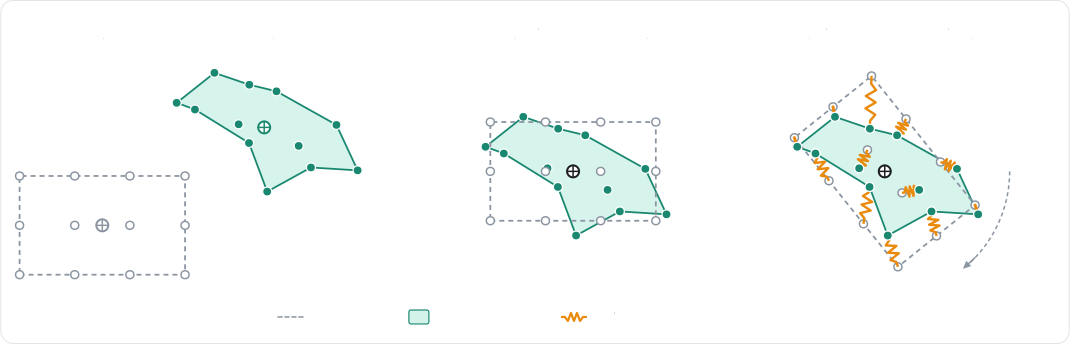
This is cheap, and a body always recovers its original shape whatever the deformation it went through. On the other
hand, the particles don't interact with their neighbors: pushing on one particle doesn't pull the ones around it, which
makes the deformations feel very local. Shape matching is enabled by
SoftBodyBuilder::shape_matchingSoftBodyDesc.setShapeMatchingshapeMatching field of the descriptionSoftBodyBuilder.shape_matchingshape_matching_softnessshapeMatchingSoftnessshapeMatchingSoftnessshape_matching_softness
- Example 2D
- Example 3D
// A cloud of particles without any element: shape matching alone pulls them back toward
// their rest shape, placed where it best fits the current one.
let points: Vec<Vector> = (0..9)
    .map(|i| Vector::new((i % 3) as f32, (i / 3) as f32 + 4.0) * 0.3)
    .collect();
let blob = SoftBodyBuilder::new(points)
    .shape_matching(true)
    .material(SoftBodyMaterial {
        // How fast the particles are pulled back toward their rest shape.
        shape_matching_softness: SpringCoefficients::new(5.0, 1.0),
        ..Default::default()
    })
    .particle_radius(0.1);
let _blob_handle = world.insert_soft_body(blob);
// A cloud of particles without any element: shape matching alone pulls them back toward
// their rest shape, placed where it best fits the current one.
let points: Vec<Vector> = (0..27)
    .map(|i| Vector::new((i % 3) as f32, (i / 3 % 3) as f32 + 4.0, (i / 9) as f32) * 0.3)
    .collect();
let blob = SoftBodyBuilder::new(points)
    .shape_matching(true)
    .material(SoftBodyMaterial {
        // How fast the particles are pulled back toward their rest shape.
        shape_matching_softness: SpringCoefficients::new(5.0, 1.0),
        ..Default::default()
    })
    .particle_radius(0.1);
let _blob_handle = world.insert_soft_body(blob);
- Example 2D
- Example 3D
// A cloud of particles without any element: shape matching alone pulls them back toward
// their rest shape, placed where it best fits the current one.
let points = [];
for (let i = 0; i < 9; ++i) {
    points.push((i % 3) * 0.3, Math.floor(i / 3) * 0.3 + 4.0);
}
let shapeMaterial = new RAPIER.SoftBodyMaterial();
// How fast the particles are pulled back toward their rest shape.
shapeMaterial.shapeMatchingSoftness = { naturalFrequency: 5.0, dampingRatio: 1.0 };
let pointCloudDesc = new RAPIER.SoftBodyDesc(points)
    .setShapeMatching(true)
    .setMaterial(shapeMaterial)
    .setParticleRadius(0.1);
let pointCloud = world.createSoftBody(pointCloudDesc);
// A cloud of particles without any element: shape matching alone pulls them back toward
// their rest shape, placed where it best fits the current one.
let points = [];
for (let i = 0; i < 27; ++i) {
    points.push((i % 3) * 0.3, (Math.floor(i / 3) % 3) * 0.3 + 4.0, Math.floor(i / 9) * 0.3);
}
let shapeMaterial = new RAPIER.SoftBodyMaterial();
// How fast the particles are pulled back toward their rest shape.
shapeMaterial.shapeMatchingSoftness = { naturalFrequency: 5.0, dampingRatio: 1.0 };
let pointCloudDesc = new RAPIER.SoftBodyDesc(points)
    .setShapeMatching(true)
    .setMaterial(shapeMaterial)
    .setParticleRadius(0.1);
let pointCloud = world.createSoftBody(pointCloudDesc);
- Example 2D
- Example 3D
// A cloud of particles without any element: shape matching alone pulls them back toward
// their rest shape, placed where it best fits the current one.
let points: Vec<Vec2> = (0..9)
    .map(|i| Vec2::new((i % 3) as f32, (i / 3) as f32) * 0.3)
    .collect();
commands.spawn((
    Transform::from_xyz(0.0, 4.0, 0.0),
    SoftBody::new(
        SoftBodyBuilder::new(points)
            .shape_matching(true)
            .particle_radius(0.1),
    ),
    SoftBodyMaterial(RapierSoftBodyMaterial {
        // How fast the particles are pulled back toward their rest shape.
        shape_matching_softness: SpringCoefficients::new(5.0, 1.0),
        ..default()
    }),
));
// A cloud of particles without any element: shape matching alone pulls them back toward
// their rest shape, placed where it best fits the current one.
let points: Vec<Vec3> = (0..27)
    .map(|i| Vec3::new((i % 3) as f32, (i / 3 % 3) as f32, (i / 9) as f32) * 0.3)
    .collect();
commands.spawn((
    Transform::from_xyz(0.0, 4.0, 0.0),
    SoftBody::new(
        SoftBodyBuilder::new(points)
            .shape_matching(true)
            .particle_radius(0.1),
    ),
    SoftBodyMaterial(RapierSoftBodyMaterial {
        // How fast the particles are pulled back toward their rest shape.
        shape_matching_softness: SpringCoefficients::new(5.0, 1.0),
        ..default()
    }),
));
- Example 2D
- Example 3D
// A cloud of particles without any element: shape matching alone pulls them back toward
// their rest shape, placed where it best fits the current one.
R2Vector points[9];
for (int i = 0; i < 9; i++) {
    points[i] = r2VectorScale(r2Vector(i % 3, i / 3 + 4.0), 0.3);
}
R2SoftBodyDesc cloud = r2DefaultSoftBodyDesc();
r2SoftBodyDesc_SetParticles(&cloud, (R2VectorView){points, 9});
cloud.shapeMatching = (R2OptionalBool){1, 1};
// How fast the particles are pulled back toward their rest shape.
cloud.material.shapeMatchingSoftness = (R2SpringCoefficients){5.0, 1.0};
cloud.particleRadius = (R2OptionalReal){1, 0.1};
R2SoftBodyHandle cloud_handle = r2InsertSoftBody(world, &cloud);
// A cloud of particles without any element: shape matching alone pulls them back toward
// their rest shape, placed where it best fits the current one.
R3Vector points[27];
for (int i = 0; i < 27; i++) {
    points[i] = r3VectorScale(r3Vector(i % 3, i / 3 % 3 + 4.0, i / 9), 0.3);
}
R3SoftBodyDesc cloud = r3DefaultSoftBodyDesc();
r3SoftBodyDesc_SetParticles(&cloud, (R3VectorView){points, 27});
cloud.shapeMatching = (R3OptionalBool){1, 1};
// How fast the particles are pulled back toward their rest shape.
cloud.material.shapeMatchingSoftness = (R3SpringCoefficients){5.0, 1.0};
cloud.particleRadius = (R3OptionalReal){1, 0.1};
R3SoftBodyHandle cloud_handle = r3InsertSoftBody(world, &cloud);
# A cloud of particles without any element: shape matching alone pulls them back toward
# their rest shape, placed where it best fits the current one.
points = 0.3 * np.array([(i % 3, i // 3 % 3 + 4.0, i // 9) for i in range(27)])
blob = (
    rp.SoftBodyBuilder(points)
    .shape_matching(True)
    .material(
        rp.SoftBodyMaterial(
            # How fast the particles are pulled back toward their rest shape.
            shape_matching_softness=rp.SpringCoefficients(5.0, 1.0),
        )
    )
    .particle_radius(0.1)
)
blob_handle = world.add_soft_body(blob)
Use shape matching for low-detail deformations, or whenever computing a topology (edges, cells) isn't desired. It is
enabled by default by the trimesh and polyline constructorstrimesh and polyline constructorsr3SoftBodyDesc_SetSurfaceMesh and r2SoftBodyDesc_SetTrimesh constructors (unless the shapeMatching override disables it)trimesh constructor
Constraints
The constraints-based soft-body solver is the default solverSoftBodySolver::Constraints)R3_SOFT_SOLVER_CONSTRAINTS)SoftBodySolver.CONSTRAINTS)

An edge is a spring-damper pulling its two particles back toward its rest length. A cell is either a volume constraint
keeping its area or its volume, the shape itself being held by the edges, or an elastic element resisting any
deformation. This is selected by the cell model of the body
(cell_modelsetCellModelcellModelcell_model, which takes a SoftBodyCellModel
VolumeVolumeR3_SOFT_CELL_VOLUMEVOLUMECorotationalCorotationalR3_SOFT_CELL_COROTATIONALCOROTATIONALNeoHookeanNeoHookeanR3_SOFT_CELL_NEO_HOOKEANNEO_HOOKEAN
The stiffness of every element is configured by the SoftBodyMaterialR3SoftBodyMaterialSoftBody::set_materialRapierSoftBodyMaterial) and overrides the one of the
builderSoftBody.setMaterialr3SoftBody_SetMaterial (the current one being given by r3SoftBody_Material)material property of SoftBodyr3DefaultSoftBodyMaterial, or by r3UniformSoftBodyMaterial which gives the same softness to every constraint.SoftBodyMaterial.copy gives a detached copy. A material is created with the SoftBodyMaterial constructor, which takes any of its fields as keyword arguments, or with SoftBodyMaterial.uniform which gives the same softness to every constraint.
- The edge softness (
edge_softnessedgeSoftnessedgeSoftnessedge_softness - The bend softness (
bend_softnessbendSoftnessbendSoftnessbend_softness - The volume softness (
volume_softnessvolumeSoftnessvolumeSoftnessvolume_softness
The elastic cells are given a Young modulus (young_modulusyoungModulusyoungModulusyoung_moduluspoisson_ratiopoissonRatiopoissonRatiopoisson_ratioelastic_damping_ratioelasticDampingRatioelasticDampingRatioelastic_damping_ratio
Finally, a body with a closed surface can preserve the area (2D) or the volume (3D) it encloses
(volume_preservationsetVolumePreservationvolumePreservationvolume_preservation, or enable_volume_preservation after the insertionvolume_factorvolume_factor (or a SoftBodyVolumeFactor component)setVolumeFactorvolumeFactor (or r3SoftBody_SetVolumeFactor after the insertion)volume_factor (or the volume_factor property of SoftBody after the insertion)
- Example 2D
- Example 3D
// Elastic cells: a jelly square with corotational linear elasticity.
let jelly = SoftBodyBuilder::grid(Vector::new(3.0, 1.2), Vector::splat(1.0), 6, 6)
    // The constitutive model of the cells: `Volume` (per-cell area constraints,
    // the shape is held by the edges), `Corotational` or `NeoHookean`.
    .cell_model(SoftBodyCellModel::Corotational)
    .material(SoftBodyMaterial {
        // Stiffness of the elastic cells.
        young_modulus: 3.0e3,
        poisson_ratio: 0.35,
        elastic_damping_ratio: 0.5,
        // Plasticity: the rest shape flows past 5% strain, at 20 per second.
        plastic_yield: 0.05,
        plastic_creep: 20.0,
        // Tearing: an element past 40% strain tears.
        tear_strain: Some(0.4),
        ..Default::default()
    })
    .particle_mass(0.2);
let jelly_handle = world.insert_soft_body(jelly);

// A pressurized blob: a ring of particles inflated by area preservation.
let blob = SoftBodyBuilder::disk(Vector::new(0.0, 3.0), 0.8, 24)
    .softness(SpringCoefficients::new(20.0, 1.0))
    // Target area multiplier (`> 1` inflates the body); enables area preservation.
    .volume_factor(1.1)
    .self_contacts(true);
let blob_handle = world.insert_soft_body(blob);
// Elastic cells: a jelly cube with corotational linear elasticity.
let jelly = SoftBodyBuilder::cuboid(Vector::new(3.0, 1.0, 0.0), Vector::splat(0.5), 4, 4, 4)
    // The constitutive model of the cells: `Volume` (per-cell volume constraints,
    // the shape is held by the edges), `Corotational` or `NeoHookean`.
    .cell_model(SoftBodyCellModel::Corotational)
    .material(SoftBodyMaterial {
        // Stiffness of the elastic cells.
        young_modulus: 2.0e3,
        poisson_ratio: 0.35,
        elastic_damping_ratio: 0.5,
        // Plasticity: the rest shape flows past 5% strain, at 20 per second.
        plastic_yield: 0.05,
        plastic_creep: 20.0,
        // Tearing: an element past 40% strain tears.
        tear_strain: Some(0.4),
        ..Default::default()
    })
    .particle_mass(0.2);
let jelly_handle = world.insert_soft_body(jelly);

// A material shared by the edges, bending constraints and volume constraints.
let material = SoftBodyMaterial {
    // Softness of the bending constraints, on top of a uniform 30 Hz softness.
    bend_softness: SpringCoefficients::new(3.0, 1.0),
    ..SoftBodyMaterial::uniform(SpringCoefficients::new(30.0, 1.0))
};
world.soft_bodies[cloth_handle].set_material(material);
- Example 2D
- Example 3D
// Elastic cells: a jelly square with corotational linear elasticity.
let material = new RAPIER.SoftBodyMaterial();
// Stiffness of the elastic cells.
material.youngModulus = 3.0e3;
material.poissonRatio = 0.35;
material.elasticDampingRatio = 0.5;
// Plasticity: the rest shape flows past 5% strain, at 20 per second.
material.plasticYield = 0.05;
material.plasticCreep = 20.0;
// Tearing: an element past 40% strain tears.
material.tearStrain = 0.4;
let jellyDesc = RAPIER.SoftBodyDesc.grid({ x: 3.0, y: 1.2 }, { x: 1.0, y: 1.0 }, 6, 6)
    // The constitutive model of the cells: `Volume` (per-cell area constraints,
    // the shape is held by the edges), `Corotational` or `NeoHookean`.
    .setCellModel(RAPIER.SoftBodyCellModel.Corotational)
    .setMaterial(material)
    .setParticleMass(0.2);
let jelly = world.createSoftBody(jellyDesc);

// A pressurized blob: a ring of particles inflated by area preservation.
let blobDesc = RAPIER.SoftBodyDesc.disk({ x: 0.0, y: 3.0 }, 0.8, 24)
    .setSoftness(20.0, 1.0)
    // Target area multiplier (`> 1` inflates the body); enables area preservation.
    .setVolumeFactor(1.1)
    .setSelfContacts(true);
let blob = world.createSoftBody(blobDesc);
// Elastic cells: a jelly cube with corotational linear elasticity.
let material = new RAPIER.SoftBodyMaterial();
// Stiffness of the elastic cells.
material.youngModulus = 2.0e3;
material.poissonRatio = 0.35;
material.elasticDampingRatio = 0.5;
// Plasticity: the rest shape flows past 5% strain, at 20 per second.
material.plasticYield = 0.05;
material.plasticCreep = 20.0;
// Tearing: an element past 40% strain tears.
material.tearStrain = 0.4;
let jellyDesc = RAPIER.SoftBodyDesc.cuboid({ x: 3.0, y: 1.0, z: 0.0 }, { x: 0.5, y: 0.5, z: 0.5 }, 4, 4, 4)
    // The constitutive model of the cells: `Volume` (per-cell volume constraints,
    // the shape is held by the edges), `Corotational` or `NeoHookean`.
    .setCellModel(RAPIER.SoftBodyCellModel.Corotational)
    .setMaterial(material)
    .setParticleMass(0.2);
let jelly = world.createSoftBody(jellyDesc);

// A material shared by the edges, bending constraints and volume constraints.
let clothMaterial = RAPIER.SoftBodyMaterial.uniform(30.0, 1.0);
// Softness of the bending constraints, on top of the uniform 30 Hz softness.
clothMaterial.bendSoftness = { naturalFrequency: 3.0, dampingRatio: 1.0 };
cloth.setMaterial(clothMaterial);
- Example 2D
- Example 3D
// Elastic cells: a jelly square with corotational linear elasticity.
let jelly_body = SoftBody::grid(Vec2::splat(1.0), 6, 6).map(|builder| {
    // The constitutive model of the cells: `Volume` (per-cell area constraints,
    // the shape is held by the edges), `Corotational` or `NeoHookean`.
    builder
        .cell_model(SoftBodyCellModel::Corotational)
        .particle_mass(0.2)
});
let jelly = commands
    .spawn((
        Jelly,
        Transform::from_xyz(3.0, 1.2, 0.0),
        jelly_body.clone(),
        // The material of the soft-body: modifying this component updates the soft-body.
        SoftBodyMaterial(RapierSoftBodyMaterial {
            // Stiffness of the elastic cells.
            young_modulus: 3.0e3,
            poisson_ratio: 0.35,
            elastic_damping_ratio: 0.5,
            // Plasticity: the rest shape flows past 5% strain, at 20 per second.
            plastic_yield: 0.05,
            plastic_creep: 20.0,
            // Tearing: an element past 40% strain tears.
            tear_strain: Some(0.4),
            ..default()
        }),
    ))
    .id();

// A pressurized blob: a ring of particles inflated by area preservation.
let blob_body = SoftBody::disk(0.8, 24).map(|builder| builder.self_contacts(true));
let blob_transform = Transform::from_xyz(0.0, 3.0, 0.0);
let blob = commands
    .spawn((
        blob_transform,
        blob_body.clone(),
        SoftBodyMaterial::uniform(20.0, 1.0),
        // Target area multiplier (`> 1` inflates the body).
        SoftBodyVolumeFactor(1.1),
    ))
    .id();
// Elastic cells: a jelly cube with corotational linear elasticity.
let jelly_body = SoftBody::cuboid(Vec3::splat(0.5), 4, 4, 4).map(|builder| {
    // The constitutive model of the cells: `Volume` (per-cell volume constraints,
    // the shape is held by the edges), `Corotational` or `NeoHookean`.
    builder
        .cell_model(SoftBodyCellModel::Corotational)
        .particle_mass(0.2)
});
let jelly = commands
    .spawn((
        Jelly,
        Transform::from_xyz(3.0, 1.0, 0.0),
        jelly_body.clone(),
        // The material of the soft-body: modifying this component updates the soft-body.
        SoftBodyMaterial(RapierSoftBodyMaterial {
            // Stiffness of the elastic cells.
            young_modulus: 2.0e3,
            poisson_ratio: 0.35,
            elastic_damping_ratio: 0.5,
            // Plasticity: the rest shape flows past 5% strain, at 20 per second.
            plastic_yield: 0.05,
            plastic_creep: 20.0,
            // Tearing: an element past 40% strain tears.
            tear_strain: Some(0.4),
            ..default()
        }),
    ))
    .id();

// A balloon inflated by volume preservation.
commands.spawn((
    Transform::from_xyz(0.0, 3.0, 3.0),
    SoftBody::sphere(0.8, 2),
    SoftBodyMaterial::uniform(20.0, 1.0),
    // Target volume multiplier (`> 1` inflates the body).
    SoftBodyVolumeFactor(1.1),
));

// A material shared by the edges, bending constraints and volume constraints.
commands
    .entity(cloth)
    .insert(SoftBodyMaterial(RapierSoftBodyMaterial {
        // Softness of the bending constraints, on top of a uniform 30 Hz softness.
        bend_softness: SpringCoefficients::new(3.0, 1.0),
        ..RapierSoftBodyMaterial::uniform(SpringCoefficients::new(30.0, 1.0))
    }));
- Example 2D
- Example 3D
// Elastic cells: a jelly square with corotational linear elasticity.
R2SoftBodyDesc jelly = r2GridSoftBodyDesc(r2Vector(3.0, 1.2), r2Vector(1.0, 1.0), 6, 6);
// The constitutive model of the cells: R2_SOFT_CELL_VOLUME (per-cell area constraints,
// the shape is held by the edges), R2_SOFT_CELL_COROTATIONAL or R2_SOFT_CELL_NEO_HOOKEAN.
jelly.cellModel = R2_SOFT_CELL_COROTATIONAL;
// Stiffness of the elastic cells.
jelly.material.youngModulus = 3.0e3;
jelly.material.poissonRatio = 0.35;
jelly.material.elasticDampingRatio = 0.5;
// Plasticity: the rest shape flows past 5% strain, at 20 per second.
jelly.material.plasticYield = 0.05;
jelly.material.plasticCreep = 20.0;
// Tearing: an element past 40% strain tears.
jelly.material.tearStrain = (R2OptionalReal){1, 0.4};
jelly.particleMass = 0.2;
R2SoftBodyHandle jelly_handle = r2InsertSoftBody(world, &jelly);

// A pressurized blob: a ring of particles inflated by area preservation.
R2SoftBodyDesc blob = r2DiskSoftBodyDesc(r2Vector(0.0, 3.0), 0.8, 24);
blob.material = r2UniformSoftBodyMaterial((R2SpringCoefficients){20.0, 1.0});
// Target area multiplier (`> 1` inflates the body), for the area preservation enabled by
// the disk constructor (`volumePreservation`).
blob.volumeFactor = 1.1;
blob.selfContacts = 1;
R2SoftBodyHandle blob_handle = r2InsertSoftBody(world, &blob);
// Elastic cells: a jelly cube with corotational linear elasticity.
R3SoftBodyDesc jelly = r3CuboidSoftBodyDesc(r3Vector(3.0, 1.0, 0.0), r3Vector(0.5, 0.5, 0.5), 4, 4, 4);
// The constitutive model of the cells: R3_SOFT_CELL_VOLUME (per-cell volume constraints,
// the shape is held by the edges), R3_SOFT_CELL_COROTATIONAL or R3_SOFT_CELL_NEO_HOOKEAN.
jelly.cellModel = R3_SOFT_CELL_COROTATIONAL;
// Stiffness of the elastic cells.
jelly.material.youngModulus = 2.0e3;
jelly.material.poissonRatio = 0.35;
jelly.material.elasticDampingRatio = 0.5;
// Plasticity: the rest shape flows past 5% strain, at 20 per second.
jelly.material.plasticYield = 0.05;
jelly.material.plasticCreep = 20.0;
// Tearing: an element past 40% strain tears.
jelly.material.tearStrain = (R3OptionalReal){1, 0.4};
jelly.particleMass = 0.2;
R3SoftBodyHandle jelly_handle = r3InsertSoftBody(world, &jelly);

// A material shared by the edges, bending constraints and volume constraints.
R3SoftBodyMaterial material = r3UniformSoftBodyMaterial((R3SpringCoefficients){30.0, 1.0});
// Softness of the bending constraints, on top of a uniform 30 Hz softness.
material.bendSoftness = (R3SpringCoefficients){3.0, 1.0};
r3SoftBody_SetMaterial(cloth_handle, &material);
# Elastic cells: a jelly cube with corotational linear elasticity.
jelly = (
    rp.SoftBody.cuboid((3.0, 1.0, 0.0), (0.5, 0.5, 0.5), 4, 4, 4)
    # The constitutive model of the cells: `VOLUME` (per-cell volume constraints,
    # the shape is held by the edges), `COROTATIONAL` or `NEO_HOOKEAN`.
    .cell_model(rp.SoftBodyCellModel.COROTATIONAL)
    .material(
        rp.SoftBodyMaterial(
            # Stiffness of the elastic cells.
            young_modulus=2.0e3,
            poisson_ratio=0.35,
            elastic_damping_ratio=0.5,
            # Plasticity: the rest shape flows past 5% strain, at 20 per second.
            plastic_yield=0.05,
            plastic_creep=20.0,
            # Tearing: an element past 40% strain tears.
            tear_strain=0.4,
        )
    )
    .particle_mass(0.2)
)
jelly_handle = world.add_soft_body(jelly)

# A material shared by the edges, bending constraints and volume constraints.
material = rp.SoftBodyMaterial.uniform(rp.SpringCoefficients(30.0, 1.0))
# Softness of the bending constraints, on top of a uniform 30 Hz softness.
material.bend_softness = rp.SpringCoefficients(3.0, 1.0)
world.soft_bodies[cloth_handle].material = material
# The `material` property is also a live view: its fields can be modified in place.
world.soft_bodies[cloth_handle].material.deformation_damping = 0.1
The stiffness effectively simulated by the constraints solver depends on its convergence: with too few iterations, a stiff
body looks softer than its material says. This is why soft-bodies are configured with 3 additional internal PGS solver iterations by default, which can
be modified with
additional_pgs_iterationssetAdditionalPgsIterationsadditionalPgsIterationsadditional_pgs_iterationsadditional_solver_iterationssetAdditionalSolverIterationsadditionalSolverIterationsadditional_solver_iterations

The following table gathers the settings to look at for the most common problems:
| Problem | What to change |
|---|---|
| The body is too soft, or stretches too much. | Raise the natural frequency of the material's edge_softnessedgeSoftnessedgeSoftnessedge_softnessyoung_modulusyoungModulusyoungModulusyoung_modulusadditional_pgs_iterationssetAdditionalPgsIterationsadditionalPgsIterationsadditional_pgs_iterationssolversetSolversolversolver |
| A cloth stretches, but should still fold easily. | Keep a stiff edge_softnessedgeSoftnessedgeSoftnessedge_softnessbend_softnessbendSoftnessbendSoftnessbend_softness |
| A rope compresses like a spring. | Make its edges resist stretching only with tension_onlysetTensionOnlytensionOnlyEdgestension_only |
| The body keeps wobbling after an impact. | Raise the damping_ratiodampingRatiodamping_ratiodamping_ratioelastic_damping_ratioelasticDampingRatioelasticDampingRatioelastic_damping_ratiodeformation_dampingdeformationDampingdeformationDampingdeformation_damping |
| A closed body collapses, or must be inflated. | Enable volume_preservationsetVolumePreservationvolumePreservationvolume_preservationvolume_factorsetVolumeFactorvolumeFactorvolume_factor |
| The deformations are too local. | Combine shape_matchingsetShapeMatchingshapeMatchingshape_matching |
FEM solver
The FEM solver (SoftBodySolver::Fem, behind the fem cargo featureSoftBodySolver::Fem,
behind the fem feature of bevy_rapier, given to the builder or with the SoftBodyElasticitySolver
componentSoftBodySolver.FemR3_SOFT_SOLVER_FEM, given to the solver field of the description or to r3SoftBody_SetSolver, and requiring the fem feature of the librarySoftBodySolver.FEM, given to the builder with solver, or to the solver property of SoftBody after the insertion
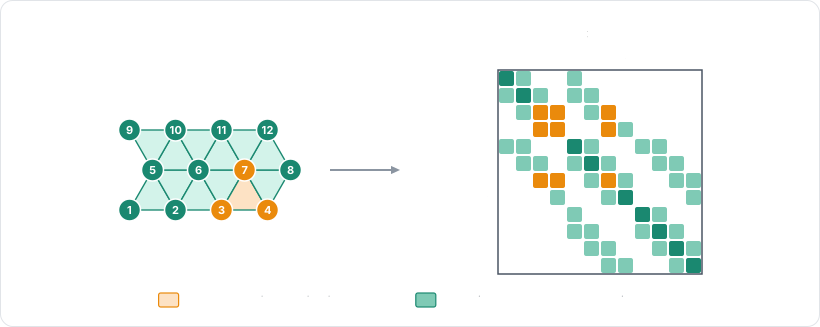
This comes at a price: the system is factorized at each timestep, and every constraint touching the body (contacts,
joints) needs a solve against it. Note that the FEM solver requires cells, so it only applies to the bodies built with
cells, e.g., with the grid, cuboid, or volumetricgrid, cuboid, or volumetricr2GridSoftBodyDesc, r3CuboidSoftBodyDesc, or r3VolumetricSoftBodyDesccuboid, volumetric, or volumetric_with
- Example 2D
- Example 3D
// A stiff beam simulated by the FEM solver (requires the `fem` cargo feature): its stiffness
// doesn't depend on the number of solver iterations.
let beam = SoftBodyBuilder::grid(Vector::new(0.0, 2.0), Vector::new(1.0, 0.1), 21, 3)
    .solver(SoftBodySolver::Fem)
    .cell_model(SoftBodyCellModel::NeoHookean)
    .material(SoftBodyMaterial {
        young_modulus: 1.0e5,
        poisson_ratio: 0.3,
        ..Default::default()
    })
    // The particles of the side at `x = -1` are the first 3 ones.
    .pinned_particles(0..3);
let _beam_handle = world.insert_soft_body(beam);

// The tuning of the linear solves of the FEM solver, shared by every body using it.
let fem = &mut world.integration_parameters.soft_bodies.fem;
fem.linear_tolerance = 1.0e-5;
fem.max_linear_iterations = 20;
// A stiff beam simulated by the FEM solver (requires the `fem` cargo feature): its stiffness
// doesn't depend on the number of solver iterations.
let beam = SoftBodyBuilder::cuboid(Vector::new(0.0, 2.0, -3.0), Vector::new(1.0, 0.1, 0.1), 11, 3, 3)
    .solver(SoftBodySolver::Fem)
    .cell_model(SoftBodyCellModel::NeoHookean)
    .material(SoftBodyMaterial {
        young_modulus: 1.0e5,
        poisson_ratio: 0.3,
        ..Default::default()
    })
    // The particles of the face at `x = -1` are the first 3 × 3 ones.
    .pinned_particles(0..9);
let _beam_handle = world.insert_soft_body(beam);

// The tuning of the linear solves of the FEM solver, shared by every body using it.
let fem = &mut world.integration_parameters.soft_bodies.fem;
fem.linear_tolerance = 1.0e-5;
fem.max_linear_iterations = 20;
- Example 2D
- Example 3D
// A stiff beam simulated by the FEM solver: its stiffness doesn't depend on the number of
// solver iterations.
let beamMaterial = new RAPIER.SoftBodyMaterial();
beamMaterial.youngModulus = 1.0e5;
beamMaterial.poissonRatio = 0.3;
let beamDesc = RAPIER.SoftBodyDesc.grid({ x: 0.0, y: 2.0 }, { x: 1.0, y: 0.1 }, 21, 3)
    .setSolver(RAPIER.SoftBodySolver.Fem)
    .setCellModel(RAPIER.SoftBodyCellModel.NeoHookean)
    .setMaterial(beamMaterial)
    // The particles of the side at `x = -1` are the first 3 ones.
    .setPinnedParticles(new Uint32Array([0, 1, 2]));
let beam = world.createSoftBody(beamDesc);

// The tuning of the linear solves of the FEM solver, shared by every body using it.
world.integrationParameters.softBodiesFemLinearTolerance = 1.0e-5;
world.integrationParameters.softBodiesFemMaxLinearIterations = 20;
// A stiff beam simulated by the FEM solver: its stiffness doesn't depend on the number of
// solver iterations.
let beamMaterial = new RAPIER.SoftBodyMaterial();
beamMaterial.youngModulus = 1.0e5;
beamMaterial.poissonRatio = 0.3;
let beamDesc = RAPIER.SoftBodyDesc.cuboid(
    { x: 0.0, y: 2.0, z: -3.0 }, { x: 1.0, y: 0.1, z: 0.1 }, 11, 3, 3,
)
    .setSolver(RAPIER.SoftBodySolver.Fem)
    .setCellModel(RAPIER.SoftBodyCellModel.NeoHookean)
    .setMaterial(beamMaterial)
    // The particles of the face at `x = -1` are the first 3 × 3 ones.
    .setPinnedParticles(new Uint32Array([0, 1, 2, 3, 4, 5, 6, 7, 8]));
let beam = world.createSoftBody(beamDesc);

// The tuning of the linear solves of the FEM solver, shared by every body using it.
world.integrationParameters.softBodiesFemLinearTolerance = 1.0e-5;
world.integrationParameters.softBodiesFemMaxLinearIterations = 20;
- Example 2D
- Example 3D
fn configure_fem(
    mut commands: Commands,
    mut simulation: Single<&mut RapierContextSimulation, With<DefaultRapierContext>>,
) {
    // A stiff beam simulated by the FEM solver (requires the `fem` feature): its stiffness
    // doesn't depend on the number of solver iterations.
    commands.spawn((
        Transform::from_xyz(0.0, 2.0, 0.0),
        SoftBody::grid(Vec2::new(1.0, 0.1), 21, 3).map(|builder| {
            builder
                .cell_model(SoftBodyCellModel::NeoHookean)
                // The particles of the side at `x = -1` are the first 3 ones.
                .pinned_particles(0..3)
        }),
        SoftBodyElasticitySolver(SoftBodySolver::Fem),
        SoftBodyMaterial(RapierSoftBodyMaterial {
            young_modulus: 1.0e5,
            poisson_ratio: 0.3,
            ..default()
        }),
    ));

    // The tuning of the linear solves of the FEM solver, shared by every body using it.
    let fem = &mut simulation.integration_parameters.soft_bodies.fem;
    fem.linear_tolerance = 1.0e-5;
    fem.max_linear_iterations = 20;
}
fn configure_fem(
    mut commands: Commands,
    mut simulation: Single<&mut RapierContextSimulation, With<DefaultRapierContext>>,
) {
    // A stiff beam simulated by the FEM solver (requires the `fem` feature): its stiffness
    // doesn't depend on the number of solver iterations.
    commands.spawn((
        Transform::from_xyz(0.0, 2.0, -3.0),
        SoftBody::cuboid(Vec3::new(1.0, 0.1, 0.1), 11, 3, 3).map(|builder| {
            builder
                .cell_model(SoftBodyCellModel::NeoHookean)
                // The particles of the face at `x = -1` are the first 3 × 3 ones.
                .pinned_particles(0..9)
        }),
        SoftBodyElasticitySolver(SoftBodySolver::Fem),
        SoftBodyMaterial(RapierSoftBodyMaterial {
            young_modulus: 1.0e5,
            poisson_ratio: 0.3,
            ..default()
        }),
    ));

    // The tuning of the linear solves of the FEM solver, shared by every body using it.
    let fem = &mut simulation.integration_parameters.soft_bodies.fem;
    fem.linear_tolerance = 1.0e-5;
    fem.max_linear_iterations = 20;
}
- Example 2D
- Example 3D
// A stiff beam simulated by the FEM solver (requires the `fem` feature): its stiffness
// doesn't depend on the number of solver iterations.
R2SoftBodyDesc beam = r2GridSoftBodyDesc(r2Vector(0.0, 2.0), r2Vector(1.0, 0.1), 21, 3);
beam.solver = R2_SOFT_SOLVER_FEM;
beam.cellModel = R2_SOFT_CELL_NEO_HOOKEAN;
beam.material.youngModulus = 1.0e5;
beam.material.poissonRatio = 0.3;
// The particles of the side at `x = -1` are the first 3 ones.
const uint32_t beam_pinned[] = {0, 1, 2};
beam.pinned = (R2IndexView){beam_pinned, 3};
R2SoftBodyHandle beam_handle = r2InsertSoftBody(world, &beam);

// The tuning of the linear solves of the FEM solver, shared by every body using it.
r2FemSetLinearTolerance(world, 1.0e-5);
r2FemSetMaxLinearIterations(world, 20);
// A stiff beam simulated by the FEM solver (requires the `fem` feature): its stiffness
// doesn't depend on the number of solver iterations.
R3SoftBodyDesc beam = r3CuboidSoftBodyDesc(r3Vector(0.0, 2.0, -3.0), r3Vector(1.0, 0.1, 0.1), 11, 3, 3);
beam.solver = R3_SOFT_SOLVER_FEM;
beam.cellModel = R3_SOFT_CELL_NEO_HOOKEAN;
beam.material.youngModulus = 1.0e5;
beam.material.poissonRatio = 0.3;
// The particles of the face at `x = -1` are the first 3 × 3 ones.
const uint32_t beam_pinned[] = {0, 1, 2, 3, 4, 5, 6, 7, 8};
beam.pinned = (R3IndexView){beam_pinned, 9};
R3SoftBodyHandle beam_handle = r3InsertSoftBody(world, &beam);

// The tuning of the linear solves of the FEM solver, shared by every body using it.
r3FemSetLinearTolerance(world, 1.0e-5);
r3FemSetMaxLinearIterations(world, 20);
# A stiff beam simulated by the FEM solver: its stiffness doesn't depend on the number of
# solver iterations.
beam = (
    rp.SoftBody.cuboid((0.0, 2.0, -3.0), (1.0, 0.1, 0.1), 11, 3, 3)
    .solver(rp.SoftBodySolver.FEM)
    .cell_model(rp.SoftBodyCellModel.NEO_HOOKEAN)
    .material(rp.SoftBodyMaterial(young_modulus=1.0e5, poisson_ratio=0.3))
    # The particles of the face at `x = -1` are the first 3 × 3 ones.
    .pinned_particles(range(9))
)
beam_handle = world.add_soft_body(beam)

# The tuning of the linear solves of the FEM solver, shared by every body using it.
fem = world.integration_parameters.soft_bodies.fem
fem.linear_tolerance = 1.0e-5
fem.max_linear_iterations = 20
The linear solves stop at the relative residual
linear_tolerancesoftBodiesFemLinearTolerancelinearTolerance (set by r3FemSetLinearTolerance)linear_tolerancemax_linear_iterationssoftBodiesFemMaxLinearIterationsmaxLinearIterations (set by r3FemSetMaxLinearIterations)max_linear_iterationsmax_dense_dofssoftBodiesFemMaxDenseDofsmaxDenseDofs (set by r3FemSetMaxDenseDofs)max_dense_dofs600 by default) are
factorized directly, whereas the larger ones rely on the iterative conjugate gradient.
Use the FEM solver for stiff materials which simulated stiffness must not depend on the iteration count, e.g., the chassis of a car or a metal beam. This also results in more realistic plasticity and tearing.
Contacts and self-intersections
A soft-body collides through the collider covering its surface, which is a deformable triangle-mesh (a polyline in 2D) built from the template given to the builder.
Thickness
The radius of the particles
(particle_radiussetParticleRadiusparticleRadius field of R3SoftBodyDescSoftBodyBuilder.particle_radius
Oriented surfaces and shells
A closed surface (a balloon, a jelly cube, a filled polygon) is oriented: its contacts are generated on its outward
side only, like for an oriented triangle-mesh, so nothing is held
inside it. An open surface (a rope, a cloth) is two-sided, because a body arriving from either side must be stopped.
This is what the builder does by default, and it is what a solid body wants. A shell, i.e., a closed surface which
inner side must hold the bodies contained in it, is obtained by asking for a surface that is not oriented
(orientedsetOrientedoriented field of R3SoftBodyDescSoftBodyBuilder.oriented
- Example 2D
- Example 3D
// A shell: a closed surface that is not oriented, so its inner side holds the bodies put
// inside it (a bowl, a box, a container). A closed surface is oriented by default.
let bowl = SoftBodyBuilder::disk(Vector::new(-3.0, 2.0), 0.8, 24)
    .oriented(false)
    .softness(SpringCoefficients::new(60.0, 1.0));
let _bowl_handle = world.insert_soft_body(bowl);
// A shell: a closed surface that is not oriented, so its inner side holds the bodies put
// inside it (a bowl, a box, a container). A closed surface is oriented by default.
let bowl = SoftBodyBuilder::sphere(Vector::new(-3.0, 2.0, 0.0), 0.8, 2)
    .oriented(false)
    .softness(SpringCoefficients::new(60.0, 1.0));
let _bowl_handle = world.insert_soft_body(bowl);
- Example 2D
- Example 3D
// A shell: a closed surface that is not oriented, so its inner side holds the bodies put
// inside it (a bowl, a box, a container). A closed surface is oriented by default.
let bowlDesc = RAPIER.SoftBodyDesc.disk({ x: -3.0, y: 2.0 }, 0.8, 24)
    .setOriented(false)
    .setSoftness(60.0, 1.0);
let bowl = world.createSoftBody(bowlDesc);
// A shell: a closed surface that is not oriented, so its inner side holds the bodies put
// inside it (a bowl, a box, a container). A closed surface is oriented by default.
let bowlDesc = RAPIER.SoftBodyDesc.sphere({ x: -3.0, y: 2.0, z: 0.0 }, 0.8, 2)
    .setOriented(false)
    .setSoftness(60.0, 1.0);
let bowl = world.createSoftBody(bowlDesc);
- Example 2D
- Example 3D
// A shell: a closed surface that is not oriented, so its inner side holds the bodies put
// inside it (a bowl, a box, a container). A closed surface is oriented by default.
commands.spawn((
    Transform::from_xyz(-3.0, 2.0, 0.0),
    SoftBody::disk(0.8, 24).map(|builder| {
        builder
            .oriented(false)
            .softness(SpringCoefficients::new(60.0, 1.0))
    }),
));
// A shell: a closed surface that is not oriented, so its inner side holds the bodies put
// inside it (a bowl, a box, a container). A closed surface is oriented by default.
commands.spawn((
    Transform::from_xyz(-3.0, 2.0, 0.0),
    SoftBody::sphere(0.8, 2).map(|builder| {
        builder
            .oriented(false)
            .softness(SpringCoefficients::new(60.0, 1.0))
    }),
));
- Example 2D
- Example 3D
// A shell: a closed surface that is not oriented, so its inner side holds the bodies put
// inside it (a bowl, a box, a container). A closed surface is oriented by default.
R2SoftBodyDesc bowl = r2DiskSoftBodyDesc(r2Vector(-3.0, 2.0), 0.8, 24);
// Default: disabled, i.e., oriented if the surface is closed.
bowl.oriented = (R2OptionalBool){1, 0};
bowl.material = r2UniformSoftBodyMaterial((R2SpringCoefficients){60.0, 1.0});
R2SoftBodyHandle bowl_handle = r2InsertSoftBody(world, &bowl);
// A shell: a closed surface that is not oriented, so its inner side holds the bodies put
// inside it (a bowl, a box, a container). A closed surface is oriented by default.
R3SoftBodyDesc bowl = r3SphereSoftBodyDesc(r3Vector(-3.0, 2.0, 0.0), 0.8, 2);
// Default: disabled, i.e., oriented if the surface is closed.
bowl.oriented = (R3OptionalBool){1, 0};
bowl.material = r3UniformSoftBodyMaterial((R3SpringCoefficients){60.0, 1.0});
R3SoftBodyHandle bowl_handle = r3InsertSoftBody(world, &bowl);
# A shell: a closed surface that is not oriented, so its inner side holds the bodies put
# inside it (a bowl, a box, a container). A closed surface is oriented by default.
bowl = rp.SoftBody.sphere((-3.0, 2.0, 0.0), 0.8, 2).oriented(False).softness((60.0, 1.0))
bowl_handle = world.add_soft_body(bowl)
After the insertion, the shape of the ColliderColliderr3SoftBody_MeshColliders)SoftBody.collision_mesh().collider)shape a triangle-mesh with the TriMeshFlags.ORIENTED flag toggled)
Self-contacts
A soft-body doesn't collide with itself by default. Self-contacts are enabled by
SoftBodyBuilder::self_contactsSoftBodyDesc.setSelfContactsselfContacts field of R3SoftBodyDescSoftBodyBuilder.self_contacts
Penetrations and tangles
The contacts between two meshes are computed triangle by triangle (segment by segment in 2D), without any notion of their interiors. As long as the two surfaces don't penetrate, this works well. But as soon as they do, some of these local contacts start pointing the wrong way, and actively keep the two surfaces in their penetrating state instead of separating them. Deformations make it worse, since a single surface can also cross itself and end up tangled:
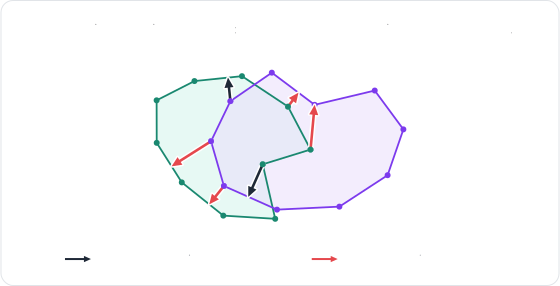
Rapier handles these configurations by measuring the volume of the overlap between the two surfaces. The gradient of that volume gives a good approximation of the direction separating the two bodies, aka. the volume normal, which is used both to push the overlapping regions apart, and to correct the direction of the local contacts inside them:
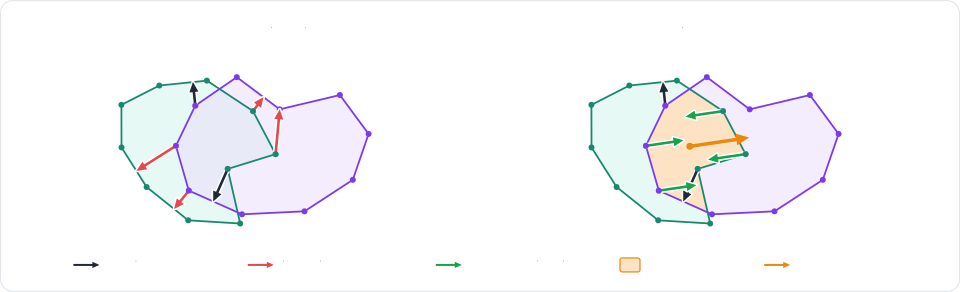
This is enabled by default for the closed surfaces, against other soft-bodies as well as against rigid colliders.
It is configured, along with the detection and the recovery of the tangled configurations, by the recovery settings of
the global settings
(IntegrationParameters::soft_bodies.recoveryintegration_parameters.soft_bodies.recovery of the
RapierContextSimulation componentIntegrationParameters.softBodiesRecoverysoftBodies.recovery of R3IntegrationParametersIntegrationParameters.soft_bodies.recovery
| Problem | What to change |
|---|---|
| Thin or fast objects pass through a surface. | Raise the particle radius (particle_radiussetParticleRadiusparticleRadiusparticle_radiusmax_extra_substepssoftBodiesMaxExtraSubstepsmaxExtraSubstepsmax_extra_substeps |
| Two bodies crossing corner-first don't collide. | Enable edge_speculationedgeSpeculationedgeSpeculationedge_speculation |
| A body stays tangled with itself. | Keep self_stand_downselfStandDownselfStandDownself_stand_downcrossing_repulsioncrossingRepulsioncrossingRepulsioncrossing_repulsion |
| The recovery from a penetration is too slow, or too violent. | Change the recovery_pacerecoveryPacerecoveryPacerecovery_pace |
| Soft contacts feel too spongy. | Raise the contact_stiffeningsoftBodiesContactStiffeningcontactStiffeningcontact_stiffening |
| The overlap of two bodies isn't resolved at all. | Make sure both surfaces are closed: the intersection-volume constraints (overlap_constraintsoverlapConstraintsoverlapConstraintsoverlap_constraints |
Each of these settings has its own setter (and getter), named after its field: r3SoftBodiesSetMaxExtraSubsteps and
r3SoftBodiesSetContactStiffening for the settings of the soft-bodies, and r3RecoverySetEdgeSpeculation,
r3RecoverySetSelfStandDown, r3RecoverySetCrossingRepulsion, etc. for the recovery settings. See the
global settings for an example.
Soft frames: joints and rigid colliders
Joints and rigid colliders both need a frame to be attached to, i.e., a translation and a rotation, which a soft-body
doesn't have. This is what soft frames are for: a soft frame is a rigid-body of type
RigidBodyType::SoftFrameRigidBodyType.SoftFrameR3_SOFT_FRAME (see r3RigidBody_IsSoftFrame)RigidBodyType.SOFT_FRAME (see RigidBody.is_soft_frame)
The root body
Every soft-body is created with one soft frame covering all of its particles: its root body. It is the rigid-body
given by SoftBody::root_bodyRapierSoftBody::root_bodySoftBody.rootBodyr3SoftBody_RootBodySoftBody.root_bodyCollider::deformable_mesh_refdeformable_mesh_ref of the Rapier colliderCollider.softBodyr3Collider_SoftBodyCollider.deformable_mesh_ref
- Example 2D
- Example 3D
// The rigid body the engine created for the whole soft body, read back after its insertion.
let root: RigidBodyHandle = world.soft_bodies[jelly_handle].root_body();
assert!(world.bodies[root].is_soft_frame());

// A rigid collider attached to it follows the frame of the whole body: here a sensor
// detecting what comes close to the jelly.
let _sensor = world.insert_collider(ColliderBuilder::ball(1.6).sensor(true), Some(root));

// A joint attached to it acts on the soft body as a whole: this one hangs the jelly under a
// fixed anchor by a spring.
let anchor = world.insert_body(RigidBodyBuilder::fixed().translation(Vector::new(3.0, 5.0)));
world.insert_impulse_joint(anchor, root, SpringJointBuilder::new(2.0, 60.0, 2.0));
// The rigid body the engine created for the whole soft body, read back after its insertion.
let root: RigidBodyHandle = world.soft_bodies[jelly_handle].root_body();
assert!(world.bodies[root].is_soft_frame());

// A rigid collider attached to it follows the frame of the whole body: here a sensor
// detecting what comes close to the jelly.
let _sensor = world.insert_collider(ColliderBuilder::ball(1.0).sensor(true), Some(root));

// A joint attached to it acts on the soft body as a whole: this one hangs the jelly under a
// fixed anchor by a spring.
let anchor =
    world.insert_body(RigidBodyBuilder::fixed().translation(Vector::new(3.0, 4.0, 0.0)));
world.insert_impulse_joint(anchor, root, SpringJointBuilder::new(2.5, 60.0, 2.0));
- Example 2D
- Example 3D
// The rigid body the engine created for the whole soft body, read back after its insertion.
let rootBody = jelly.rootBody();
console.log("root body is a soft frame:", rootBody.isSoftFrame());

// A rigid collider attached to it follows the frame of the whole body: here a sensor
// detecting what comes close to the jelly.
world.createCollider(RAPIER.ColliderDesc.ball(1.6).setSensor(true), rootBody);

// A joint attached to it acts on the soft body as a whole: this one hangs the jelly under a
// fixed anchor by a spring.
let jellyAnchor = world.createRigidBody(RAPIER.RigidBodyDesc.fixed().setTranslation(3.0, 5.0));
let jellySpring = RAPIER.JointData.spring(2.0, 60.0, 2.0, { x: 0.0, y: 0.0 }, { x: 0.0, y: 0.0 });
world.createImpulseJoint(jellySpring, jellyAnchor, rootBody, true);
// The rigid body the engine created for the whole soft body, read back after its insertion.
let rootBody = jelly.rootBody();
console.log("root body is a soft frame:", rootBody.isSoftFrame());

// A rigid collider attached to it follows the frame of the whole body: here a sensor
// detecting what comes close to the jelly.
world.createCollider(RAPIER.ColliderDesc.ball(1.0).setSensor(true), rootBody);

// A joint attached to it acts on the soft body as a whole: this one hangs the jelly under a
// fixed anchor by a spring.
let jellyAnchor = world.createRigidBody(RAPIER.RigidBodyDesc.fixed().setTranslation(3.0, 4.0, 0.0));
let jellySpring = RAPIER.JointData.spring(
    2.5, 60.0, 2.0,
    { x: 0.0, y: 0.0, z: 0.0 }, { x: 0.0, y: 0.0, z: 0.0 },
);
world.createImpulseJoint(jellySpring, jellyAnchor, rootBody, true);
The soft-body entity stands for its root body: an ImpulseJoint inserted on the soft-body entity,
or which parent is the soft-body entity, is attached to the root body, and so is a Collider inserted on a child
entity of the soft-body entity (such a child follows the pose of the root body, as explained in the
soft-bodies and entities section). The handle of the root body is
given by soft_body_whole_proxy:
- Example 2D
- Example 3D
// The soft-body entity stands for its root body. A joint attached to it acts on the soft-body
// as a whole: this one hangs the jelly under a fixed anchor by a spring.
let anchor = commands
    .spawn((Transform::from_xyz(3.0, 5.0, 0.0), RigidBody::Fixed))
    .id();
commands.entity(jelly).insert(ImpulseJoint::new(
    anchor,
    SpringJointBuilder::new(2.0, 60.0, 2.0),
));

// A rigid collider on a child of the soft-body entity is attached to its root body: here a
// sensor detecting what comes close to the jelly.
commands
    .entity(jelly)
    .with_child((Transform::default(), Collider::ball(1.6), Sensor));
// The soft-body entity stands for its root body. A joint attached to it acts on the soft-body
// as a whole: this one hangs the jelly under a fixed anchor by a spring.
let anchor = commands
    .spawn((Transform::from_xyz(3.0, 4.0, 0.0), RigidBody::Fixed))
    .id();
commands.entity(jelly).insert(ImpulseJoint::new(
    anchor,
    SpringJointBuilder::new(2.5, 60.0, 2.0),
));

// A rigid collider on a child of the soft-body entity is attached to its root body: here a
// sensor detecting what comes close to the jelly.
commands
    .entity(jelly)
    .with_child((Transform::default(), Collider::ball(1.0), Sensor));
- Example 2D
- Example 3D
// The rigid-body the engine created for the whole soft-body, read back after its insertion.
R2RigidBodyHandle root = r2SoftBody_RootBody(jelly_handle);
assert(r2RigidBody_IsSoftFrame(root));

// A rigid collider attached to it follows the frame of the whole body: here a sensor
// detecting what comes close to the jelly.
R2ColliderDesc sensor = r2BallColliderDesc(1.6);
sensor.isSensor = 1;
r2InsertCollider(root, &sensor);

// A joint attached to it acts on the soft-body as a whole: this one hangs the jelly under a
// fixed anchor by a spring.
R2RigidBodyDesc anchor_desc = r2FixedRigidBodyDesc();
anchor_desc.position.translation = r2Vector(3.0, 5.0);
R2RigidBodyHandle anchor = r2InsertRigidBody(world, &anchor_desc);
R2JointDesc spring = r2SpringJointDesc(2.0, 60.0, 2.0);
r2InsertImpulseJoint(anchor, root, &spring);
// The rigid-body the engine created for the whole soft-body, read back after its insertion.
R3RigidBodyHandle root = r3SoftBody_RootBody(jelly_handle);
assert(r3RigidBody_IsSoftFrame(root));

// A rigid collider attached to it follows the frame of the whole body: here a sensor
// detecting what comes close to the jelly.
R3ColliderDesc sensor = r3BallColliderDesc(1.0);
sensor.isSensor = 1;
r3InsertCollider(root, &sensor);

// A joint attached to it acts on the soft-body as a whole: this one hangs the jelly under a
// fixed anchor by a spring.
R3RigidBodyDesc anchor_desc = r3FixedRigidBodyDesc();
anchor_desc.position.translation = r3Vector(3.0, 4.0, 0.0);
R3RigidBodyHandle anchor = r3InsertRigidBody(world, &anchor_desc);
R3JointDesc spring = r3SpringJointDesc(2.5, 60.0, 2.0);
r3InsertImpulseJoint(anchor, root, &spring);
# The rigid body the engine created for the whole soft body, read back after its insertion.
root = world.soft_bodies[jelly_handle].root_body
assert world.rigid_bodies[root].is_soft_frame

# A rigid collider attached to it follows the frame of the whole body: here a sensor
# detecting what comes close to the jelly.
sensor = world.add_collider(rp.Collider.ball(1.0).sensor(True), parent=root)

# A joint attached to it acts on the soft body as a whole: this one hangs the jelly under a
# fixed anchor by a spring.
anchor = world.add_body(rp.RigidBody.fixed(translation=(3.0, 4.0, 0.0)))
world.impulse_joints.insert(anchor, root, rp.SpringJointBuilder(2.5, 60.0, 2.0))
The pose of the root body is recomputed from the particles at each timestep, therefore moving it has no effect.
r3RemoveRigidBody is rejected (with R3_INVALID_ARGUMENT): the soft-body is removed as a whole with r3RemoveSoftBody instead (see removal).
Clusters
A single frame for the whole body is often not expressive enough: several joints attached to the root body all act on
the body as a whole, and their effect isn't concentrated where they are attached. This is why a soft-body can also be
given clusters (PhysicsWorld::add_soft_body_clusterSoftBodyCluster
componentWorld.addSoftBodyClusterr3SoftBody_AddClusterPhysicsWorld.add_soft_body_cluster
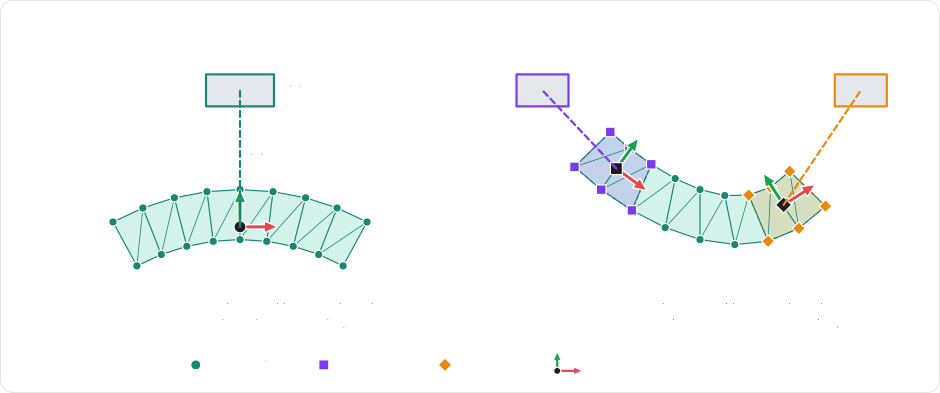
Similarly, rigid colliders attached to the proxies of different clusters move and rotate independently, which is what allows the definition of rigid parts on a deformable body: the handle of a deformable hammer, the bones of a soft character, or the plate a jelly is carried on.
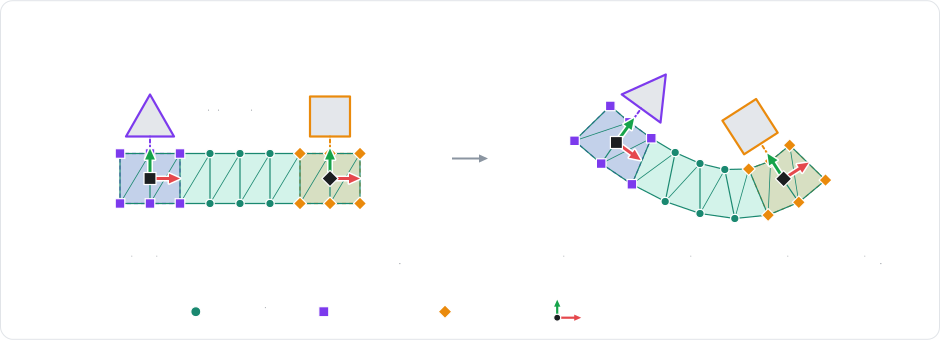
- Example 2D
- Example 3D
// A cluster over the top particles of the jelly: a rigid proxy that joints and
// colliders can attach to.
let top: Vec<u32> = {
    let jelly = &world.soft_bodies[jelly_handle];
    (0..jelly.num_particles() as u32)
        .filter(|&i| jelly.particle_position(i as usize).y > 2.0)
        .collect()
};
let cluster = world
    .add_soft_body_cluster(jelly_handle, &top)
    .expect("at least one valid particle");
let proxy: RigidBodyHandle = world.soft_bodies[jelly_handle]
    .cluster_proxy(cluster)
    .unwrap();
// A rigid plate welded onto the cluster.
let (plate, _) = world.insert(
    RigidBodyBuilder::dynamic().translation(Vector::new(3.0, 2.4)),
    ColliderBuilder::cuboid(1.2, 0.05).density(0.4),
);
world.insert_impulse_joint(
    plate,
    proxy,
    FixedJointBuilder::new().local_anchor1(Vector::new(0.0, -0.1)),
);
// A cluster can be pinned, driven or tuned as a whole.
let jelly = &mut world.soft_bodies[jelly_handle];
jelly.set_cluster_stiffness_scale(cluster, 2.0);
jelly.enable_cluster_shape_matching(cluster, true);
// A cluster over the top particles of the jelly: a rigid proxy that joints and
// colliders can attach to.
let top: Vec<u32> = {
    let jelly = &world.soft_bodies[jelly_handle];
    (0..jelly.num_particles() as u32)
        .filter(|&i| jelly.particle_position(i as usize).y > 1.3)
        .collect()
};
let cluster = world
    .add_soft_body_cluster(jelly_handle, &top)
    .expect("at least one valid particle");
let proxy: RigidBodyHandle = world.soft_bodies[jelly_handle]
    .cluster_proxy(cluster)
    .unwrap();
// A rigid plate welded onto the cluster.
let (plate, _) = world.insert(
    RigidBodyBuilder::dynamic().translation(Vector::new(3.0, 1.9, 0.0)),
    ColliderBuilder::cuboid(0.7, 0.05, 0.7).density(0.4),
);
world.insert_impulse_joint(
    plate,
    proxy,
    FixedJointBuilder::new().local_anchor1(Vector::new(0.0, -0.1, 0.0)),
);
// A cluster can be pinned, driven or tuned as a whole.
let jelly = &mut world.soft_bodies[jelly_handle];
jelly.set_cluster_stiffness_scale(cluster, 2.0);
jelly.enable_cluster_shape_matching(cluster, true);
- Example 2D
- Example 3D
// A cluster over the top particles of the jelly: a rigid proxy that joints and
// colliders can attach to.
let top = [];
for (let i = 0; i < jelly.numParticles(); ++i) {
    if (jelly.particlePosition(i).y > 2.0) {
        top.push(i);
    }
}
let cluster = world.addSoftBodyCluster(jelly, top);
let proxy = jelly.clusterProxy(cluster);
// A rigid plate welded onto the cluster.
let plate = world.createRigidBody(RAPIER.RigidBodyDesc.dynamic().setTranslation(3.0, 2.4));
world.createCollider(RAPIER.ColliderDesc.cuboid(1.2, 0.05).setDensity(0.4), plate);
let weld = RAPIER.JointData.fixed({ x: 0.0, y: -0.1 }, 0.0, { x: 0.0, y: 0.0 }, 0.0);
world.createImpulseJoint(weld, plate, proxy, true);
// A cluster can be pinned, driven or tuned as a whole.
jelly.setClusterStiffnessScale(cluster, 2.0);
jelly.enableClusterShapeMatching(cluster, true);
// A cluster over the top particles of the jelly: a rigid proxy that joints and
// colliders can attach to.
let top = [];
for (let i = 0; i < jelly.numParticles(); ++i) {
    if (jelly.particlePosition(i).y > 1.3) {
        top.push(i);
    }
}
let cluster = world.addSoftBodyCluster(jelly, top);
let proxy = jelly.clusterProxy(cluster);
// A rigid plate welded onto the cluster.
let plate = world.createRigidBody(RAPIER.RigidBodyDesc.dynamic().setTranslation(3.0, 1.9, 0.0));
world.createCollider(RAPIER.ColliderDesc.cuboid(0.7, 0.05, 0.7).setDensity(0.4), plate);
let weld = RAPIER.JointData.fixed(
    { x: 0.0, y: -0.1, z: 0.0 }, { w: 1.0, x: 0.0, y: 0.0, z: 0.0 },
    { x: 0.0, y: 0.0, z: 0.0 }, { w: 1.0, x: 0.0, y: 0.0, z: 0.0 },
);
world.createImpulseJoint(weld, plate, proxy, true);
// A cluster can be pinned, driven or tuned as a whole.
jelly.setClusterStiffnessScale(cluster, 2.0);
jelly.enableClusterShapeMatching(cluster, true);
A cluster is created by inserting a SoftBodyCluster component (containing the soft-body entity it
related to and the indices of the particles of the cluster) on another entity than the soft-body entity. The plugin then
inserts the RapierRigidBodyHandle of the proxy of the cluster on that entity, which can therefore be used like any rigid-body
entity by the ImpulseJoints, as well as by the Colliders inserted on its children. The pose of the proxy is written
back to the Transform of the cluster entity after each step, so its children follow every motion of the cluster.
Note that the cluster entity must not be given a RigidBody component, that modifying its Transform has no effect,
and that its SoftBodyCluster component is only read when the cluster is created:
- Example 2D
- Example 3D
// A cluster over the top particles of the jelly (their indices are read from its builder,
// in the local frame of the jelly entity).
let top: Vec<u32> = (0..)
    .zip(jelly_body.builder.particle_positions())
    .filter(|(_, p)| p.y > 0.8)
    .map(|(i, _)| i)
    .collect();
// A rigid plate welded onto the cluster.
let plate = commands
    .spawn((
        Transform::from_xyz(3.0, 2.4, 0.0),
        RigidBody::Dynamic,
        Collider::cuboid(1.2, 0.05),
        ColliderMassProperties::Density(0.4),
    ))
    .id();
// The cluster entity gets the proxy rigid-body of the cluster, which joints and colliders
// can be attached to like to any rigid-body.
commands.spawn((
    PlateCluster,
    SoftBodyCluster::new(jelly, top),
    ImpulseJoint::new(
        plate,
        FixedJointBuilder::new().local_anchor1(Vec2::new(0.0, -0.1)),
    ),
    // A cluster can be tuned as a whole.
    SoftBodyClusterMaterial {
        stiffness_scale: 2.0,
        ..default()
    },
    SoftBodyClusterShapeMatching::default(),
));
// A cluster over the top particles of the jelly (their indices are read from its builder,
// in the local frame of the jelly entity).
let top: Vec<u32> = (0..)
    .zip(jelly_body.builder.particle_positions())
    .filter(|(_, p)| p.y > 0.3)
    .map(|(i, _)| i)
    .collect();
// A rigid plate welded onto the cluster.
let plate = commands
    .spawn((
        Transform::from_xyz(3.0, 1.9, 0.0),
        RigidBody::Dynamic,
        Collider::cuboid(0.7, 0.05, 0.7),
        ColliderMassProperties::Density(0.4),
    ))
    .id();
// The cluster entity gets the proxy rigid-body of the cluster, which joints and colliders
// can be attached to like to any rigid-body.
commands.spawn((
    PlateCluster,
    SoftBodyCluster::new(jelly, top),
    ImpulseJoint::new(
        plate,
        FixedJointBuilder::new().local_anchor1(Vec3::new(0.0, -0.1, 0.0)),
    ),
    // A cluster can be tuned as a whole.
    SoftBodyClusterMaterial {
        stiffness_scale: 2.0,
        ..default()
    },
    SoftBodyClusterShapeMatching::default(),
));
A cluster is identified by its index in the soft-body, returned by r3SoftBody_AddCluster, and its proxy is given by
r3SoftBody_ClusterProxy. The indices of the live clusters of a body are given by r3SoftBody_Clusters, and the
particles of one of them by r3SoftBody_ClusterParticles:
- Example 2D
- Example 3D
// A cluster over the top particles of the jelly: a rigid proxy that joints and
// colliders can attach to.
size_t num_jelly_particles = r2SoftBody_NumParticles(jelly_handle);
uint32_t *top = malloc(num_jelly_particles * sizeof(uint32_t));
size_t num_top = 0;
for (uint32_t i = 0; i < num_jelly_particles; i++) {
    if (r2SoftBody_ParticlePosition(jelly_handle, i).y > 2.0) {
        top[num_top++] = i;
    }
}
uint32_t cluster = r2SoftBody_AddCluster(jelly_handle, top, num_top);
free(top);
R2RigidBodyHandle proxy = r2SoftBody_ClusterProxy(jelly_handle, cluster);
// A rigid plate welded onto the cluster.
R2RigidBodyDesc plate_desc = r2DynamicRigidBodyDesc();
plate_desc.position.translation = r2Vector(3.0, 2.4);
R2RigidBodyHandle plate = r2InsertRigidBody(world, &plate_desc);
R2ColliderDesc plate_collider = r2CuboidColliderDesc(r2Vector(1.2, 0.05));
plate_collider.density = 0.4;
r2InsertCollider(plate, &plate_collider);
R2JointDesc weld = r2FixedJointDesc();
weld.localFrame1.translation = r2Vector(0.0, -0.1);
r2InsertImpulseJoint(plate, proxy, &weld);
// A cluster can be pinned, driven or tuned as a whole.
r2SoftBody_SetClusterStiffnessScale(jelly_handle, cluster, 2.0);
r2SoftBody_SetClusterShapeMatchingEnabled(jelly_handle, cluster, 1);
// A cluster over the top particles of the jelly: a rigid proxy that joints and
// colliders can attach to.
size_t num_jelly_particles = r3SoftBody_NumParticles(jelly_handle);
uint32_t *top = malloc(num_jelly_particles * sizeof(uint32_t));
size_t num_top = 0;
for (uint32_t i = 0; i < num_jelly_particles; i++) {
    if (r3SoftBody_ParticlePosition(jelly_handle, i).y > 1.3) {
        top[num_top++] = i;
    }
}
uint32_t cluster = r3SoftBody_AddCluster(jelly_handle, top, num_top);
free(top);
R3RigidBodyHandle proxy = r3SoftBody_ClusterProxy(jelly_handle, cluster);
// A rigid plate welded onto the cluster.
R3RigidBodyDesc plate_desc = r3DynamicRigidBodyDesc();
plate_desc.position.translation = r3Vector(3.0, 1.9, 0.0);
R3RigidBodyHandle plate = r3InsertRigidBody(world, &plate_desc);
R3ColliderDesc plate_collider = r3CuboidColliderDesc(r3Vector(0.7, 0.05, 0.7));
plate_collider.density = 0.4;
r3InsertCollider(plate, &plate_collider);
R3JointDesc weld = r3FixedJointDesc();
weld.localFrame1.translation = r3Vector(0.0, -0.1, 0.0);
r3InsertImpulseJoint(plate, proxy, &weld);
// A cluster can be pinned, driven or tuned as a whole.
r3SoftBody_SetClusterStiffnessScale(jelly_handle, cluster, 2.0);
r3SoftBody_SetClusterShapeMatchingEnabled(jelly_handle, cluster, 1);
A cluster is identified by its index in the soft-body, returned by add_soft_body_cluster (which returns None if
none of the given particles is valid), and its proxy is given by SoftBody.cluster_proxy. Snapshots of the live
clusters of a body (their index, particles, and proxy) are given by the clusters property of SoftBody, and the
cluster a proxy stands for by the soft_body and soft_cluster properties of its RigidBody:
# A cluster over the top particles of the jelly: a rigid proxy that joints and
# colliders can attach to.
positions = world.soft_bodies[jelly_handle].particle_positions
top = np.flatnonzero(positions[:, 1] > 1.3)
cluster = world.add_soft_body_cluster(jelly_handle, top)
assert cluster is not None, "at least one valid particle"
proxy = world.soft_bodies[jelly_handle].cluster_proxy(cluster)
# A rigid plate welded onto the cluster.
plate = world.add_body(
    rp.RigidBody.dynamic(translation=(3.0, 1.9, 0.0)),
    colliders=[rp.Collider.cuboid(0.7, 0.05, 0.7).density(0.4)],
)
world.impulse_joints.insert(
    plate, proxy, rp.FixedJointBuilder().local_anchor1((0.0, -0.1, 0.0))
)
# A cluster can be pinned, driven or tuned as a whole.
jelly = world.soft_bodies[jelly_handle]
jelly.set_cluster_stiffness_scale(cluster, 2.0)
jelly.enable_cluster_shape_matching(cluster, True)
A cluster also defines a few settings for the elements it covers, which gives regional materials without needing separate bodies:
- The stiffness scale
(
set_cluster_stiffness_scaleSoftBodyClusterMaterial::stiffness_scalesetClusterStiffnessScaler3SoftBody_SetClusterStiffnessScaleset_cluster_stiffness_scale - The edge softness
(
set_cluster_edge_softnessSoftBodyClusterMaterial::edge_softnesssetClusterEdgeSoftnessr3SoftBody_SetClusterEdgeSoftnessset_cluster_edge_softness - The tear resistance
(
set_cluster_tear_resistanceSoftBodyClusterMaterial::tear_resistancesetClusterTearResistancer3SoftBody_SetClusterTearResistanceset_cluster_tear_resistance - Shape-matching (
enable_cluster_shape_matchingthe SoftBodyClusterShapeMatchingcomponentenableClusterShapeMatchingr3SoftBody_SetClusterShapeMatchingEnabledenable_cluster_shape_matching(or toward the target pose given by SoftBodyCluster::set_shape_matching_target)(or toward the world-space targetof that component)(or toward the target pose given by r3SoftBody_SetClusterShapeMatchingTarget)(or toward the target pose given by , so that part of the body tends to keep the shape it was created with.set_cluster_shape_matching_target)
These cluster components, as well as the ones controlling a cluster kinematically, are applied again whenever they change, and can also be inserted on the soft-body entity itself in order to act on its whole-body cluster.
The rotation of a cluster is deduced from its particles, which isn't possible for a cluster made of a single particle (or, in 3D, of collinear particles). Such a cluster has no angular response, therefore the angular parts of the joints attached to its proxy are disabled.
Attaching a rigid-body to a particle
A particle can also be attached directly to a rigid-body (SoftBody::attach_particleSoftBodyAttachments componentSoftBody.attachParticler3SoftBody_AttachParticleSoftBody.attach_particleSoftBody::detach_particleSoftBodyAttachments component (removing the
component detaches every particle)SoftBody.detachParticler3SoftBody_DetachParticleSoftBody.detach_particle
- Example 2D
- Example 3D
// Attach the last particle of a rope to a rigid box, at the particle's position.
let rope = SoftBodyBuilder::rope(Vector::new(8.0, 9.0), Vector::new(12.0, 9.0), 25)
    .pinned_particles([0])
    .softness(SpringCoefficients::new(40.0, 1.0));
let rope_handle = world.insert_soft_body(rope);
let last_position = world.soft_bodies[rope_handle].particle_position(24);
let (weight, _) = world.insert(
    RigidBodyBuilder::dynamic().translation(last_position - Vector::new(0.0, 0.4)),
    ColliderBuilder::cuboid(0.3, 0.3).density(2.0),
);
world.soft_bodies[rope_handle].attach_particle(24, weight, &world.bodies);
// Attach the last particle of a rope to a rigid ball, at the particle's position.
let rope = SoftBodyBuilder::rope(Vector::new(-0.5, 5.0, 3.0), Vector::new(2.5, 5.0, 3.0), 30)
    .pinned_particles([0])
    .softness(SpringCoefficients::new(40.0, 1.0));
let rope_handle = world.insert_soft_body(rope);
let last_position = world.soft_bodies[rope_handle].particle_position(29);
let (ball, _) = world.insert(
    RigidBodyBuilder::dynamic().translation(last_position - Vector::new(0.0, 0.3, 0.0)),
    ColliderBuilder::ball(0.25).density(2.0),
);
world.soft_bodies[rope_handle].attach_particle(29, ball, &world.bodies);
- Example 2D
- Example 3D
// Attach the last particle of a rope to a rigid box, at the particle's position.
let ropeDesc = RAPIER.SoftBodyDesc.rope({ x: 8.0, y: 9.0 }, { x: 12.0, y: 9.0 }, 25)
    .setPinnedParticles([0])
    .setSoftness(40.0, 1.0);
let rope = world.createSoftBody(ropeDesc);
let last = rope.particlePosition(24);
let weight = world.createRigidBody(RAPIER.RigidBodyDesc.dynamic().setTranslation(last.x, last.y - 0.4));
world.createCollider(RAPIER.ColliderDesc.cuboid(0.3, 0.3).setDensity(2.0), weight);
rope.attachParticle(24, weight);
// Attach the last particle of a rope to a rigid ball, at the particle's position.
let ropeDesc = RAPIER.SoftBodyDesc.rope({ x: -0.5, y: 5.0, z: 3.0 }, { x: 2.5, y: 5.0, z: 3.0 }, 30)
    .setPinnedParticles([0])
    .setSoftness(40.0, 1.0);
let rope = world.createSoftBody(ropeDesc);
let last = rope.particlePosition(29);
let ball = world.createRigidBody(RAPIER.RigidBodyDesc.dynamic().setTranslation(last.x, last.y - 0.3, last.z));
world.createCollider(RAPIER.ColliderDesc.ball(0.25).setDensity(2.0), ball);
rope.attachParticle(29, ball);
Each entry of the SoftBodyAttachments component attaches one particle to the entity of a
rigid-body (or of a cluster). Each time the component changes, the attachments of the
soft-body are updated to match it: the attachments that didn't change keep their anchor, and the ones targeting an
entity which rigid-body isn't created yet are retried on the next frames:
- Example 2D
- Example 3D
// Attach the last particle of a rope to a rigid box, at the particle's position.
let weight = commands
    .spawn((
        Transform::from_xyz(12.0, 8.6, 0.0),
        RigidBody::Dynamic,
        Collider::cuboid(0.3, 0.3),
        ColliderMassProperties::Density(2.0),
    ))
    .id();
commands.spawn((
    Rope,
    Transform::from_xyz(8.0, 9.0, 0.0),
    SoftBody::rope(Vec2::ZERO, Vec2::new(4.0, 0.0), 25).map(|builder| {
        builder
            .pinned_particles([0])
            .softness(SpringCoefficients::new(40.0, 1.0))
    }),
    SoftBodyAttachments(vec![SoftBodyAttachment {
        particle: 24,
        body: weight,
    }]),
));
// Attach the last particle of a rope to a rigid ball, at the particle's position.
let ball = commands
    .spawn((
        Transform::from_xyz(2.5, 4.7, 3.0),
        RigidBody::Dynamic,
        Collider::ball(0.25),
        ColliderMassProperties::Density(2.0),
    ))
    .id();
commands.spawn((
    Rope,
    Transform::from_xyz(-0.5, 5.0, 3.0),
    SoftBody::rope(Vec3::ZERO, Vec3::new(3.0, 0.0, 0.0), 30).map(|builder| {
        builder
            .pinned_particles([0])
            .softness(SpringCoefficients::new(40.0, 1.0))
    }),
    SoftBodyAttachments(vec![SoftBodyAttachment {
        particle: 29,
        body: ball,
    }]),
));
- Example 2D
- Example 3D
// Attach the last particle of a rope to a rigid box, at the particle's position.
R2SoftBodyDesc rope = r2RopeSoftBodyDesc(r2Vector(8.0, 9.0), r2Vector(12.0, 9.0), 25);
uint32_t pinned[] = {0};
r2SoftBodyDesc_SetPinnedParticles(&rope, (R2IndexView){pinned, 1});
rope.material = r2UniformSoftBodyMaterial((R2SpringCoefficients){40.0, 1.0});
R2SoftBodyHandle rope_handle = r2InsertSoftBody(world, &rope);
R2Vector last_position = r2SoftBody_ParticlePosition(rope_handle, 24);
R2RigidBodyDesc weight_body = r2DynamicRigidBodyDesc();
weight_body.position.translation = r2VectorSub(last_position, r2Vector(0.0, 0.4));
R2RigidBodyHandle weight = r2InsertRigidBody(world, &weight_body);
R2ColliderDesc weight_collider = r2CuboidColliderDesc(r2Vector(0.3, 0.3));
weight_collider.density = 2.0;
r2InsertCollider(weight, &weight_collider);
r2SoftBody_AttachParticle(rope_handle, 24, weight);
// Attach the last particle of a rope to a rigid ball, at the particle's position.
R3SoftBodyDesc rope = r3RopeSoftBodyDesc(r3Vector(-0.5, 5.0, 3.0), r3Vector(2.5, 5.0, 3.0), 30);
uint32_t pinned[] = {0};
r3SoftBodyDesc_SetPinnedParticles(&rope, (R3IndexView){pinned, 1});
rope.material = r3UniformSoftBodyMaterial((R3SpringCoefficients){40.0, 1.0});
R3SoftBodyHandle rope_handle = r3InsertSoftBody(world, &rope);
R3Vector last_position = r3SoftBody_ParticlePosition(rope_handle, 29);
R3RigidBodyDesc ball_body = r3DynamicRigidBodyDesc();
ball_body.position.translation = r3VectorSub(last_position, r3Vector(0.0, 0.3, 0.0));
R3RigidBodyHandle ball = r3InsertRigidBody(world, &ball_body);
R3ColliderDesc ball_collider = r3BallColliderDesc(0.25);
ball_collider.density = 2.0;
r3InsertCollider(ball, &ball_collider);
r3SoftBody_AttachParticle(rope_handle, 29, ball);
Note that r3SoftBody_DetachParticle returns whether the particle was attached at all.
The target of an attachment must be an ordinary rigid-body: r3SoftBody_AttachParticle rejects the root body and
the cluster proxies of a soft-body (they are rigid-bodies too, see r3RigidBody_IsSoftFrame). Two soft-bodies are
linked with a joint between their soft frames instead.
# Attach the last particle of a rope to a rigid ball, at the particle's position.
rope = rp.SoftBody.rope((-0.5, 5.0, 3.0), (2.5, 5.0, 3.0), 30).pinned_particles([0]).softness((40.0, 1.0))
rope_handle = world.add_soft_body(rope)
last_position = world.soft_bodies[rope_handle].particle_position(29)
ball = world.add_body(
    rp.RigidBody.dynamic(translation=last_position - (0.0, 0.3, 0.0)),
    colliders=[rp.Collider.ball(0.25).density(2.0)],
)
world.soft_bodies[rope_handle].attach_particle(29, ball, world.rigid_bodies)
Note that the rigid-body set of the world is given to SoftBody.attach_particle, so that the anchor can be expressed in
the local frame of the rigid-body. The attachments of a soft-body are listed by its particle_attachments property,
each SoftParticleAttachment giving its particle, its rigid-body (body), its local_anchor, and the impulse it
applied during the last step.
Particles and kinematic control
The state of a soft-body is the state of its particles, which are identified by their index in the body. Their positions
and their velocities can be read (particle_position, particle_positions, particle_velocity,
particle_velocitiesparticlePosition, particlePositions, particleVelocity,
particleVelocitiesr3SoftBody_ParticlePosition, r3SoftBody_ParticlePositions, r3SoftBody_ParticleVelocity, r3SoftBody_ParticleVelocitiesparticle_position, particle_positions, particle_velocity, particle_velocitiesset_particle_position,
set_particle_velocitysetParticlePosition, setParticleVelocityr3SoftBody_SetParticlePosition, r3SoftBody_SetParticleVelocityset_particle_position, set_particle_velocityedges, cells, and boundaryedges, cells, and
boundaryr3SoftBody_Edges, r3SoftBody_Cells, and r3SoftBody_Boundaryedges, cells, and boundaryNULL buffer with a zero capacity only returns the length of the array. The elements are given as flat arrays of particle indices: 2 per edge, 3 (2D) or 4 (3D) per cell, and 2 (2D) or 3 (3D) per boundary element.(N, 3) for the positions and (B, 3) for the boundary triangles. All the positions (or velocities) are modified at once by assigning such an array to particle_positions (or particle_velocities). A snapshot of all the properties of a particle (its mass, its rest position, whether it is pinned, etc.) is given by particle.soft_body and soft_body_mut methods of the
physics context (see soft-bodies and entities). Note that the positions
are expressed in world-space, and not in the frame of the entity.
A particle can also be pinned (set_particle_pinnedSoftBodyPinnedParticles
componentsetParticlePinnedr3SoftBody_SetParticlePinnedset_particle_pinnedset_particle_kinematic_targetSoftBodyKinematicTargets
componentsetParticleKinematicTargetr3SoftBody_SetParticleKinematicTargetset_particle_kinematic_target
- Example 2D
- Example 3D
let soft_body = &mut world.soft_bodies[sheet_handle];
// Read the particles.
let position = soft_body.particle_position(0);
let velocity = soft_body.particle_velocity(0);
let positions: Vec<Vector> = soft_body.particle_positions().collect();
assert_eq!(positions.len(), soft_body.num_particles());
// Move a particle.
soft_body.set_particle_position(1, position + Vector::new(0.0, 0.1));
soft_body.set_particle_velocity(1, velocity);
// Pin (or release) a particle; a pinned particle can be driven like a kinematic body.
soft_body.set_particle_pinned(2, true);
soft_body.set_particle_kinematic_target(2, Vector::new(-3.5, 3.5));
// The elements: edges, cells and the boundary segments.
let num_edges = soft_body.edges().len();
let num_cells = soft_body.cells().len();
let boundary: &[[u32; 2]] = soft_body.boundary();
assert!(num_edges > 0 && num_cells > 0 && !boundary.is_empty());
let soft_body = &mut world.soft_bodies[cloth_handle];
// Read the particles.
let position = soft_body.particle_position(0);
let velocity = soft_body.particle_velocity(0);
let positions: Vec<Vector> = soft_body.particle_positions().collect();
assert_eq!(positions.len(), soft_body.num_particles());
// Move a particle.
soft_body.set_particle_position(1, position + Vector::new(0.0, 0.1, 0.0));
soft_body.set_particle_velocity(1, velocity);
// Pin (or release) a particle; a pinned particle can be driven like a kinematic body.
soft_body.set_particle_pinned(2, true);
soft_body.set_particle_kinematic_target(2, Vector::new(-1.0, 2.5, -0.8));
// The elements: edges, cells and the boundary triangles.
let num_edges = soft_body.edges().len();
let num_cells = soft_body.cells().len();
let boundary: &[[u32; 3]] = soft_body.boundary();
assert!(num_edges > 0 && num_cells == 0 && !boundary.is_empty());
- Example 2D
- Example 3D
// Read the particles.
let position = sheet.particlePosition(0);
let velocity = sheet.particleVelocity(0);
let positions: Float32Array = sheet.particlePositions(); // Two floats per particle.
console.log("The sheet has", sheet.numParticles(), "particles;", positions.length / 2);
// Move a particle.
sheet.setParticlePosition(1, { x: position.x, y: position.y + 0.1 });
sheet.setParticleVelocity(1, velocity);
// Pin (or release) a particle; a pinned particle can be driven like a kinematic body.
sheet.setParticlePinned(2, true);
sheet.setParticleKinematicTarget(2, { x: -3.5, y: 3.5 });
// The elements: edges (two indices each), cells (three) and the boundary segments (two).
let edges: Uint32Array = sheet.edges();
let cells: Uint32Array = sheet.cells();
let boundary: Uint32Array = sheet.boundary();
console.log(edges.length / 2, "edges,", cells.length / 3, "cells,", boundary.length / 2, "segments");
// Read the particles.
let position = cloth.particlePosition(0);
let velocity = cloth.particleVelocity(0);
let positions: Float32Array = cloth.particlePositions(); // Three floats per particle.
console.log("The cloth has", cloth.numParticles(), "particles;", positions.length / 3);
// Move a particle.
cloth.setParticlePosition(1, { x: position.x, y: position.y + 0.1, z: position.z });
cloth.setParticleVelocity(1, velocity);
// Pin (or release) a particle; a pinned particle can be driven like a kinematic body.
cloth.setParticlePinned(2, true);
cloth.setParticleKinematicTarget(2, { x: -1.0, y: 2.5, z: -0.8 });
// The elements: edges (two indices each), cells (four) and the boundary triangles (three).
let edges: Uint32Array = cloth.edges();
let cells: Uint32Array = cloth.cells();
let boundary: Uint32Array = cloth.boundary();
console.log(edges.length / 2, "edges,", cells.length / 4, "cells,", boundary.length / 3, "triangles");
The SoftBodyPinnedParticles component lists exactly the particles that are pinned: it replaces the
particles pinned by the builder, which are restored when the component is removed. The SoftBodyKinematicTargets
component gives world-space targets to some of the pinned particles: each time it changes, the listed particles are
moved to their target over the next step, then held there:
- Example 2D
- Example 3D
fn control_particles(
    mut commands: Commands,
    mut context: WriteRapierContext,
    sheet: Single<Entity, With<Sheet>>,
) -> Result {
    let mut context = context.single_mut()?;
    let Some(soft_body) = context.soft_body_mut(*sheet) else {
        return Ok(());
    };
    // Read the particles (in world-space).
    let position = soft_body.particle_position(0);
    let velocity = soft_body.particle_velocity(0);
    let positions: Vec<Vec2> = soft_body.particle_positions().collect();
    assert_eq!(positions.len(), soft_body.num_particles());
    // Move a particle.
    soft_body.set_particle_position(1, position + Vec2::new(0.0, 0.1));
    soft_body.set_particle_velocity(1, velocity);
    // The elements: edges, cells and the boundary segments.
    let num_edges = soft_body.edges().len();
    let num_cells = soft_body.cells().len();
    let boundary: &[[u32; 2]] = soft_body.boundary();
    assert!(num_edges > 0 && num_cells > 0 && !boundary.is_empty());

    // Pin particles (exactly the listed ones), and drive the particle 2 kinematically.
    commands.entity(*sheet).insert((
        SoftBodyPinnedParticles(vec![0, 19, 2]),
        SoftBodyKinematicTargets(vec![(2, Vec2::new(-3.5, 3.5))]),
    ));
    Ok(())
}
fn control_particles(
    mut commands: Commands,
    mut context: WriteRapierContext,
    cloth: Single<Entity, With<Cloth>>,
) -> Result {
    let mut context = context.single_mut()?;
    let Some(soft_body) = context.soft_body_mut(*cloth) else {
        return Ok(());
    };
    // Read the particles (in world-space).
    let position = soft_body.particle_position(0);
    let velocity = soft_body.particle_velocity(0);
    let positions: Vec<Vec3> = soft_body.particle_positions().collect();
    assert_eq!(positions.len(), soft_body.num_particles());
    // Move a particle.
    soft_body.set_particle_position(1, position + Vec3::new(0.0, 0.1, 0.0));
    soft_body.set_particle_velocity(1, velocity);
    // The elements: edges, cells and the boundary triangles.
    let num_edges = soft_body.edges().len();
    let num_cells = soft_body.cells().len();
    let boundary: &[[u32; 3]] = soft_body.boundary();
    assert!(num_edges > 0 && num_cells == 0 && !boundary.is_empty());

    // Pin particles (exactly the listed ones), and drive the particle 2 kinematically.
    commands.entity(*cloth).insert((
        SoftBodyPinnedParticles(vec![0, 19, 380, 399, 2]),
        SoftBodyKinematicTargets(vec![(2, Vec3::new(-1.0, 2.5, -0.8))]),
    ));
    Ok(())
}
- Example 2D
- Example 3D
// Read the particles.
R2Vector position = r2SoftBody_ParticlePosition(sheet_handle, 0);
R2Vector velocity = r2SoftBody_ParticleVelocity(sheet_handle, 0);
size_t num_particles = r2SoftBody_NumParticles(sheet_handle);
R2Vector *positions = malloc(num_particles * sizeof(R2Vector));
r2SoftBody_ParticlePositions(sheet_handle, positions, num_particles);
// Move a particle.
r2SoftBody_SetParticlePosition(sheet_handle, 1, r2VectorAdd(position, r2Vector(0.0, 0.1)));
r2SoftBody_SetParticleVelocity(sheet_handle, 1, velocity);
// Pin (or release) a particle; a pinned particle can be driven like a kinematic body.
r2SoftBody_SetParticlePinned(sheet_handle, 2, 1);
r2SoftBody_SetParticleKinematicTarget(sheet_handle, 2, r2Vector(-3.5, 3.5));
// The elements: edges, cells and the boundary segments, as flat arrays of particle indices
// (2, 3, and 2 indices per element). A NULL buffer with a zero capacity gives their length.
size_t num_edges = r2SoftBody_Edges(sheet_handle, NULL, 0) / 2;
size_t num_cells = r2SoftBody_Cells(sheet_handle, NULL, 0) / 3;
size_t boundary_len = r2SoftBody_Boundary(sheet_handle, NULL, 0);
uint32_t *boundary = malloc(boundary_len * sizeof(uint32_t));
r2SoftBody_Boundary(sheet_handle, boundary, boundary_len);
assert(num_edges > 0 && num_cells > 0 && boundary_len > 0);
free(positions);
free(boundary);
// Read the particles.
R3Vector position = r3SoftBody_ParticlePosition(cloth_handle, 0);
R3Vector velocity = r3SoftBody_ParticleVelocity(cloth_handle, 0);
size_t num_particles = r3SoftBody_NumParticles(cloth_handle);
R3Vector *positions = malloc(num_particles * sizeof(R3Vector));
r3SoftBody_ParticlePositions(cloth_handle, positions, num_particles);
// Move a particle.
r3SoftBody_SetParticlePosition(cloth_handle, 1, r3VectorAdd(position, r3Vector(0.0, 0.1, 0.0)));
r3SoftBody_SetParticleVelocity(cloth_handle, 1, velocity);
// Pin (or release) a particle; a pinned particle can be driven like a kinematic body.
r3SoftBody_SetParticlePinned(cloth_handle, 2, 1);
r3SoftBody_SetParticleKinematicTarget(cloth_handle, 2, r3Vector(-1.0, 2.5, -0.8));
// The elements: edges, cells and the boundary triangles, as flat arrays of particle indices
// (2, 4, and 3 indices per element). A NULL buffer with a zero capacity gives their length.
size_t num_edges = r3SoftBody_Edges(cloth_handle, NULL, 0) / 2;
size_t num_cells = r3SoftBody_Cells(cloth_handle, NULL, 0) / 4;
size_t boundary_len = r3SoftBody_Boundary(cloth_handle, NULL, 0);
uint32_t *boundary = malloc(boundary_len * sizeof(uint32_t));
r3SoftBody_Boundary(cloth_handle, boundary, boundary_len);
assert(num_edges > 0 && num_cells == 0 && boundary_len > 0);
free(positions);
free(boundary);
soft_body = world.soft_bodies[cloth_handle]
# Read the particles.
position = soft_body.particle_position(0)
velocity = soft_body.particle_velocity(0)
# All the positions (or velocities) at once, as an (N, 3) NumPy array.
positions = soft_body.particle_positions
assert positions.shape == (soft_body.num_particles, 3)
# Move a particle.
soft_body.set_particle_position(1, position + rp.Vec3(0.0, 0.1, 0.0))
soft_body.set_particle_velocity(1, velocity)
# Pin (or release) a particle; a pinned particle can be driven like a kinematic body.
soft_body.set_particle_pinned(2, True)
soft_body.set_particle_kinematic_target(2, (-1.0, 2.5, -0.8))
# The elements, as NumPy arrays of particle indices: edges, cells and the boundary triangles.
edges = soft_body.edges  # Shape (E, 2).
cells = soft_body.cells  # Shape (C, 4).
boundary = soft_body.boundary  # Shape (B, 3).
assert len(edges) > 0 and len(cells) == 0 and len(boundary) > 0
Setting the position of a particle explicitly teleports it: no contact is taken into account along the way, so a particle can be moved inside of another object this way. Whenever the motion must be seen by the contacts and by the friction (to drag a piece of cloth, for example), it is recommended to pin the particle and to give it a kinematic target instead.
Controlling a region kinematically
A whole region of the body is controlled at once through a cluster covering it. Pinning
the cluster (set_cluster_pinnedSoftBodyClusterPinned
componentsetClusterPinnedr3SoftBody_SetClusterPinnedset_cluster_pinnedset_cluster_kinematic_targetSoftBodyClusterKinematicTarget component, a world-space
Transform which also pins the cluster when it is insertedsetClusterKinematicTargetr3SoftBody_SetClusterKinematicTargetset_cluster_kinematic_target
- Example 2D
- Example 3D
// Pin every particle of the cluster, then move it along a path: the cluster behaves like a
// kinematic rigid part dragging the rest of the body.
let jelly = &mut world.soft_bodies[jelly_handle];
jelly.set_cluster_pinned(cluster, true);
jelly.set_cluster_kinematic_target(cluster, Pose::from_translation(Vector::new(3.0, 2.5)));
// Release it: the cluster is simulated again.
jelly.set_cluster_pinned(cluster, false);
// Pin every particle of the cluster, then move it along a path: the cluster behaves like a
// kinematic rigid part dragging the rest of the body.
let jelly = &mut world.soft_bodies[jelly_handle];
jelly.set_cluster_pinned(cluster, true);
jelly.set_cluster_kinematic_target(
    cluster,
    Pose::from_translation(Vector::new(3.0, 2.0, 0.0)),
);
// Release it: the cluster is simulated again.
jelly.set_cluster_pinned(cluster, false);
- Example 2D
- Example 3D
// Pin every particle of the cluster, then move it along a path: the cluster behaves like a
// kinematic rigid part dragging the rest of the body.
jelly.setClusterPinned(cluster, true);
jelly.setClusterKinematicTarget(cluster, { x: 3.0, y: 2.5 }, 0.0);
// Release it: the cluster is simulated again.
jelly.setClusterPinned(cluster, false);
// Pin every particle of the cluster, then move it along a path: the cluster behaves like a
// kinematic rigid part dragging the rest of the body.
jelly.setClusterPinned(cluster, true);
jelly.setClusterKinematicTarget(cluster, { x: 3.0, y: 2.0, z: 0.0 }, { w: 1.0, x: 0.0, y: 0.0, z: 0.0 });
// Release it: the cluster is simulated again.
jelly.setClusterPinned(cluster, false);
- Example 2D
- Example 3D
fn drive_cluster(mut commands: Commands, cluster: Single<Entity, With<PlateCluster>>) {
    // Pin every particle of the cluster (the target inserts `SoftBodyClusterPinned`), and move
    // it to a world-space pose: the cluster behaves like a kinematic rigid part dragging the
    // rest of the body.
    commands
        .entity(*cluster)
        .insert(SoftBodyClusterKinematicTarget(Transform::from_xyz(
            3.0, 2.5, 0.0,
        )));
}

fn release_cluster(mut commands: Commands, cluster: Single<Entity, With<PlateCluster>>) {
    // Release it: the cluster is simulated again.
    commands
        .entity(*cluster)
        .remove::<(SoftBodyClusterKinematicTarget, SoftBodyClusterPinned)>();
}
fn drive_cluster(mut commands: Commands, cluster: Single<Entity, With<PlateCluster>>) {
    // Pin every particle of the cluster (the target inserts `SoftBodyClusterPinned`), and move
    // it to a world-space pose: the cluster behaves like a kinematic rigid part dragging the
    // rest of the body.
    commands
        .entity(*cluster)
        .insert(SoftBodyClusterKinematicTarget(Transform::from_xyz(
            3.0, 2.0, 0.0,
        )));
}

fn release_cluster(mut commands: Commands, cluster: Single<Entity, With<PlateCluster>>) {
    // Release it: the cluster is simulated again.
    commands
        .entity(*cluster)
        .remove::<(SoftBodyClusterKinematicTarget, SoftBodyClusterPinned)>();
}
- Example 2D
- Example 3D
// Pin every particle of the cluster, then move it along a path: the cluster behaves like a
// kinematic rigid part dragging the rest of the body.
r2SoftBody_SetClusterPinned(jelly_handle, cluster, 1);
r2SoftBody_SetClusterKinematicTarget(jelly_handle, cluster, r2TranslationPose(r2Vector(3.0, 2.5)));
// Release it: the cluster is simulated again.
r2SoftBody_SetClusterPinned(jelly_handle, cluster, 0);
// Pin every particle of the cluster, then move it along a path: the cluster behaves like a
// kinematic rigid part dragging the rest of the body.
r3SoftBody_SetClusterPinned(jelly_handle, cluster, 1);
r3SoftBody_SetClusterKinematicTarget(jelly_handle, cluster, r3TranslationPose(r3Vector(3.0, 2.0, 0.0)));
// Release it: the cluster is simulated again.
r3SoftBody_SetClusterPinned(jelly_handle, cluster, 0);
# Pin every particle of the cluster, then move it along a path: the cluster behaves like a
# kinematic rigid part dragging the rest of the body.
jelly = world.soft_bodies[jelly_handle]
jelly.set_cluster_pinned(cluster, True)
jelly.set_cluster_kinematic_target(cluster, rp.Isometry3(translation=(3.0, 2.0, 0.0)))
# Release it: the cluster is simulated again.
jelly.set_cluster_pinned(cluster, False)
Deformable colliders and skinning
Games don't need the simulated shape of a body to be as detailed as its visual shape: a coarse and well-shaped lattice is faster and more stable to simulate than one cell per visual triangle. This is why Rapier supports cage simulation and skinning. The detailed mesh is embedded in a coarse volumetric lattice, aka. its cage, which is the only part being simulated. The vertices of the mesh are then interpolated from the deformed cells holding them, aka. skinning:
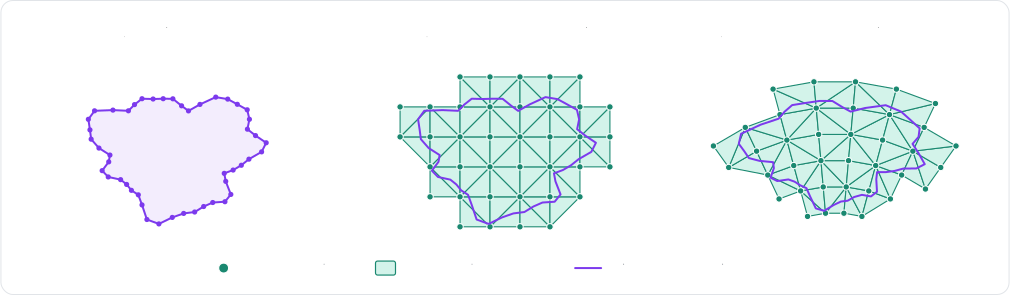
Skinned soft-bodies
The
SoftBodyBuilder::volumetric_skinnedSoftBody::volumetric_skinnedSoftBodyDesc.volumetricSoftBody.volumetrictrueskinned argument is True
The r3VolumetricSoftBodyDesc constructor computes the cage of a closed mesh automatically, and the same mesh becomes
the skin of the body once it is also given to r3SoftBodyDesc_SetSkin. That automatic cage is built for
performance rather than geometric fidelity: in 3D, it encloses the whole mesh with the tetrahedra of a lattice, without
snapping them to the mesh:
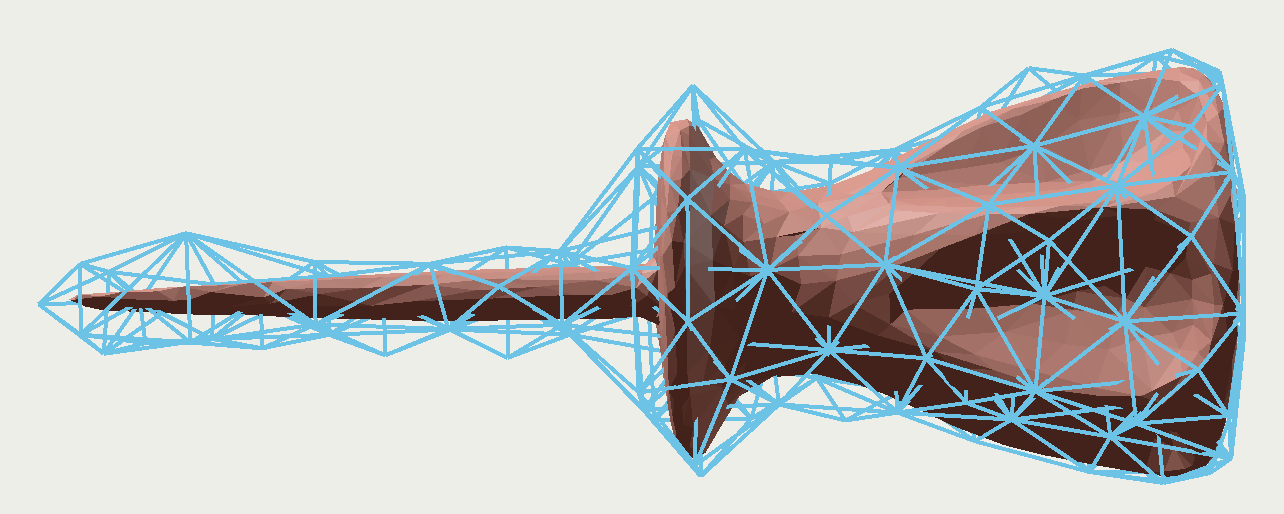
By default, the body still collides through the boundary of its cage, which is as coarse as its cells. Its skin can
become its actual collision mesh instead with
skin_collisionsetSkinCollisionskinCollision field of R3SoftBodyDescSoftBodyBuilder.skin_collision
- Example 2D
- Example 3D
// A detailed outline held by a coarse cage of cells: only the cells are simulated, and the
// outline (the skin) follows their deformation.
let num = 48;
let vertices: Vec<Vector> = (0..num)
    .map(|i| {
        let angle = i as f32 / num as f32 * std::f32::consts::TAU;
        Vector::new(angle.cos(), angle.sin()) * 0.5
    })
    .collect();
let indices: Vec<[u32; 2]> = (0..num as u32).map(|i| [i, (i + 1) % num as u32]).collect();
let skinned = SoftBodyBuilder::volumetric_skinned(&vertices, &indices, 0.25)
    .expect("the polyline must be closed and enclose some area")
    // Collide through the skin instead of the boundary of the cage.
    .skin_collision(true)
    .translated(Vector::new(0.0, 4.0));
let skinned_handle = world.insert_soft_body(skinned);
// The skin is the body's collision mesh: read its vertices back to render it.
let body = &world.soft_bodies[skinned_handle];
let skin = body.collision_mesh().expect("the skin collides");
let skin_vertices: Vec<Vector> = skin.vertex_positions(body).collect();
assert_eq!(skin_vertices.len(), vertices.len());
// A detailed mesh held by a coarse cage of cells: only the cells are simulated, and the mesh
// (the skin) follows their deformation.
let (vertices, indices) = Ball::new(0.5).to_trimesh(24, 24);
let skinned = SoftBodyBuilder::volumetric_skinned(&vertices, &indices, 0.25)
    .expect("the mesh must be closed and enclose some volume")
    // Collide through the skin instead of the boundary of the cage.
    .skin_collision(true)
    .translated(Vector::new(0.0, 4.0, 3.0));
let skinned_handle = world.insert_soft_body(skinned);
// The skin is the body's collision mesh: read its vertices back to render it.
let body = &world.soft_bodies[skinned_handle];
let skin = body.collision_mesh().expect("the skin collides");
let skin_vertices: Vec<Vector> = skin.vertex_positions(body).collect();
assert_eq!(skin_vertices.len(), vertices.len());
- Example 2D
- Example 3D
// A detailed outline held by a coarse cage of cells (the last `true` argument): only the
// cells are simulated, and the outline (the skin) follows their deformation.
let numSegments = 48;
let circleVertices = new Float32Array(numSegments * 2);
let circleIndices = new Uint32Array(numSegments * 2);
for (let i = 0; i < numSegments; ++i) {
    let angle = (i / numSegments) * 2.0 * Math.PI;
    circleVertices.set([Math.cos(angle) * 0.5, Math.sin(angle) * 0.5], i * 2);
    circleIndices.set([i, (i + 1) % numSegments], i * 2);
}
let skinnedDesc = RAPIER.SoftBodyDesc.volumetric(circleVertices, circleIndices, 0.25, true)
    // Collide through the skin instead of the boundary of the cage.
    .setSkinCollision(true)
    .setTranslation({ x: 0.0, y: 4.0 });
let skinned = world.createSoftBody(skinnedDesc);
// The skin is the body's collision mesh: read its vertices back to render it.
let skinPositions: Float32Array = skinned.meshVertices(0);
console.log("The skin has", skinPositions.length / 2, "vertices");
// A mesh held by a cage of cells (the last `true` argument): only the cells are simulated,
// and the mesh (the skin) follows their deformation.
let skinnedDesc = RAPIER.SoftBodyDesc.volumetric(boxVertices, boxIndices, 0.25, true)
    // Collide through the skin instead of the boundary of the cage.
    .setSkinCollision(true)
    .setTranslation({ x: 0.0, y: 4.0, z: 3.0 });
let skinned = world.createSoftBody(skinnedDesc);
// The skin is the body's collision mesh: read its vertices back to render it.
let skinPositions: Float32Array = skinned.meshVertices(0);
console.log("The skin has", skinPositions.length / 3, "vertices");
The SoftBodyMeshSync component renders the skin of a 3D body, as in this example (the meshes of the deformable
colliders bound to a body are never rendered by this component). In 2D, it renders the cells of the cage instead, and
the vertices of the skin are read from the collision mesh of the Rapier soft-body (RapierSoftBody::collision_mesh):
- Example 2D
- Example 3D
// A detailed outline held by a coarse cage of cells: only the cells are simulated, and the
// outline (the skin) follows their deformation.
let num = 48;
let vertices: Vec<Vec2> = (0..num)
    .map(|i| {
        let angle = i as f32 / num as f32 * std::f32::consts::TAU;
        Vec2::new(angle.cos(), angle.sin()) * 0.5
    })
    .collect();
let indices: Vec<[u32; 2]> = (0..num as u32).map(|i| [i, (i + 1) % num as u32]).collect();
let skinned = SoftBody::volumetric_skinned(&vertices, &indices, 0.25)
    .expect("the polyline must be closed and enclose some area")
    // Collide through the skin instead of the boundary of the cage.
    .map(|builder| builder.skin_collision(true));
commands.spawn((
    Transform::from_xyz(0.0, 4.0, 0.0),
    skinned,
    // The synchronized mesh renders the cells of the cage.
    SoftBodyMeshSync::default(),
    MeshMaterial2d(materials.add(Color::srgb(0.2, 0.6, 0.3))),
));
// A detailed mesh held by a coarse cage of cells: only the cells are simulated, and the mesh
// (the skin) follows their deformation.
let (vertices, indices) = Ball::new(0.5).to_trimesh(24, 24);
let skinned = SoftBody::volumetric_skinned(&vertices, &indices, 0.25)
    .expect("the mesh must be closed and enclose some volume")
    // Collide through the skin instead of the boundary of the cage.
    .map(|builder| builder.skin_collision(true));
commands.spawn((
    Transform::from_xyz(0.0, 4.0, 3.0),
    skinned,
    // The synchronized mesh renders the skin, since it is the collision mesh of the body.
    SoftBodyMeshSync::default(),
    MeshMaterial3d(materials.add(Color::srgb(0.2, 0.6, 0.3))),
));
Note that the mesh arrays are only borrowed by the description until its insertion. The vertices of the skin, as well as
the ones of any other mesh of the body, are read back with r3SoftBody_MeshVertices, given the collider of the mesh
(r3SoftBody_MeshColliders gives the colliders of the meshes of a body). A skin that doesn't collide has no collider:
r3SoftBody_Meshes lists every mesh of the body with its identifier (an R3SoftMeshInfo which is_skinned and
collision_enabled fields tell which mesh is which), and r3SoftBody_MeshVerticesById reads the vertices of a mesh
from that identifier. Their triangles (segments in 2D) are read the same way, with r3SoftBody_MeshIndices and
r3SoftBody_MeshIndicesById:
- Example 2D
- Example 3D
// A detailed outline held by a coarse cage of cells: only the cells are simulated, and the
// outline (the skin) follows their deformation.
R2Vector vertices[48];
R2Edge indices[48];
for (uint32_t i = 0; i < 48; i++) {
    R2Real angle = (R2Real)i / 48 * 2.0 * R2_PI;
    vertices[i] = r2Vector(0.5 * cos(angle), 0.5 * sin(angle));
    indices[i] = (R2Edge){i, (i + 1) % 48};
}
R2VectorView outline_vertices = {vertices, 48};
R2SurfaceElementView outline_segments = {indices, 48};
// The cage: the outline filled with cells of about 0.25 in size.
R2SoftBodyDesc skinned =
    r2VolumetricSoftBodyDesc(outline_vertices, outline_segments, r2NewVolumeMeshParameters(0.25));
// The skin: the outline itself, following the cells holding its vertices.
r2SoftBodyDesc_SetSkin(&skinned, outline_vertices, outline_segments);
// Collide through the skin instead of the boundary of the cage.
skinned.skinCollision = 1;
skinned.translation = r2Vector(0.0, 4.0);
R2SoftBodyHandle skinned_handle = r2InsertSoftBody(world, &skinned);

// The skin is the body's collision mesh: read its vertices back to render it.
R2ColliderHandle skin_collider;
r2SoftBody_MeshColliders(skinned_handle, &skin_collider, 1);
R2Vector skin_vertices[48];
size_t num_skin_vertices = r2SoftBody_MeshVertices(skinned_handle, skin_collider, skin_vertices, 48);
// A detailed mesh held by a coarse cage of cells: only the cells are simulated, and the mesh
// (the skin) follows their deformation.
R3SharedShape *ball_shape = r3BallSharedShape(0.5);
R3TriMeshData *ball_mesh = r3SharedShape_ToTrimesh(ball_shape, 24, 24);
size_t num_vertices = r3TriMeshData_Vertices(ball_mesh, NULL, 0);
size_t num_indices = r3TriMeshData_Indices(ball_mesh, NULL, 0);
R3Vector *vertices = malloc(num_vertices * sizeof(R3Vector));
uint32_t *indices = malloc(num_indices * sizeof(uint32_t));
r3TriMeshData_Vertices(ball_mesh, vertices, num_vertices);
r3TriMeshData_Indices(ball_mesh, indices, num_indices);
r3FreeTriMeshData(ball_mesh);
r3FreeSharedShape(ball_shape);

R3VectorView mesh_vertices = {vertices, num_vertices};
R3SurfaceElementView mesh_triangles = {(const R3Triangle *)indices, num_indices / 3};
// The cage: the mesh filled with cells of about 0.25 in size.
R3SoftBodyDesc skinned =
    r3VolumetricSoftBodyDesc(mesh_vertices, mesh_triangles, r3NewVolumeMeshParameters(0.25));
// The skin: the mesh itself, following the cells holding its vertices.
r3SoftBodyDesc_SetSkin(&skinned, mesh_vertices, mesh_triangles);
// Collide through the skin instead of the boundary of the cage.
skinned.skinCollision = 1;
skinned.translation = r3Vector(0.0, 4.0, 3.0);
R3SoftBodyHandle skinned_handle = r3InsertSoftBody(world, &skinned);
// The mesh arrays are only borrowed until the insertion.
free(vertices);
free(indices);

// The skin is the body's collision mesh: read its vertices back to render it.
R3ColliderHandle skin_collider;
r3SoftBody_MeshColliders(skinned_handle, &skin_collider, 1);
size_t num_skin_vertices = r3SoftBody_MeshVertices(skinned_handle, skin_collider, NULL, 0);
R3Vector *skin_vertices = malloc(num_skin_vertices * sizeof(R3Vector));
r3SoftBody_MeshVertices(skinned_handle, skin_collider, skin_vertices, num_skin_vertices);
SoftBody.volumetric raises a MeshConversionError if the mesh can't be filled with cells, e.g., because it isn't
closed. The vertices of the skin, as well as the ones of any other mesh of the body, are read back from a
SoftCollisionMesh: a snapshot of the mesh taken when it is requested, which vertices (in world-space) and indices
are NumPy arrays. SoftBody.collision_mesh gives the collision mesh of the body (its skin here), and
SoftBody.mesh_of gives the mesh of a collider. A skin that doesn't collide has no collider: SoftBody.meshes lists
every mesh of the body (its is_skinned and collision_enabled properties telling which mesh is which), and
SoftBody.mesh gives the mesh with the given identifier (a SoftMeshId):
# A detailed mesh held by a coarse cage of cells: only the cells are simulated, and the mesh
# (the skin) follows their deformation.
vertices, indices = rp.Ball(0.5).to_trimesh(24, 24)
# Raises `MeshConversionError` if the mesh isn't closed or doesn't enclose any volume.
skinned = (
    rp.SoftBody.volumetric(vertices, indices, 0.25, skinned=True)
    # Collide through the skin instead of the boundary of the cage.
    .skin_collision(True)
    .translated((0.0, 4.0, 3.0))
)
skinned_handle = world.add_soft_body(skinned)
# The skin is the body's collision mesh: read its vertices back to render it.
skin = world.soft_bodies[skinned_handle].collision_mesh()
assert skin is not None and skin.is_skinned
assert skin.vertices.shape == vertices.shape
A skin doesn't need a computed cage: any mesh can be given as the skin of a body built with cells, with
SoftBodyBuilder::skinSoftBodyDesc.setSkinr3SoftBodyDesc_SetSkinSoftBodyBuilder.skin
Deformable colliders
The colliders built from the surface or the skin of a soft-body are generated by the engine itself, but it is also
possible to give a body a collider of your own which vertices follow its particles: a deformable collider
(ColliderSet::insert_deformableDeformableCollider component next to the Collider of an
entityWorld.createDeformableColliderr3InsertDeformableColliderPhysicsWorld.insert_deformableGlobalTransform of the collider entity when the
collider is created
How the vertices follow the particles is given by the binding
(SoftMeshBindingR3SoftMeshBindingDesc
skinnedR3_SOFT_BINDING_SKINNEDdirectR3_SOFT_BINDING_DIRECTifollows the particle given for it, which must belong to the cluster. Its alternative that binds every vertex to the closest particle within a given distance (direct_by_positiondirectByPositionR3_SOFT_BINDING_DIRECT_BY_POSITIONdirect_by_position
- Example 2D
- Example 3D
// A deformable polyline bound to the blob: each vertex follows one particle (`direct`),
// or is embedded in the cell holding it (`skinned`). The polyline is given in the frame
// of the proxy it is attached to.
let root = world.soft_bodies[blob_handle].root_body();
let root_pose = *world.bodies[root].position();
let blob = &world.soft_bodies[blob_handle];
let num = blob.num_particles();
let vertices: Vec<Vector> = blob
    .particle_positions()
    .map(|p| root_pose.inverse() * p)
    .collect();
let indices: Vec<[u32; 2]> = (0..num as u32).map(|i| [i, (i + 1) % num as u32]).collect();
let particles: Vec<u32> = (0..num as u32).collect();
let outline =
    ColliderBuilder::polyline_with_flags(vertices, Some(indices), PolylineFlags::DEFORMABLE)
        .sensor(true);
let outline_handle = world
    .insert_deformable(outline, SoftMeshBinding::direct(particles), root)
    .expect("a deformable polyline bound to a cluster proxy");
// The polyline follows the particles: read its current vertices back.
let blob = &world.soft_bodies[blob_handle];
let mesh = blob.mesh_of(outline_handle).unwrap();
let outline_vertices: Vec<Vector> = mesh.vertex_positions(blob).collect();
assert_eq!(outline_vertices.len(), num);
// A deformable triangle mesh bound to the jelly: each vertex is embedded in the cell
// holding it (`skinned`), or follows one particle (`direct`). The mesh is given in the
// frame of the proxy it is attached to.
let root = world.soft_bodies[jelly_handle].root_body();
let root_pose = *world.bodies[root].position();
let center = world.soft_bodies[jelly_handle].center_of_mass();
let r = 1.0;
let vertices: Vec<Vector> = [
    Vector::new(r, 0.0, 0.0),
    Vector::new(-r, 0.0, 0.0),
    Vector::new(0.0, r, 0.0),
    Vector::new(0.0, -r, 0.0),
    Vector::new(0.0, 0.0, r),
    Vector::new(0.0, 0.0, -r),
]
.iter()
.map(|v| root_pose.inverse() * (center + *v))
.collect();
let indices = vec![
    [0, 2, 4],
    [2, 1, 4],
    [1, 3, 4],
    [3, 0, 4],
    [2, 0, 5],
    [1, 2, 5],
    [3, 1, 5],
    [0, 3, 5],
];
let skin = ColliderBuilder::trimesh_with_flags(vertices, indices, TriMeshFlags::DEFORMABLE)
    .unwrap()
    .sensor(true);
let skin_handle = world
    .insert_deformable(skin, SoftMeshBinding::skinned(), root)
    .expect("a deformable mesh bound to a cluster proxy");
// The mesh follows the particles: read its current vertices back.
let jelly = &world.soft_bodies[jelly_handle];
let mesh = jelly.mesh_of(skin_handle).unwrap();
let skin_vertices: Vec<Vector> = mesh.vertex_positions(jelly).collect();
assert_eq!(skin_vertices.len(), 6);
- Example 2D
- Example 3D
// A deformable polyline bound to the blob: each vertex follows one particle (`direct`),
// or is embedded in the cell holding it (`skinned`). The polyline is given in the frame
// of the proxy it is attached to.
let root = blob.rootBody();
let origin = root.translation();
let num = blob.numParticles();
let vertices = blob.particlePositions();
for (let i = 0; i < num; ++i) {
    vertices[i * 2] -= origin.x;
    vertices[i * 2 + 1] -= origin.y;
}
let indices = new Uint32Array(num * 2);
let particles = [];
for (let i = 0; i < num; ++i) {
    indices[i * 2] = i;
    indices[i * 2 + 1] = (i + 1) % num;
    particles.push(i);
}
let outlineDesc = RAPIER.ColliderDesc.polyline(vertices, indices, RAPIER.PolylineFlags.DEFORMABLE).setSensor(true);
let outline = world.createDeformableCollider(outlineDesc, RAPIER.SoftMeshBinding.direct(particles), root);
// The polyline follows the particles: read its current vertices back.
let meshIndex = blob.meshOfCollider(outline);
let outlineVertices: Float32Array = blob.meshVertices(meshIndex);
console.log("The outline has", outlineVertices.length / 2, "vertices");
// A deformable triangle mesh bound to the jelly: each vertex is embedded in the cell
// holding it (`skinned`), or follows one particle (`direct`). The mesh is given in the
// frame of the proxy it is attached to.
let root = jelly.rootBody();
let origin = root.translation();
let c = jelly.centerOfMass();
let r = 1.0;
let vertices = new Float32Array([
    c.x + r, c.y, c.z, c.x - r, c.y, c.z, c.x, c.y + r, c.z,
    c.x, c.y - r, c.z, c.x, c.y, c.z + r, c.x, c.y, c.z - r,
]);
for (let i = 0; i < 6; ++i) {
    vertices[i * 3] -= origin.x;
    vertices[i * 3 + 1] -= origin.y;
    vertices[i * 3 + 2] -= origin.z;
}
let indices = new Uint32Array([0, 2, 4, 2, 1, 4, 1, 3, 4, 3, 0, 4, 2, 0, 5, 1, 2, 5, 3, 1, 5, 0, 3, 5]);
let skinDesc = RAPIER.ColliderDesc.trimesh(vertices, indices, RAPIER.TriMeshFlags.DEFORMABLE).setSensor(true);
let skin = world.createDeformableCollider(skinDesc, RAPIER.SoftMeshBinding.skinned(), root);
// The mesh follows the particles: read its current vertices back.
let meshIndex = jelly.meshOfCollider(skin);
let skinVertices: Float32Array = jelly.meshVertices(meshIndex);
console.log("The skin has", skinVertices.length / 3, "vertices");
The DeformableCollider component targets the soft-body entity (for its root body) or a
cluster entity. The Collider of its entity must be a polyline (2D) or a triangle mesh
(3D) flagged with PolylineFlags::DEFORMABLE or TriMeshFlags::DEFORMABLE. Once created, the collider follows the
particles: the Transform and the shape of its entity are ignored, whereas its other collider components (friction,
collision groups, events, etc.) apply as usual. If the binding fails, an error is logged and a
DeformableColliderError component is inserted on the entity:
- Example 2D
- Example 3D
// A deformable polyline bound to the blob: each vertex follows one particle (`direct`),
// or is embedded in the cell holding it (`skinned`). The vertices are placed by the
// transform of the collider entity when the collider is created.
let vertices = blob_body.builder.particle_positions().to_vec();
let num = vertices.len() as u32;
let indices: Vec<[u32; 2]> = (0..num).map(|i| [i, (i + 1) % num]).collect();
commands.spawn((
    blob_transform,
    Collider::polyline_with_flags(vertices, Some(indices), PolylineFlags::DEFORMABLE),
    Sensor,
    DeformableCollider::new(blob, SoftMeshBinding::direct((0..num).collect())),
));
// A deformable triangle mesh bound to the jelly: each vertex is embedded in the cell
// holding it (`skinned`), or follows one particle (`direct`). The vertices are placed by the
// transform of the collider entity when the collider is created.
let (vertices, indices) = Ball::new(1.0).to_trimesh(10, 10);
commands.spawn((
    Transform::from_xyz(3.0, 1.0, 0.0),
    Collider::trimesh_with_flags(vertices, indices, TriMeshFlags::DEFORMABLE)
        .expect("a valid triangle mesh"),
    Sensor,
    DeformableCollider::new(jelly, SoftMeshBinding::skinned()),
));
The current vertices of a deformable collider are read from the Rapier soft-body it follows, which is also given by
the deformable_mesh_ref of its Rapier collider:
- Example 2D
- Example 3D
fn read_deformable_colliders(
    context: ReadRapierContext,
    colliders: Query<&RapierColliderHandle, With<DeformableCollider>>,
) -> Result {
    let context = context.single()?;
    for handle in &colliders {
        // The soft-body a collider follows.
        let collider = &context.colliders.colliders[handle.0];
        let Some(mesh_ref) = collider.deformable_mesh_ref() else {
            continue;
        };
        let soft_body = &context.rigidbody_set.soft_bodies[mesh_ref.body];
        // The mesh follows the particles: read its current vertices back (in world-space).
        let mesh = soft_body.mesh_of(handle.0).unwrap();
        let vertices: Vec<Vec2> = mesh.vertex_positions(soft_body).collect();
        assert!(!vertices.is_empty());
    }
    Ok(())
}
fn read_deformable_colliders(
    context: ReadRapierContext,
    colliders: Query<&RapierColliderHandle, With<DeformableCollider>>,
) -> Result {
    let context = context.single()?;
    for handle in &colliders {
        // The soft-body a collider follows.
        let collider = &context.colliders.colliders[handle.0];
        let Some(mesh_ref) = collider.deformable_mesh_ref() else {
            continue;
        };
        let soft_body = &context.rigidbody_set.soft_bodies[mesh_ref.body];
        // The mesh follows the particles: read its current vertices back (in world-space).
        let mesh = soft_body.mesh_of(handle.0).unwrap();
        let vertices: Vec<Vec3> = mesh.vertex_positions(soft_body).collect();
        assert!(!vertices.is_empty());
    }
    Ok(())
}
The collider is described by an ordinary R3ColliderDesc which shape is a polyline (2D) or a triangle mesh (3D) flagged
with R2_POLYLINE_DEFORMABLE or R3_TRIMESH_DEFORMABLE (see r2ShapeDesc_SetPolyline and r3ShapeDesc_SetTrimesh),
and its binding by an R3SoftMeshBindingDesc initialized with r3DefaultSoftMeshBindingDesc:
kindselects the binding:R3_SOFT_BINDING_SKINNED(the default),R3_SOFT_BINDING_DIRECT, orR3_SOFT_BINDING_DIRECT_BY_POSITION.particlesis the particle followed by each vertex, for a direct binding.epsilonis the distance within which each vertex is bound to the closest particle, for a binding by position.selfContactsmakes the mesh collide with itself.
The collider is created by r3InsertDeformableCollider, given the rigid-body handle of the root body
(r3SoftBody_RootBody) or of a cluster proxy (r3SoftBody_ClusterProxy) it is attached to. Its other properties
(friction, collision groups, events, sensor, etc.) apply as usual. The arrays of the collider and of the binding are
only borrowed until the insertion. If the binding fails, the error handler is called and the returned handle is
invalid. Then the current vertices of the collider are read with r3SoftBody_MeshVertices:
- Example 2D
- Example 3D
// A deformable polyline bound to the blob: each vertex follows one particle (direct),
// or is embedded in the cell holding it (skinned). The polyline is given in the frame
// of the proxy it is attached to.
R2RigidBodyHandle root = r2SoftBody_RootBody(blob);
R2Pose root_pose_inverse = r2PoseInverse(r2RigidBody_Position(root));
size_t num = r2SoftBody_NumParticles(blob); // 24 particles.
R2Vector vertices[24];
R2Edge indices[24];
uint32_t particles[24];
r2SoftBody_ParticlePositions(blob, vertices, 24);
for (uint32_t i = 0; i < num; i++) {
    vertices[i] = r2PoseTransformPoint(root_pose_inverse, vertices[i]);
    indices[i] = (R2Edge){i, (i + 1) % num};
    // The vertex `i` follows the particle `i`.
    particles[i] = i;
}
R2ColliderDesc outline = r2DefaultColliderDesc();
r2ShapeDesc_SetPolyline(&outline.shape, (R2VectorView){vertices, num}, (R2EdgeView){indices, num},
                        R2_POLYLINE_DEFORMABLE);
outline.isSensor = 1;
R2SoftMeshBindingDesc binding = r2DefaultSoftMeshBindingDesc();
binding.kind = R2_SOFT_BINDING_DIRECT;
binding.particles = (R2IndexView){particles, num};
R2ColliderHandle outline_handle = r2InsertDeformableCollider(&outline, &binding, root);
// The polyline follows the particles: read its current vertices back.
R2Vector outline_vertices[24];
size_t num_outline_vertices = r2SoftBody_MeshVertices(blob, outline_handle, outline_vertices, 24);
// A deformable triangle mesh bound to the jelly: each vertex is embedded in the cell
// holding it (skinned), or follows one particle (direct). The mesh is given in the
// frame of the proxy it is attached to.
R3RigidBodyHandle root = r3SoftBody_RootBody(jelly);
R3Pose root_pose_inverse = r3PoseInverse(r3RigidBody_Position(root));
R3Vector center = r3SoftBody_CenterOfMass(jelly);
R3Real r = 1.0;
R3Vector offsets[6] = {{r, 0.0, 0.0}, {-r, 0.0, 0.0}, {0.0, r, 0.0},
                       {0.0, -r, 0.0}, {0.0, 0.0, r}, {0.0, 0.0, -r}};
R3Vector vertices[6];
for (size_t i = 0; i < 6; i++) {
    vertices[i] = r3PoseTransformPoint(root_pose_inverse, r3VectorAdd(center, offsets[i]));
}
R3Triangle indices[8] = {{0, 2, 4}, {2, 1, 4}, {1, 3, 4}, {3, 0, 4},
                         {2, 0, 5}, {1, 2, 5}, {3, 1, 5}, {0, 3, 5}};
R3ColliderDesc skin = r3DefaultColliderDesc();
r3ShapeDesc_SetTrimesh(&skin.shape, (R3VectorView){vertices, 6}, (R3TriangleView){indices, 8},
                       R3_TRIMESH_DEFORMABLE);
skin.isSensor = 1;
// Default: R3_SOFT_BINDING_SKINNED.
R3SoftMeshBindingDesc binding = r3DefaultSoftMeshBindingDesc();
R3ColliderHandle skin_handle = r3InsertDeformableCollider(&skin, &binding, root);
// The mesh follows the particles: read its current vertices back.
R3Vector skin_vertices[6];
size_t num_skin_vertices = r3SoftBody_MeshVertices(jelly, skin_handle, skin_vertices, 6);
The collider is built by Collider.trimesh with the TriMeshFlags.DEFORMABLE flag, and its binding by one of the
static methods of SoftMeshBinding: skinned(), direct(particles), or direct_by_position(eps), the
self_contacts method of the binding making the mesh collide with itself. The collider is created by
PhysicsWorld.insert_deformable (or by ColliderSet.insert_deformable when the sets are used directly), given the
rigid-body handle of the root body (SoftBody.root_body) or of a cluster proxy (SoftBody.cluster_proxy) it is
attached to. Its other properties (friction, collision groups, events, sensor, etc.) apply as usual. If the binding
fails, a SoftBindingError is raised. Then the current vertices of the collider are read from its SoftCollisionMesh
(SoftBody.mesh_of), and the collider tells which soft-body mesh it is with its deformable_mesh_ref property:
# A deformable triangle mesh bound to the jelly: each vertex is embedded in the cell
# holding it (`skinned`), or follows one particle (`direct`). The mesh is given in the
# frame of the proxy it is attached to.
jelly = world.soft_bodies[jelly_handle]
root = jelly.root_body
to_root = world.rigid_bodies[root].position.inverse()
center = jelly.center_of_mass
r = 1.0
offsets = [(r, 0.0, 0.0), (-r, 0.0, 0.0), (0.0, r, 0.0), (0.0, -r, 0.0), (0.0, 0.0, r), (0.0, 0.0, -r)]
vertices = np.array([tuple(to_root.transform_point(center + v)) for v in offsets], dtype=np.float32)
indices = np.array(
    [[0, 2, 4], [2, 1, 4], [1, 3, 4], [3, 0, 4], [2, 0, 5], [1, 2, 5], [3, 1, 5], [0, 3, 5]],
    dtype=np.uint32,
)
skin = rp.Collider.trimesh(vertices, indices, rp.TriMeshFlags.DEFORMABLE).sensor(True)
# Raises `SoftBindingError` if the mesh can't be bound to the cluster of `root`.
skin_handle = world.insert_deformable(skin, rp.SoftMeshBinding.skinned(), root)
# The mesh follows the particles: read its current vertices back (a NumPy array).
mesh = world.soft_bodies[jelly_handle].mesh_of(skin_handle)
skin_vertices = mesh.vertices
assert skin_vertices.shape == (6, 3)
A deformable collider has no mass: its density is ignored, and it is the particles which hold the mass of the soft-body. Note that a collider given no contact skin explicitly gets the particle radius of the soft-body as its skin, so its thickness matches the thickness of the surface of the body.
Plasticity and tearing
A soft-body can deform permanently in two ways:
- Plasticity changes the rest shape of the body, without any change of its topology: a metal sheet folding on impact, a piece of clay being modeled, the chassis of a car denting.
- Tearing changes its topology: pieces of the body physically disconnect from each other, e.g., a piece of fabric torn in two, or a jelly sliced by a blade.
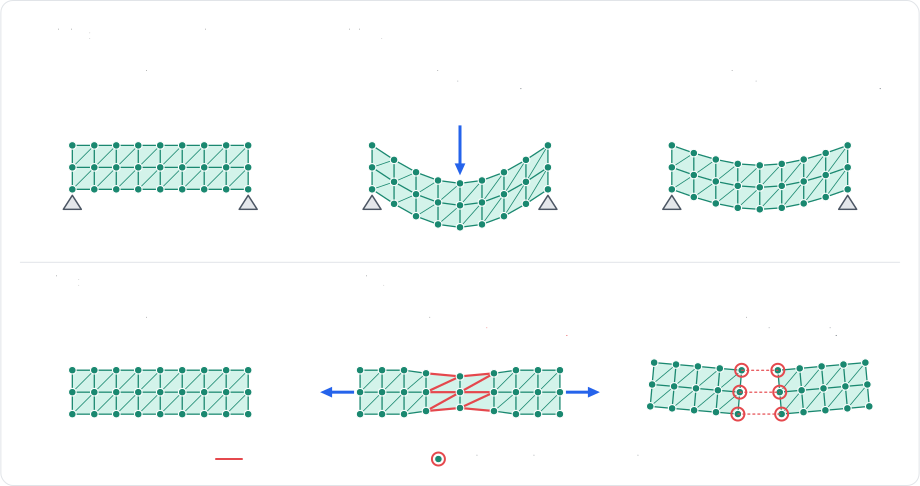
Both are supported by the constraints
solver
Plasticity
Plasticity is configured by the material of the body, separately for its cells and for its edges:
- A cell strained past its plastic yield
(
plastic_yieldplasticYieldplasticYieldplastic_yieldplastic_creepplasticCreepplasticCreepplastic_creepplastic_maxplasticMaxplasticMaxplastic_maxCorotationalandNeoHookeanCorotationalandNeoHookeanR3_SOFT_CELL_COROTATIONALandR3_SOFT_CELL_NEO_HOOKEANSoftBodyCellModel.COROTATIONALandSoftBodyCellModel.NEO_HOOKEANVolumeVolumeR3_SOFT_CELL_VOLUMESoftBodyCellModel.VOLUME - An edge strained past its edge plastic yield
(
edge_plastic_yieldedgePlasticYieldedgePlasticYieldedge_plastic_yield|length / rest_length - 1|) sees its rest length flow toward its current length at the rate of its edge plastic creep (edge_plastic_creepedgePlasticCreepedgePlasticCreepedge_plastic_creepedge_plastic_maxedgePlasticMaxedgePlasticMaxedge_plastic_maxedge_plastic_flowedgePlasticFlowedgePlasticFlowedge_plastic_flowSoftEdgePlasticFlow) selects whether that happens when it is squeezed, when it is stretched, or both.
A plastic deformation can be undone at any time
(SoftBody::reset_plasticityRapierSoftBody::reset_plasticitySoftBody.resetPlasticityr3SoftBody_ResetPlasticitySoftBody.reset_plasticity
- Example 2D
- Example 3D
// The jelly has elastic (corotational) cells: the plasticity of `Volume` cells has no effect.
let material = world.soft_bodies[jelly_handle].material_mut();
// Cells: the rest shape flows toward the current one past 5% strain, at a rate of 20 per
// second, up to a total permanent deformation of 50%.
material.plastic_yield = 0.05;
material.plastic_creep = 20.0;
material.plastic_max = 0.5;
// Edges: the rest length flows past 10% strain, up to half the initial length, but only
// when squeezed (a dent stays, a stretch springs back).
material.edge_plastic_yield = 0.1;
material.edge_plastic_creep = 10.0;
material.edge_plastic_max = 0.5;
material.edge_plastic_flow = SoftEdgePlasticFlow::Compression;
// Every permanent deformation can be undone at once.
world.soft_bodies[jelly_handle].reset_plasticity();
// The jelly has elastic (corotational) cells: the plasticity of `Volume` cells has no effect.
let material = world.soft_bodies[jelly_handle].material_mut();
// Cells: the rest shape flows toward the current one past 5% strain, at a rate of 20 per
// second, up to a total permanent deformation of 50%.
material.plastic_yield = 0.05;
material.plastic_creep = 20.0;
material.plastic_max = 0.5;
// Edges: the rest length flows past 10% strain, up to half the initial length, but only
// when squeezed (a dent stays, a stretch springs back).
material.edge_plastic_yield = 0.1;
material.edge_plastic_creep = 10.0;
material.edge_plastic_max = 0.5;
material.edge_plastic_flow = SoftEdgePlasticFlow::Compression;
// Every permanent deformation can be undone at once.
world.soft_bodies[jelly_handle].reset_plasticity();
- Example 2D
- Example 3D
// The jelly has elastic (corotational) cells: the plasticity of `Volume` cells has no effect.
let plasticMaterial = jelly.material();
// Cells: the rest shape flows toward the current one past 5% strain, at a rate of 20 per
// second, up to a total permanent deformation of 50%.
plasticMaterial.plasticYield = 0.05;
plasticMaterial.plasticCreep = 20.0;
plasticMaterial.plasticMax = 0.5;
// Edges: the rest length flows past 10% strain, up to half the initial length, but only
// when squeezed (a dent stays, a stretch springs back).
plasticMaterial.edgePlasticYield = 0.1;
plasticMaterial.edgePlasticCreep = 10.0;
plasticMaterial.edgePlasticMax = 0.5;
plasticMaterial.edgePlasticFlow = RAPIER.SoftEdgePlasticFlow.Compression;
jelly.setMaterial(plasticMaterial);
// Every permanent deformation can be undone at once.
jelly.resetPlasticity();
// The jelly has elastic (corotational) cells: the plasticity of `Volume` cells has no effect.
let plasticMaterial = jelly.material();
// Cells: the rest shape flows toward the current one past 5% strain, at a rate of 20 per
// second, up to a total permanent deformation of 50%.
plasticMaterial.plasticYield = 0.05;
plasticMaterial.plasticCreep = 20.0;
plasticMaterial.plasticMax = 0.5;
// Edges: the rest length flows past 10% strain, up to half the initial length, but only
// when squeezed (a dent stays, a stretch springs back).
plasticMaterial.edgePlasticYield = 0.1;
plasticMaterial.edgePlasticCreep = 10.0;
plasticMaterial.edgePlasticMax = 0.5;
plasticMaterial.edgePlasticFlow = RAPIER.SoftEdgePlasticFlow.Compression;
jelly.setMaterial(plasticMaterial);
// Every permanent deformation can be undone at once.
jelly.resetPlasticity();
The material is modified through the SoftBodyMaterial component of the soft-body entity:
- Example 2D
- Example 3D
fn configure_plasticity(
    mut context: WriteRapierContext,
    jelly: Single<(Entity, &mut SoftBodyMaterial), With<Jelly>>,
) -> Result {
    // The jelly has elastic (corotational) cells: the plasticity of `Volume` cells has no effect.
    let (entity, mut material) = jelly.into_inner();
    // Cells: the rest shape flows toward the current one past 5% strain, at a rate of 20 per
    // second, up to a total permanent deformation of 50%.
    material.plastic_yield = 0.05;
    material.plastic_creep = 20.0;
    material.plastic_max = 0.5;
    // Edges: the rest length flows past 10% strain, up to half the initial length, but only
    // when squeezed (a dent stays, a stretch springs back).
    material.edge_plastic_yield = 0.1;
    material.edge_plastic_creep = 10.0;
    material.edge_plastic_max = 0.5;
    material.edge_plastic_flow = SoftEdgePlasticFlow::Compression;
    // Every permanent deformation can be undone at once.
    if let Some(soft_body) = context.single_mut()?.soft_body_mut(entity) {
        soft_body.reset_plasticity();
    }
    Ok(())
}
fn configure_plasticity(
    mut context: WriteRapierContext,
    jelly: Single<(Entity, &mut SoftBodyMaterial), With<Jelly>>,
) -> Result {
    // The jelly has elastic (corotational) cells: the plasticity of `Volume` cells has no effect.
    let (entity, mut material) = jelly.into_inner();
    // Cells: the rest shape flows toward the current one past 5% strain, at a rate of 20 per
    // second, up to a total permanent deformation of 50%.
    material.plastic_yield = 0.05;
    material.plastic_creep = 20.0;
    material.plastic_max = 0.5;
    // Edges: the rest length flows past 10% strain, up to half the initial length, but only
    // when squeezed (a dent stays, a stretch springs back).
    material.edge_plastic_yield = 0.1;
    material.edge_plastic_creep = 10.0;
    material.edge_plastic_max = 0.5;
    material.edge_plastic_flow = SoftEdgePlasticFlow::Compression;
    // Every permanent deformation can be undone at once.
    if let Some(soft_body) = context.single_mut()?.soft_body_mut(entity) {
        soft_body.reset_plasticity();
    }
    Ok(())
}
The material is read with r3SoftBody_Material, which gives back a copy of the material of the body. That copy is
modified, then applied with r3SoftBody_SetMaterial:
- Example 2D
- Example 3D
// The jelly has elastic (corotational) cells: the plasticity of volume cells has no effect.
R2SoftBodyMaterial plastic_material = r2SoftBody_Material(jelly);
// Cells: the rest shape flows toward the current one past 5% strain, at a rate of 20 per
// second, up to a total permanent deformation of 50%.
plastic_material.plasticYield = 0.05;
plastic_material.plasticCreep = 20.0;
plastic_material.plasticMax = 0.5;
// Edges: the rest length flows past 10% strain, up to half the initial length, but only
// when squeezed (a dent stays, a stretch springs back).
plastic_material.edgePlasticYield = 0.1;
plastic_material.edgePlasticCreep = 10.0;
plastic_material.edgePlasticMax = 0.5;
plastic_material.edgePlasticFlow = R2_SOFT_EDGE_PLASTIC_FLOW_COMPRESSION;
r2SoftBody_SetMaterial(jelly, &plastic_material);
// Every permanent deformation can be undone at once.
r2SoftBody_ResetPlasticity(jelly);
// The jelly has elastic (corotational) cells: the plasticity of volume cells has no effect.
R3SoftBodyMaterial plastic_material = r3SoftBody_Material(jelly);
// Cells: the rest shape flows toward the current one past 5% strain, at a rate of 20 per
// second, up to a total permanent deformation of 50%.
plastic_material.plasticYield = 0.05;
plastic_material.plasticCreep = 20.0;
plastic_material.plasticMax = 0.5;
// Edges: the rest length flows past 10% strain, up to half the initial length, but only
// when squeezed (a dent stays, a stretch springs back).
plastic_material.edgePlasticYield = 0.1;
plastic_material.edgePlasticCreep = 10.0;
plastic_material.edgePlasticMax = 0.5;
plastic_material.edgePlasticFlow = R3_SOFT_EDGE_PLASTIC_FLOW_COMPRESSION;
r3SoftBody_SetMaterial(jelly, &plastic_material);
// Every permanent deformation can be undone at once.
r3SoftBody_ResetPlasticity(jelly);
The material property of a soft-body is a live view of its material (a SoftBodyMaterial): setting one of its fields
changes the body directly. Assigning a whole SoftBodyMaterial to it replaces the material, and its copy method
gives a detached copy:
# The jelly has elastic (corotational) cells: the plasticity of `VOLUME` cells has no effect.
jelly = world.soft_bodies[jelly_handle]
# A live view of the material: setting one of its fields changes the body.
material = jelly.material
# Cells: the rest shape flows toward the current one past 5% strain, at a rate of 20 per
# second, up to a total permanent deformation of 50%.
material.plastic_yield = 0.05
material.plastic_creep = 20.0
material.plastic_max = 0.5
# Edges: the rest length flows past 10% strain, up to half the initial length, but only
# when squeezed (a dent stays, a stretch springs back).
material.edge_plastic_yield = 0.1
material.edge_plastic_creep = 10.0
material.edge_plastic_max = 0.5
material.edge_plastic_flow = rp.SoftEdgePlasticFlow.COMPRESSION
# Every permanent deformation can be undone at once.
jelly.reset_plasticity()
Tearing
Tearing is configured by the material of the body as well. An element tears at the end of the timestep during which its load goes beyond one of the two thresholds of the material:
- The tear strain (
tear_straintearStraintearStraintear_strain - The tear force (
tear_forcetearForcetearForcetear_force
The other settings of the material shape how a tear propagates:
- The tear smoothing (
tear_smoothingtearSmoothingtearSmoothingtear_smoothing - The interior strength (
interior_strengthinteriorStrengthinteriorStrengthinterior_strength - The max tears per step (
max_tears_per_stepmaxTearsPerStepmaxTearsPerStepmax_tears_per_step - The min piece (
min_pieceminPieceminPiecemin_piece
Individual edges can be made tougher (or weaker, e.g., a perforation line) with their tear resistance, given to the
builder
(edge_tear_resistancesetEdgeTearResistanceedgeTearResistance field of R3SoftBodyDescSoftBodyBuilder.edge_tear_resistance
- Example 2D
- Example 3D
let material = world.soft_bodies[sheet_handle].material_mut();
// An edge tears past 40% of stretch, or past a force of 50 along its direction.
material.tear_strain = Some(0.4);
material.tear_force = Some(50.0);
// The load is smoothed over 0.1 second, so a single impact spike doesn't tear.
material.tear_smoothing = 0.1;
// Undamaged interior elements are twice as tough: tears start from the surface.
material.interior_strength = 2.0;
// A tear never splits off a piece smaller than 10 elements.
material.min_piece = Some(10);
let material = world.soft_bodies[cloth_handle].material_mut();
// An edge tears past 40% of stretch, or past a force of 50 along its direction.
material.tear_strain = Some(0.4);
material.tear_force = Some(50.0);
// The load is smoothed over 0.1 second, so a single impact spike doesn't tear.
material.tear_smoothing = 0.1;
// Undamaged interior elements are twice as tough: tears start from the surface.
material.interior_strength = 2.0;
// A tear never splits off a piece smaller than 10 elements.
material.min_piece = Some(10);
- Example 2D
- Example 3D
let tearMaterial = sheet.material();
// An edge tears past 40% of stretch, or past a force of 50 along its direction.
tearMaterial.tearStrain = 0.4;
tearMaterial.tearForce = 50.0;
// The load is smoothed over 0.1 second, so a single impact spike doesn't tear.
tearMaterial.tearSmoothing = 0.1;
// Undamaged interior elements are twice as tough: tears start from the surface.
tearMaterial.interiorStrength = 2.0;
// A tear never splits off a piece smaller than 10 elements.
tearMaterial.minPiece = 10;
sheet.setMaterial(tearMaterial);
let tearMaterial = cloth.material();
// An edge tears past 40% of stretch, or past a force of 50 along its direction.
tearMaterial.tearStrain = 0.4;
tearMaterial.tearForce = 50.0;
// The load is smoothed over 0.1 second, so a single impact spike doesn't tear.
tearMaterial.tearSmoothing = 0.1;
// Undamaged interior elements are twice as tough: tears start from the surface.
tearMaterial.interiorStrength = 2.0;
// A tear never splits off a piece smaller than 10 elements.
tearMaterial.minPiece = 10;
cloth.setMaterial(tearMaterial);
- Example 2D
- Example 3D
fn configure_tearing(mut commands: Commands, sheet: Single<Entity, With<Sheet>>) {
    commands
        .entity(*sheet)
        .insert(SoftBodyMaterial(RapierSoftBodyMaterial {
            // An edge tears past 40% of stretch, or past a force of 50 along its direction.
            tear_strain: Some(0.4),
            tear_force: Some(50.0),
            // The load is smoothed over 0.1 second, so a single impact spike doesn't tear.
            tear_smoothing: 0.1,
            // Undamaged interior elements are twice as tough: tears start from the surface.
            interior_strength: 2.0,
            // A tear never splits off a piece smaller than 10 elements.
            min_piece: Some(10),
            ..RapierSoftBodyMaterial::uniform(SpringCoefficients::new(30.0, 1.0))
        }));
}
fn configure_tearing(mut material: Single<&mut SoftBodyMaterial, With<Cloth>>) {
    // An edge tears past 40% of stretch, or past a force of 50 along its direction.
    material.tear_strain = Some(0.4);
    material.tear_force = Some(50.0);
    // The load is smoothed over 0.1 second, so a single impact spike doesn't tear.
    material.tear_smoothing = 0.1;
    // Undamaged interior elements are twice as tough: tears start from the surface.
    material.interior_strength = 2.0;
    // A tear never splits off a piece smaller than 10 elements.
    material.min_piece = Some(10);
}
The optional thresholds of the material (tearStrain, tearForce, and minPiece) are only used when the enabled
field of their R3OptionalReal or R3OptionalU32 is set. The tear resistance of the edges and of the clusters can
also be changed after the insertion, with r3SoftBody_SetEdgeTearResistance and r3SoftBody_SetClusterTearResistance:
- Example 2D
- Example 3D
R2SoftBodyMaterial tear_material = r2SoftBody_Material(sheet);
// An edge tears past 40% of stretch, or past a force of 50 along its direction.
tear_material.tearStrain = (R2OptionalReal){1, 0.4};
tear_material.tearForce = (R2OptionalReal){1, 50.0};
// The load is smoothed over 0.1 second, so a single impact spike doesn't tear.
tear_material.tearSmoothing = 0.1;
// Undamaged interior elements are twice as tough: tears start from the surface.
tear_material.interiorStrength = 2.0;
// A tear never splits off a piece smaller than 10 elements.
tear_material.minPiece = (R2OptionalU32){1, 10};
r2SoftBody_SetMaterial(sheet, &tear_material);
R3SoftBodyMaterial tear_material = r3SoftBody_Material(cloth);
// An edge tears past 40% of stretch, or past a force of 50 along its direction.
tear_material.tearStrain = (R3OptionalReal){1, 0.4};
tear_material.tearForce = (R3OptionalReal){1, 50.0};
// The load is smoothed over 0.1 second, so a single impact spike doesn't tear.
tear_material.tearSmoothing = 0.1;
// Undamaged interior elements are twice as tough: tears start from the surface.
tear_material.interiorStrength = 2.0;
// A tear never splits off a piece smaller than 10 elements.
tear_material.minPiece = (R3OptionalU32){1, 10};
r3SoftBody_SetMaterial(cloth, &tear_material);
The optional thresholds of the material (tear_strain, tear_force, and min_piece) are disabled when they are set
to None. As for the plasticity, they are set through the live view of the material of the soft-body:
material = world.soft_bodies[cloth_handle].material
# An edge tears past 40% of stretch, or past a force of 50 along its direction (`None`
# disables a threshold).
material.tear_strain = 0.4
material.tear_force = 50.0
# The load is smoothed over 0.1 second, so a single impact spike doesn't tear.
material.tear_smoothing = 0.1
# Undamaged interior elements are twice as tough: tears start from the surface.
material.interior_strength = 2.0
# A tear never splits off a piece smaller than 10 elements.
material.min_piece = 10
The tear resistance of the edges is given to the builder as a list of (edge index, resistance) pairs. It can also be
changed after the insertion, for the edges and the cells with SoftBody.set_edge_tear_resistance and
SoftBody.set_cell_tear_resistance, and for the clusters with SoftBody.set_cluster_tear_resistance:
# A perforation line: these edges tear at half the load of the others (1.0 restores the
# threshold of the material).
perforated = rp.SoftBody.rope((0.0, 6.0, -3.0), (3.0, 6.0, -3.0), 30).edge_tear_resistance(
    [(14, 0.5), (15, 0.5)]
)
perforated_handle = world.add_soft_body(perforated)
# The same, after the insertion.
cloth = world.soft_bodies[cloth_handle]
for edge in (30, 31, 32):
    cloth.set_edge_tear_resistance(edge, 0.5)
# Every element of the root cluster of the jelly (i.e., of the whole body) is twice as
# tough, and its first cell three times as tough.
jelly = world.soft_bodies[jelly_handle]
jelly.set_cluster_tear_resistance(0, 2.0)
jelly.set_cell_tear_resistance(0, 3.0)
A tear can also be requested explicitly, either edge by edge
(SoftBody::tear_edge, tear_cellRapierSoftBody::tear_edge, tear_cellSoftBody.tearEdge, tearCellr3SoftBody_TearEdge, r3SoftBody_TearCellSoftBody.tear_edge, tear_cellPhysicsWorld::tear_soft_bodyRapierContextMut::tear_soft_bodyWorld.tearSoftBodyr3SoftBody_TearPhysicsWorld.tear_soft_bodyPhysicsWorld::cut_soft_bodyRapierContextMut::cut_soft_bodyWorld.cutSoftBodyr3CutSoftBodyPhysicsWorld.cut_soft_body
Tearing and cutting lose no material: the particles are duplicated along the tear instead of being removed, so the area (2D) or the volume (3D) of the body is preserved. The pieces a tear disconnects become soft-bodies of their own, which keep the material and the settings of the body they come from, the deformable meshes and the joints following the pieces they were attached to. Therefore the particles of the torn body are renumbered, and the returned event tells where each of them went:
- Example 2D
- Example 3D
// Elements tear on their own past the material's thresholds; a tear can also be requested.
world.soft_bodies[sheet_handle].tear_edge(10); // Applied at the end of the next step.
                                               // Tear at once along edges and through cells; pieces the tear disconnects become soft
                                               // bodies of their own.
let event = world.tear_soft_body(sheet_handle, &[11, 12], &[]);
if let Some(event) = event {
    println!("{} edges torn", event.torn_edges.len());
}
// Cut along a blade (a segment in 2D), without removing material.
let blade = [Vector::new(-3.0, -10.0), Vector::new(-3.0, 10.0)];
if let Some(event) = world.cut_soft_body(sheet_handle, &blade) {
    for piece in &event.pieces {
        println!(
            "piece {:?} has {} particles",
            piece.soft_body,
            piece.particles.len()
        );
    }
    // Where a particle of the torn body went.
    if let Some((body, index)) = event.particle_destination(n as u32 * n as u32 - 1) {
        println!(
            "particle {} is now particle {} of {:?}",
            n * n - 1,
            index,
            body
        );
    }
}
// Elements tear on their own past the material's thresholds; a tear can also be requested.
world.soft_bodies[cloth_handle].tear_edge(10); // Applied at the end of the next step.
                                               // Tear at once along edges and through cells; pieces the tear disconnects become soft
                                               // bodies of their own.
let event = world.tear_soft_body(cloth_handle, &[11, 12], &[]);
if let Some(event) = event {
    println!("{} edges torn", event.torn_edges.len());
}
// Cut along a blade (a triangle in 3D), without removing material.
let blade = [
    Vector::new(-0.1, -10.0, -10.0),
    Vector::new(-0.1, 10.0, 0.0),
    Vector::new(-0.1, -10.0, 10.0),
];
if let Some(event) = world.cut_soft_body(cloth_handle, &blade) {
    for piece in &event.pieces {
        println!(
            "piece {:?} has {} particles",
            piece.soft_body,
            piece.particles.len()
        );
    }
    // Where a particle of the torn body went.
    if let Some((body, index)) = event.particle_destination(n as u32 * n as u32 - 1) {
        println!(
            "particle {} is now particle {} of {:?}",
            n * n - 1,
            index,
            body
        );
    }
}
- Example 2D
- Example 3D
// Elements tear on their own past the material's thresholds; a tear can also be requested.
sheet.tearEdge(10); // Applied at the end of the next step.
// Tear at once along edges and through cells; pieces the tear disconnects become soft
// bodies of their own.
let tear = world.tearSoftBody(sheet, [11, 12], []);
if (tear) {
    console.log(tear.tornEdges().length / 2, "edges torn");
    tear.free();
}
// Cut along a blade (a segment in 2D), without removing material.
let cut = world.cutSoftBody(sheet, [{ x: -3.0, y: -10.0 }, { x: -3.0, y: 10.0 }]);
if (cut) {
    for (let i = 0; i < cut.numPieces(); ++i) {
        let piece = world.getSoftBody(cut.pieceSoftBody(i));
        console.log("piece", i, "has", piece.numParticles(), "particles");
    }
    // Where a particle of the torn body went.
    let destination = cut.particleDestination(n * n - 1);
    if (destination) {
        console.log("particle", n * n - 1, "is now particle", destination.particle, "of", destination.softBody);
    }
    cut.free();
}
// Elements tear on their own past the material's thresholds; a tear can also be requested.
cloth.tearEdge(10); // Applied at the end of the next step.
// Tear at once along edges and through cells; pieces the tear disconnects become soft
// bodies of their own.
let tear = world.tearSoftBody(cloth, [11, 12], []);
if (tear) {
    console.log(tear.tornEdges().length / 2, "edges torn");
    tear.free();
}
// Cut along a blade (a triangle in 3D), without removing material.
let cut = world.cutSoftBody(cloth, [
    { x: -0.1, y: -10.0, z: -10.0 }, { x: -0.1, y: 10.0, z: 0.0 }, { x: -0.1, y: -10.0, z: 10.0 },
]);
if (cut) {
    for (let i = 0; i < cut.numPieces(); ++i) {
        let piece = world.getSoftBody(cut.pieceSoftBody(i));
        console.log("piece", i, "has", piece.numParticles(), "particles");
    }
    // Where a particle of the torn body went.
    let destination = cut.particleDestination(n * n - 1);
    if (destination) {
        console.log("particle", n * n - 1, "is now particle", destination.particle, "of", destination.softBody);
    }
    cut.free();
}
The largest piece keeps the torn soft-body and its entity, whereas a new entity is spawned for each other piece. That
entity receives a clone of the components of the torn entity (its material, its mesh synchronization, its render
components, your own components, etc.) during the next writeback of the physics state, except for the components
referring to the particles by index (SoftBodyPinnedParticles, SoftBodyKinematicTargets, SoftBodyAttachments,
SoftBodyExternalForce, and SoftBodyExternalImpulse): these are remapped to the renumbered particles, the entries of
the particles moved to a piece being moved to the entity of that piece. The particles pinned by the builder of the
SoftBody component (restored when the SoftBodyPinnedParticles component is removed) are remapped the same way.
Similarly, the cluster entities follow the pieces holding their particles, and a new
cluster entity is spawned for each piece of a split cluster that is given a proxy of its own. That entity inherits the
SoftBodyClusterPinned, SoftBodyClusterKinematicTarget (shifted so that the particles keep their targets),
SoftBodyClusterShapeMatching, and SoftBodyClusterMaterial components of the entity of the split cluster.
The pieces of the tears generated by the simulation get their entities during the writeback of the physics state,
whereas tear_soft_body and cut_soft_body spawn the entities of the pieces right away with the Commands they are
given. These are returned in a SoftBodyTearResult (the first piece being the torn entity itself), next to the event
of Rapier (its raw field) which identifies the pieces by their handle. Note however that these entities only receive
their components during the next writeback, when the SoftBodyTearEvent message described in the
next section is sent (and the entities of the split clusters are only spawned
then):
- Example 2D
- Example 3D
fn tear_sheet(
    mut commands: Commands,
    mut context: WriteRapierContext,
    sheet: Single<Entity, With<Sheet>>,
) -> Result {
    let mut context = context.single_mut()?;
    // Elements tear on their own past the material's thresholds; a tear can also be requested.
    if let Some(soft_body) = context.soft_body_mut(*sheet) {
        soft_body.tear_edge(10); // Applied at the end of the next step.
    }
    // Tear at once along edges and through cells. The pieces the tear disconnects become soft
    // bodies of their own, which entities are spawned right away with `commands`.
    if let Some(tear) = context.tear_soft_body(&mut commands, *sheet, &[11, 12], &[]) {
        println!("{} edges torn", tear.raw.torn_edges.len());
    }
    // Cut along a blade (a world-space segment in 2D), without removing material.
    let blade = [Vec2::new(-3.0, -10.0), Vec2::new(-3.0, 10.0)];
    if let Some(tear) = context.cut_soft_body(&mut commands, *sheet, &blade) {
        // The entities of the pieces (the first one being the torn entity) are known right away,
        // but they only get their components during the next writeback of the physics state.
        for (entity, piece) in tear.pieces.iter().zip(&tear.raw.pieces) {
            println!("piece {entity} has {} particles", piece.particles.len());
        }
    }
    Ok(())
}
fn tear_cloth(
    mut commands: Commands,
    mut context: WriteRapierContext,
    cloth: Single<Entity, With<Cloth>>,
) -> Result {
    let mut context = context.single_mut()?;
    // Elements tear on their own past the material's thresholds; a tear can also be requested.
    if let Some(soft_body) = context.soft_body_mut(*cloth) {
        soft_body.tear_edge(10); // Applied at the end of the next step.
    }
    // Tear at once along edges and through cells. The pieces the tear disconnects become soft
    // bodies of their own, which entities are spawned right away with `commands`.
    if let Some(tear) = context.tear_soft_body(&mut commands, *cloth, &[11, 12], &[]) {
        println!("{} edges torn", tear.raw.torn_edges.len());
    }
    // Cut along a blade (a world-space triangle in 3D), without removing material.
    let blade = [
        Vec3::new(-0.1, -10.0, -10.0),
        Vec3::new(-0.1, 10.0, 0.0),
        Vec3::new(-0.1, -10.0, 10.0),
    ];
    if let Some(tear) = context.cut_soft_body(&mut commands, *cloth, &blade) {
        // The entities of the pieces (the first one being the torn entity) are known right away,
        // but they only get their components during the next writeback of the physics state.
        for (entity, piece) in tear.pieces.iter().zip(&tear.raw.pieces) {
            println!("piece {entity} has {} particles", piece.particles.len());
        }
    }
    Ok(())
}
The event returned by r3SoftBody_Tear and r3CutSoftBody is an owned R3SoftBodyTearEvent, to be freed with
r3FreeSoftBodyTearEvent, or NULL if the tear or the cut changed nothing. It is read with the following functions:
r3SoftBodyTearEvent_SoftBodygives the torn soft-body, andr3SoftBodyTearEvent_Bodiesthe soft-bodies it is now made of: the torn body alone if nothing was split off, or its pieces otherwise, the piece keeping the handle of the torn body first (r3SoftBodyTearEvent_PieceCountgives their number). The particles of thei-th of them (i.e., their indices in the torn body) are given byr3SoftBodyTearEvent_PieceParticles.r3SoftBodyTearEvent_TryParticleDestinationtells in which soft-body a particle of the torn body is now, and what its index is there (r3SoftBodyTearEvent_ParticleDestinationdoes the same, but reports the particles without any destination as anR3_NOT_FOUNDerror).r3SoftBodyTearEvent_TornEdges,r3SoftBodyTearEvent_TornCells,r3SoftBodyTearEvent_RemovedEdges,r3SoftBodyTearEvent_SplitParticles, andr3SoftBodyTearEvent_InsertedParticlesgive the details of the change of topology, as flat arrays of particle indices.r3SoftBodyTearEvent_Clustersandr3SoftBodyTearEvent_MovedJointsgive the clusters the tear split, and the joints it moved from a cluster proxy to another.
The arrays are copied with the usual output-buffer protocol: each function returns the number of elements, and copies
them into the given buffer only if its capacity is large enough (a NULL buffer with a capacity of zero gives that
number first). Finally, r3SoftBody_TopologyVersion changes whenever the
connectivity of the particles of a body changes, which is a convenient way of knowing when the render meshes must be
rebuilt:
- Example 2D
- Example 3D
// Elements tear on their own past the material's thresholds; a tear can also be requested.
r2SoftBody_TearEdge(sheet, 10); // Applied at the end of the next step.
// Tear at once along edges and through cells; pieces the tear disconnects become soft
// bodies of their own. The event is NULL if nothing changed.
uint32_t torn_edges[] = {11, 12};
R2SoftBodyTearEvent *tear = r2SoftBody_Tear(sheet, torn_edges, 2, NULL, 0);
if (tear != NULL) {
    printf("%zu edges torn\n", r2SoftBodyTearEvent_TornEdges(tear, NULL, 0) / 2);
    r2FreeSoftBodyTearEvent(tear);
}
// Cut along a blade (a segment in 2D), without removing material.
R2Vector blade[2] = {{-3.0, -10.0}, {-3.0, 10.0}};
R2SoftBodyTearEvent *cut = r2CutSoftBody(sheet, blade);
if (cut != NULL) {
    // The soft-bodies the sheet is now made of, the one keeping its handle first.
    size_t num_pieces = r2SoftBodyTearEvent_PieceCount(cut);
    R2SoftBodyHandle *pieces = malloc(num_pieces * sizeof(R2SoftBodyHandle));
    r2SoftBodyTearEvent_Bodies(cut, pieces, num_pieces);
    for (size_t i = 0; i < num_pieces; i++) {
        size_t num_piece_particles = r2SoftBodyTearEvent_PieceParticles(cut, i, NULL, 0);
        printf("piece %u has %zu particles\n", pieces[i].index, num_piece_particles);
    }
    free(pieces);
    // Where a particle of the torn body went.
    R2OptionalParticleDestination destination = r2SoftBodyTearEvent_TryParticleDestination(cut, n * n - 1);
    if (destination.found) {
        printf("particle %u is now particle %u of %u\n", n * n - 1, destination.index,
               destination.body.index);
    }
    r2FreeSoftBodyTearEvent(cut);
}
// Elements tear on their own past the material's thresholds; a tear can also be requested.
r3SoftBody_TearEdge(cloth, 10); // Applied at the end of the next step.
// Tear at once along edges and through cells; pieces the tear disconnects become soft
// bodies of their own. The event is NULL if nothing changed.
uint32_t torn_edges[] = {11, 12};
R3SoftBodyTearEvent *tear = r3SoftBody_Tear(cloth, torn_edges, 2, NULL, 0);
if (tear != NULL) {
    printf("%zu edges torn\n", r3SoftBodyTearEvent_TornEdges(tear, NULL, 0) / 2);
    r3FreeSoftBodyTearEvent(tear);
}
// Cut along a blade (a triangle in 3D), without removing material.
R3Vector blade[3] = {{-0.1, -10.0, -10.0}, {-0.1, 10.0, 0.0}, {-0.1, -10.0, 10.0}};
R3SoftBodyTearEvent *cut = r3CutSoftBody(cloth, blade);
if (cut != NULL) {
    // The soft-bodies the cloth is now made of, the one keeping its handle first.
    size_t num_pieces = r3SoftBodyTearEvent_PieceCount(cut);
    R3SoftBodyHandle *pieces = malloc(num_pieces * sizeof(R3SoftBodyHandle));
    r3SoftBodyTearEvent_Bodies(cut, pieces, num_pieces);
    for (size_t i = 0; i < num_pieces; i++) {
        size_t num_piece_particles = r3SoftBodyTearEvent_PieceParticles(cut, i, NULL, 0);
        printf("piece %u has %zu particles\n", pieces[i].index, num_piece_particles);
    }
    free(pieces);
    // Where a particle of the torn body went.
    R3OptionalParticleDestination destination = r3SoftBodyTearEvent_TryParticleDestination(cut, n * n - 1);
    if (destination.found) {
        printf("particle %u is now particle %u of %u\n", n * n - 1, destination.index,
               destination.body.index);
    }
    r3FreeSoftBodyTearEvent(cut);
}
PhysicsWorld.tear_soft_body and PhysicsWorld.cut_soft_body (or SoftBodySet.tear and SoftBodySet.cut when the
sets are used directly) return a SoftBodyTearEvent, or None if the tear or the cut changed nothing:
soft_bodyis the torn soft-body, andbodies()the soft-bodies it is now made of: the torn body alone if nothing was split off, or its pieces otherwise. Thepiecesproperty lists these pieces (empty if nothing was split off), the piece keeping the handle of the torn body first, eachSoftBodyPiecegiving itssoft_bodyand itsparticles(i.e., their indices in the torn body).particle_destination(i)tells in which soft-body a particle of the torn body is now, and what its index is there, as a(handle, index)tuple (orNoneif the particle has no destination).torn_edges,torn_cells, andremoved_edgesgive the particles of the elements involved in the change of topology as NumPy arrays.split_particlesgives the particles the tear duplicated, as(copy, source)pairs, andinserted_particlesthe particles it inserted.clustersandmoved_jointsgive the clusters the tear split, and the joints it moved from a cluster proxy to another.
A soft-body split off by a tear remembers the body it comes from (SoftBody.origin), and the torn body lists the ones
split off it (SoftBody.pieces). Finally, SoftBody.topology_version changes whenever the connectivity of the
particles of a body changes, which is a convenient way of knowing when the render meshes must be rebuilt:
# Elements tear on their own past the material's thresholds; a tear can also be requested.
world.soft_bodies[cloth_handle].tear_edge(10)  # Applied at the end of the next step.
# Tear at once along edges and through cells; pieces the tear disconnects become soft
# bodies of their own.
event = world.tear_soft_body(cloth_handle, [11, 12], [])
if event is not None:
    print(f"{len(event.torn_edges)} edges torn")
# Cut along a blade (a triangle), without removing material.
blade = ((-0.1, -10.0, -10.0), (-0.1, 10.0, 0.0), (-0.1, -10.0, 10.0))
event = world.cut_soft_body(cloth_handle, blade)
if event is not None:
    for piece in event.pieces:
        print(f"piece {piece.soft_body} has {len(piece.particles)} particles")
    # Where a particle of the torn body went.
    destination = event.particle_destination(n * n - 1)
    if destination is not None:
        body, index = destination
        print(f"particle {n * n - 1} is now particle {index} of {body}")
# The connectivity of the cloth changed: its render mesh must be rebuilt.
assert world.soft_bodies[cloth_handle].topology_version > 0
Tearing one edge with
SoftBody::tear_edgeRapierSoftBody::tear_edgeSoftBody.tearEdger3SoftBody_TearEdgeSoftBody.tear_edgePhysicsWorldRapierContextMutWorldr3SoftBody_Tear and r3CutSoftBody)PhysicsWorld
Volume cells never tear. Therefore a body which cells use the VolumeVolumeR3_SOFT_CELL_VOLUMESoftBodyCellModel.VOLUMECorotational or the NeoHookeanCorotational or the NeoHookeanR3_SOFT_CELL_COROTATIONAL or the R3_SOFT_CELL_NEO_HOOKEANSoftBodyCellModel.COROTATIONAL or the SoftBodyCellModel.NEO_HOOKEAN
Tear events
The tears applied during a step, whether they were generated by the simulation itself or requested with
SoftBody::tear_edgeRapierSoftBody::tear_edge (as well as the ones applied by
RapierContextMut::tear_soft_body and cut_soft_body)SoftBody.tearEdger3SoftBody_TearEdgeSoftBody.tear_edgeEventHandler::handle_soft_body_tear_event) to the stepEventQueue.drainSoftBodyTearEvents) to the stepR3EventCollector) to r3StepPhysicsWorld.event_handler)SoftBodyTearEventSoftBodyTearEvent, read with a MessageReaderSoftBodyTearEventR3SoftBodyTearEventSoftBodyTearEvent
- Example 2D
- Example 3D
// Tears applied during a step are reported through the event handler.
let (collision_send, _collision_recv) = std::sync::mpsc::channel();
let (contact_force_send, _contact_force_recv) = std::sync::mpsc::channel();
let (soft_body_tear_send, soft_body_tear_recv) = std::sync::mpsc::channel();
let event_handler =
    ChannelEventCollector::new(collision_send, contact_force_send, soft_body_tear_send);
world.step_with_events(&(), &event_handler);
while let Ok(tear_event) = soft_body_tear_recv.try_recv() {
    println!("Soft body {:?} tore", tear_event.soft_body);
}
// Tears applied during a step are reported through the event handler.
let (collision_send, _collision_recv) = std::sync::mpsc::channel();
let (contact_force_send, _contact_force_recv) = std::sync::mpsc::channel();
let (soft_body_tear_send, soft_body_tear_recv) = std::sync::mpsc::channel();
let event_handler =
    ChannelEventCollector::new(collision_send, contact_force_send, soft_body_tear_send);
world.step_with_events(&(), &event_handler);
while let Ok(tear_event) = soft_body_tear_recv.try_recv() {
    println!("Soft body {:?} tore", tear_event.soft_body);
}
- Example 2D
- Example 3D
// Tears applied during a step are reported through the event queue.
let eventQueue = new RAPIER.EventQueue(true);
world.step(eventQueue);
eventQueue.drainSoftBodyTearEvents((event) => {
    console.log("Soft body", event.softBody(), "tore:", event.numPieces(), "pieces split off");
});
// Tears applied during a step are reported through the event queue.
let eventQueue = new RAPIER.EventQueue(true);
world.step(eventQueue);
eventQueue.drainSoftBodyTearEvents((event) => {
    console.log("Soft body", event.softBody(), "tore:", event.numPieces(), "pieces split off");
});
The SoftBodyTearEvent message gives the entities of the torn soft-body and of its pieces (the first
piece being the torn entity itself, the other ones being the entities already returned by tear_soft_body and
cut_soft_body for the tears they applied), the pieces of the clusters the tear split (cluster_splits), and the
joints it moved from a cluster proxy to another (moved_joints). Its raw field is the event of Rapier, with every
detail of the topology change in terms of handles and particle indices:
- Example 2D
- Example 3D
fn read_tear_events(context: ReadRapierContext, mut tears: MessageReader<SoftBodyTearEvent>) {
    let Ok(context) = context.single() else {
        return;
    };
    for tear in tears.read() {
        // The first piece is the torn entity itself, the others are the entities spawned for
        // the soft-bodies split off it.
        for piece in &tear.pieces {
            println!(
                "Soft body {} tore: piece {} has {} particles",
                tear.soft_body,
                piece.soft_body,
                piece.particles.len()
            );
        }
        // Where a particle of the torn body went.
        if let Some((handle, index)) = tear.raw.particle_destination(399) {
            let entity = context.soft_body_entity(handle);
            println!("particle 399 is now particle {index} of {entity:?}");
        }
    }
}
fn read_tear_events(context: ReadRapierContext, mut tears: MessageReader<SoftBodyTearEvent>) {
    let Ok(context) = context.single() else {
        return;
    };
    for tear in tears.read() {
        // The first piece is the torn entity itself, the others are the entities spawned for
        // the soft-bodies split off it.
        for piece in &tear.pieces {
            println!(
                "Soft body {} tore: piece {} has {} particles",
                tear.soft_body,
                piece.soft_body,
                piece.particles.len()
            );
        }
        // Where a particle of the torn body went.
        if let Some((handle, index)) = tear.raw.particle_destination(399) {
            let entity = context.soft_body_entity(handle);
            println!("particle 399 is now particle {index} of {entity:?}");
        }
    }
}
The collector keeps the events of every step it is given to, until it is emptied with r3EventCollector_Clear. The
tear events are counted by r3EventCollector_TearEventCount, and r3EventCollector_TearEvent returns an owned copy of
one of them, to be freed with r3FreeSoftBodyTearEvent. This is the same R3SoftBodyTearEvent as the one returned by
r3SoftBody_Tear and r3CutSoftBody, so all the accessors described in the
previous section apply to it as well:
- Example 2D
- Example 3D
// Tears applied during a step are reported through the event collector.
R2EventCollector *events = r2NewEventCollector();
r2Step(world, NULL, events);
size_t num_tear_events = r2EventCollector_TearEventCount(events);
for (size_t i = 0; i < num_tear_events; i++) {
    // An owned copy of the event.
    R2SoftBodyTearEvent *tear_event = r2EventCollector_TearEvent(events, i);
    R2SoftBodyHandle torn = r2SoftBodyTearEvent_SoftBody(tear_event);
    printf("Soft body %u tore\n", torn.index);
    r2FreeSoftBodyTearEvent(tear_event);
}
// The collector keeps its events until it is cleared.
r2EventCollector_Clear(events);
// Tears applied during a step are reported through the event collector.
R3EventCollector *events = r3NewEventCollector();
r3Step(world, NULL, events);
size_t num_tear_events = r3EventCollector_TearEventCount(events);
for (size_t i = 0; i < num_tear_events; i++) {
    // An owned copy of the event.
    R3SoftBodyTearEvent *tear_event = r3EventCollector_TearEvent(events, i);
    R3SoftBodyHandle torn = r3SoftBodyTearEvent_SoftBody(tear_event);
    printf("Soft body %u tore\n", torn.index);
    r3FreeSoftBodyTearEvent(tear_event);
}
// The collector keeps its events until it is cleared.
r3EventCollector_Clear(events);
A ChannelEventCollector keeps the tear events of every step until they are drained with its
drain_soft_body_tear_events method. Any other object following the EventHandler protocol can be used as the event
handler as well (the methods it doesn't need can be omitted): its handle_soft_body_tear_event(soft_bodies, event)
method is called at the end of the step for every soft-body that tore, soft_bodies being the SoftBodySet of the
world. The soft-bodies can be read during that call, but not modified. This is the same SoftBodyTearEvent as the one
returned by
PhysicsWorld.tear_soft_body and PhysicsWorld.cut_soft_body, so everything described in the
previous section applies to it as well:
# Tears applied during a step are reported to the event handler of the world.
collector = rp.ChannelEventCollector()
world.event_handler = collector
world.step()
for tear_event in collector.drain_soft_body_tear_events():
    print(f"Soft body {tear_event.soft_body} tore")
Forces and impulses
Forces and impulses can be applied to a soft-body as a whole
(add_force, apply_impulseSoftBodyExternalForce::force,
SoftBodyExternalImpulse::velocity_changeaddForce, applyImpulser3SoftBody_AddForce, r3SoftBody_ApplyImpulseadd_force, apply_impulseadd_particle_force, apply_particle_impulseSoftBodyExternalForce::particle_forces,
SoftBodyExternalImpulse::particle_impulsesaddParticleForce, applyParticleImpulser3SoftBody_AddParticleForce, r3SoftBody_ApplyParticleImpulseadd_particle_force, apply_particle_impulsereset_forcesSoftBodyExternalForce component
changes or is removedresetForcesr3SoftBody_ResetForcesreset_forces
Two additional methods are provided for the effects which magnitude depends on the distance to a point: an impulse
applied within a radius
(apply_impulse_at_pointapplyImpulseAtPointr3SoftBody_ApplyImpulseAtPointapply_impulse_at_pointapply_radial_impulseapplyRadialImpulser3SoftBody_ApplyRadialImpulseapply_radial_impulsewake_up argument (True by default)
- Example 2D
- Example 3D
let soft_body = &mut world.soft_bodies[sheet_handle];
// The `true` argument makes sure the soft body is awake.
soft_body.reset_forces(true); // Reset the forces to zero.
soft_body.add_force(Vector::new(0.0, 1.0), true); // Spread over the particles by mass.
soft_body.add_particle_force(3, Vector::new(0.0, 1.0), true);
soft_body.apply_impulse(Vector::new(0.0, 0.1), true);
soft_body.apply_particle_impulse(3, Vector::new(0.0, 0.1), true);
// An impulse on the particles within 0.5 of a point, scaled down with the distance.
soft_body.apply_impulse_at_point(Vector::new(0.0, 0.1), Vector::new(-3.0, 3.0), 0.5, true);
// A blast pushing the particles away from a center.
soft_body.apply_radial_impulse(Vector::new(-3.0, 3.0), 0.1, 1.0, true);
let soft_body = &mut world.soft_bodies[cloth_handle];
// The `true` argument makes sure the soft body is awake.
soft_body.reset_forces(true); // Reset the forces to zero.
soft_body.add_force(Vector::new(0.0, 1.0, 0.0), true); // Spread over the particles by mass.
soft_body.add_particle_force(3, Vector::new(0.0, 1.0, 0.0), true);
soft_body.apply_impulse(Vector::new(0.0, 0.1, 0.0), true);
soft_body.apply_particle_impulse(3, Vector::new(0.0, 0.1, 0.0), true);
// An impulse on the particles within 0.5 of a point, scaled down with the distance.
soft_body.apply_impulse_at_point(
    Vector::new(0.0, 0.1, 0.0),
    Vector::new(0.0, 2.0, 0.0),
    0.5,
    true,
);
// A blast pushing the particles away from a center.
soft_body.apply_radial_impulse(Vector::new(0.0, 2.0, 0.0), 0.1, 1.0, true);
- Example 2D
- Example 3D
// The `true` argument makes sure the soft body is awake.
sheet.resetForces(true); // Reset the forces to zero.
sheet.addForce({ x: 0.0, y: 1.0 }, true); // Spread over the particles by mass.
sheet.addParticleForce(3, { x: 0.0, y: 1.0 }, true);
sheet.applyImpulse({ x: 0.0, y: 0.1 }, true);
sheet.applyParticleImpulse(3, { x: 0.0, y: 0.1 }, true);
// An impulse on the particles within 0.5 of a point, scaled down with the distance.
sheet.applyImpulseAtPoint({ x: 0.0, y: 0.1 }, { x: -3.0, y: 3.0 }, 0.5, true);
// A blast pushing the particles away from a center.
sheet.applyRadialImpulse({ x: -3.0, y: 3.0 }, 0.1, 1.0, true);
// The `true` argument makes sure the soft body is awake.
cloth.resetForces(true); // Reset the forces to zero.
cloth.addForce({ x: 0.0, y: 1.0, z: 0.0 }, true); // Spread over the particles by mass.
cloth.addParticleForce(3, { x: 0.0, y: 1.0, z: 0.0 }, true);
cloth.applyImpulse({ x: 0.0, y: 0.1, z: 0.0 }, true);
cloth.applyParticleImpulse(3, { x: 0.0, y: 0.1, z: 0.0 }, true);
// An impulse on the particles within 0.5 of a point, scaled down with the distance.
cloth.applyImpulseAtPoint({ x: 0.0, y: 0.1, z: 0.0 }, { x: 0.0, y: 2.0, z: 0.0 }, 0.5, true);
// A blast pushing the particles away from a center.
cloth.applyRadialImpulse({ x: 0.0, y: 2.0, z: 0.0 }, 0.1, 1.0, true);
The SoftBodyExternalForce and SoftBodyExternalImpulse components wake the soft-body up
automatically, and the impulses of the SoftBodyExternalImpulse component are reset to zero once they are applied. The
impulses depending on the distance to a point are applied to the Rapier soft-body of the entity directly:
- Example 2D
- Example 3D
fn apply_forces(
    mut commands: Commands,
    mut context: WriteRapierContext,
    sheet: Single<Entity, With<Sheet>>,
) -> Result {
    commands.entity(*sheet).insert((
        // Persistent forces: applied at each step until the component changes or is removed.
        SoftBodyExternalForce {
            force: Vec2::new(0.0, 1.0),
            particle_forces: vec![(3, Vec2::new(0.0, 1.0))],
        },
        // One-time impulses: applied (and reset to zero) at the next step.
        SoftBodyExternalImpulse {
            velocity_change: Vec2::new(0.0, 0.1),
            particle_impulses: vec![(3, Vec2::new(0.0, 0.1))],
        },
    ));

    // The other impulses are applied to the Rapier soft-body directly. The `true` argument
    // makes sure the soft-body is awake.
    let mut context = context.single_mut()?;
    if let Some(soft_body) = context.soft_body_mut(*sheet) {
        // An impulse on the particles within 0.5 of a point, scaled down with the distance.
        soft_body.apply_impulse_at_point(Vec2::new(0.0, 0.1), Vec2::new(-3.0, 3.0), 0.5, true);
        // A blast pushing the particles away from a center.
        soft_body.apply_radial_impulse(Vec2::new(-3.0, 3.0), 0.1, 1.0, true);
    }
    Ok(())
}
fn apply_forces(
    mut commands: Commands,
    mut context: WriteRapierContext,
    cloth: Single<Entity, With<Cloth>>,
) -> Result {
    commands.entity(*cloth).insert((
        // Persistent forces: applied at each step until the component changes or is removed.
        SoftBodyExternalForce {
            force: Vec3::new(0.0, 1.0, 0.0),
            particle_forces: vec![(3, Vec3::new(0.0, 1.0, 0.0))],
        },
        // One-time impulses: applied (and reset to zero) at the next step.
        SoftBodyExternalImpulse {
            velocity_change: Vec3::new(0.0, 0.1, 0.0),
            particle_impulses: vec![(3, Vec3::new(0.0, 0.1, 0.0))],
        },
    ));

    // The other impulses are applied to the Rapier soft-body directly. The `true` argument
    // makes sure the soft-body is awake.
    let mut context = context.single_mut()?;
    if let Some(soft_body) = context.soft_body_mut(*cloth) {
        // An impulse on the particles within 0.5 of a point, scaled down with the distance.
        soft_body.apply_impulse_at_point(
            Vec3::new(0.0, 0.1, 0.0),
            Vec3::new(0.0, 2.0, 0.0),
            0.5,
            true,
        );
        // A blast pushing the particles away from a center.
        soft_body.apply_radial_impulse(Vec3::new(0.0, 2.0, 0.0), 0.1, 1.0, true);
    }
    Ok(())
}
- Example 2D
- Example 3D
// The last argument set to 1 makes sure the soft-body is awake.
r2SoftBody_ResetForces(sheet, 1); // Reset the forces to zero.
r2SoftBody_AddForce(sheet, r2Vector(0.0, 1.0), 1); // Added to the force of each particle.
r2SoftBody_AddParticleForce(sheet, 3, r2Vector(0.0, 1.0), 1);
r2SoftBody_ApplyImpulse(sheet, r2Vector(0.0, 0.1), 1);
r2SoftBody_ApplyParticleImpulse(sheet, 3, r2Vector(0.0, 0.1), 1);
// An impulse on the particles within 0.5 of a point, scaled down with the distance.
r2SoftBody_ApplyImpulseAtPoint(sheet, r2Vector(0.0, 0.1), r2Vector(-3.0, 3.0), 0.5, 1);
// A blast pushing the particles away from a center.
r2SoftBody_ApplyRadialImpulse(sheet, r2Vector(-3.0, 3.0), 0.1, 1.0, 1);
// The last argument set to 1 makes sure the soft-body is awake.
r3SoftBody_ResetForces(cloth, 1); // Reset the forces to zero.
r3SoftBody_AddForce(cloth, r3Vector(0.0, 1.0, 0.0), 1); // Added to the force of each particle.
r3SoftBody_AddParticleForce(cloth, 3, r3Vector(0.0, 1.0, 0.0), 1);
r3SoftBody_ApplyImpulse(cloth, r3Vector(0.0, 0.1, 0.0), 1);
r3SoftBody_ApplyParticleImpulse(cloth, 3, r3Vector(0.0, 0.1, 0.0), 1);
// An impulse on the particles within 0.5 of a point, scaled down with the distance.
r3SoftBody_ApplyImpulseAtPoint(cloth, r3Vector(0.0, 0.1, 0.0), r3Vector(0.0, 2.0, 0.0), 0.5, 1);
// A blast pushing the particles away from a center.
r3SoftBody_ApplyRadialImpulse(cloth, r3Vector(0.0, 2.0, 0.0), 0.1, 1.0, 1);
soft_body = world.soft_bodies[cloth_handle]
# The soft-body is woken up, unless `wake_up=False` is given.
soft_body.reset_forces()  # Reset the forces to zero.
soft_body.add_force((0.0, 1.0, 0.0))  # Spread over the particles by mass.
soft_body.add_particle_force(3, (0.0, 1.0, 0.0))
soft_body.apply_impulse((0.0, 0.1, 0.0))
soft_body.apply_particle_impulse(3, (0.0, 0.1, 0.0))
# An impulse on the particles within 0.5 of a point, scaled down with the distance.
soft_body.apply_impulse_at_point((0.0, 0.1, 0.0), (0.0, 2.0, 0.0), 0.5)
# A blast pushing the particles away from a center.
soft_body.apply_radial_impulse((0.0, 2.0, 0.0), 0.1, 1.0)
Global settings
A few settings are shared by every soft-body of the world. They are part of the integration
parametersintegration_parameters.soft_bodies field of the
RapierContextSimulation component)softBodies field of R3IntegrationParameters)soft_bodies property of IntegrationParameters, a SoftBodiesSettings)
- The re-sweep strain
(
resweep_strainsoftBodiesResweepStrainr3SoftBodiesSetResweepStrainresweep_strain - The maximum number of extra substeps
(
max_extra_substepssoftBodiesMaxExtraSubstepsr3SoftBodiesSetMaxExtraSubstepsmax_extra_substeps - The contact stiffening
(
contact_stiffeningsoftBodiesContactStiffeningr3SoftBodiesSetContactStiffeningcontact_stiffening
In addition, the detection of the penetrations and of the tangles, as well as the way the bodies recover from them, are
configured by the recovery settings (recovery, a SoftRecoverySettingssoftBodiesRecovery,
a SoftRecoverySettingsrecovery, an R3SoftRecoverySettingsrecovery, a SoftRecoverySettingsfem, a
SoftFemParameterssoftBodiesFem* parametersfem, an R3SoftFemParametersfem, a SoftFemParameters
- Example 2D
- Example 3D
// Settings shared by every soft body of the world.
let settings = &mut world.integration_parameters.soft_bodies;
// Strain beyond which a constraint is re-solved after the contacts of every substep.
// Default: 0.75
settings.resweep_strain = 0.75;
// Extra substeps a soft body requests while it is hit fast; 0 disables them.
// Default: 4
settings.max_extra_substeps = 4;
// Stiffening of the soft-body contacts relative to the rigid ones.
// Default: 4.0
settings.contact_stiffening = 4.0;
// The tangle detection and recovery stack can be switched off mechanism by mechanism.
settings.recovery.crossing_repulsion = true;
// Settings shared by every soft body of the world.
let settings = &mut world.integration_parameters.soft_bodies;
// Strain beyond which a constraint is re-solved after the contacts of every substep.
// Default: 0.75
settings.resweep_strain = 0.75;
// Extra substeps a soft body requests while it is hit fast; 0 disables them.
// Default: 4
settings.max_extra_substeps = 4;
// Stiffening of the soft-body contacts relative to the rigid ones.
// Default: 4.0
settings.contact_stiffening = 4.0;
// The tangle detection and recovery stack can be switched off mechanism by mechanism.
settings.recovery.crossing_repulsion = true;
Those settings are plain fields of the integration parameters of the world. Note that softBodiesRecovery gives back a
copy of the recovery settings, which is assigned back to the integration parameters to apply it:
- Example 2D
- Example 3D
// Settings shared by every soft body of the world.
// Strain beyond which a constraint is re-solved after the contacts of every substep.
// Default: 0.75
world.integrationParameters.softBodiesResweepStrain = 0.75;
// Extra substeps a soft body requests while it is hit fast; 0 disables them.
// Default: 4
world.integrationParameters.softBodiesMaxExtraSubsteps = 4;
// Stiffening of the soft-body contacts relative to the rigid ones.
// Default: 4.0
world.integrationParameters.softBodiesContactStiffening = 4.0;
// The tangle detection and recovery stack can be switched off mechanism by mechanism; the
// getter gives back a copy, so the settings are assigned back after being changed.
let recovery = world.integrationParameters.softBodiesRecovery;
recovery.crossingRepulsion = true;
world.integrationParameters.softBodiesRecovery = recovery;
// Settings shared by every soft body of the world.
// Strain beyond which a constraint is re-solved after the contacts of every substep.
// Default: 0.75
world.integrationParameters.softBodiesResweepStrain = 0.75;
// Extra substeps a soft body requests while it is hit fast; 0 disables them.
// Default: 4
world.integrationParameters.softBodiesMaxExtraSubsteps = 4;
// Stiffening of the soft-body contacts relative to the rigid ones.
// Default: 4.0
world.integrationParameters.softBodiesContactStiffening = 4.0;
// The tangle detection and recovery stack can be switched off mechanism by mechanism; the
// getter gives back a copy, so the settings are assigned back after being changed.
let recovery = world.integrationParameters.softBodiesRecovery;
recovery.crossingRepulsion = true;
world.integrationParameters.softBodiesRecovery = recovery;
- Example 2D
- Example 3D
fn configure_soft_bodies(
    mut simulation: Single<&mut RapierContextSimulation, With<DefaultRapierContext>>,
) {
    // Settings shared by every soft-body of the physics context.
    let settings = &mut simulation.integration_parameters.soft_bodies;
    // Strain beyond which a constraint is re-solved after the contacts of every substep.
    // Default: 0.75
    settings.resweep_strain = 0.75;
    // Extra substeps a soft-body requests while it is hit fast; 0 disables them.
    // Default: 4
    settings.max_extra_substeps = 4;
    // Stiffening of the soft-body contacts relative to the rigid ones.
    // Default: 4.0
    settings.contact_stiffening = 4.0;
    // The tangle detection and recovery stack can be switched off mechanism by mechanism.
    settings.recovery.crossing_repulsion = true;
}
fn configure_soft_bodies(
    mut simulation: Single<&mut RapierContextSimulation, With<DefaultRapierContext>>,
) {
    // Settings shared by every soft-body of the physics context.
    let settings = &mut simulation.integration_parameters.soft_bodies;
    // Strain beyond which a constraint is re-solved after the contacts of every substep.
    // Default: 0.75
    settings.resweep_strain = 0.75;
    // Extra substeps a soft-body requests while it is hit fast; 0 disables them.
    // Default: 4
    settings.max_extra_substeps = 4;
    // Stiffening of the soft-body contacts relative to the rigid ones.
    // Default: 4.0
    settings.contact_stiffening = 4.0;
    // The tangle detection and recovery stack can be switched off mechanism by mechanism.
    settings.recovery.crossing_repulsion = true;
}
Each of these settings has its own getter and setter, named after its field: e.g., r3SoftBodiesResweepStrain and
r3SoftBodiesSetResweepStrain, r3RecoveryCrossingRepulsion and r3RecoverySetCrossingRepulsion, or
r3FemLinearTolerance and r3FemSetLinearTolerance. All of them can also be read at once with
r3IntegrationParameters, which returns a copy of the integration parameters of the world: that copy is modified, then
written back with r3SetIntegrationParameters. Note that the fem field, as well as the r3Fem* functions, only
exist when the library is built with the fem feature:
- Example 2D
- Example 3D
// Settings shared by every soft-body of the world.
// Strain beyond which a constraint is re-solved after the contacts of every substep.
// Default: 0.75
r2SoftBodiesSetResweepStrain(world, 0.75);
// Extra substeps a soft-body requests while it is hit fast; 0 disables them.
// Default: 4
r2SoftBodiesSetMaxExtraSubsteps(world, 4);
// Stiffening of the soft-body contacts relative to the rigid ones.
// Default: 4.0
r2SoftBodiesSetContactStiffening(world, 4.0);
// The tangle detection and recovery stack can be switched off mechanism by mechanism.
r2RecoverySetCrossingRepulsion(world, 1);
// The settings can also be read all at once (as a copy), modified, and written back.
R2IntegrationParameters params = r2IntegrationParameters(world);
params.softBodies.recovery.selfStandDown = 1;
r2SetIntegrationParameters(world, ¶ms);
// Settings shared by every soft-body of the world.
// Strain beyond which a constraint is re-solved after the contacts of every substep.
// Default: 0.75
r3SoftBodiesSetResweepStrain(world, 0.75);
// Extra substeps a soft-body requests while it is hit fast; 0 disables them.
// Default: 4
r3SoftBodiesSetMaxExtraSubsteps(world, 4);
// Stiffening of the soft-body contacts relative to the rigid ones.
// Default: 4.0
r3SoftBodiesSetContactStiffening(world, 4.0);
// The tangle detection and recovery stack can be switched off mechanism by mechanism.
r3RecoverySetCrossingRepulsion(world, 1);
// The settings can also be read all at once (as a copy), modified, and written back.
R3IntegrationParameters params = r3IntegrationParameters(world);
params.softBodies.recovery.selfStandDown = 1;
r3SetIntegrationParameters(world, ¶ms);
The soft_bodies property of the integration parameters of the world is a live view of the settings, and so are its
recovery and fem properties: setting one of their fields changes the world directly. Assigning a whole
SoftBodiesSettings replaces them all, and their copy method gives a detached copy, e.g., to keep them aside before
an experiment:
# Settings shared by every soft body of the world (a live view of the integration parameters).
settings = world.integration_parameters.soft_bodies
# Strain beyond which a constraint is re-solved after the contacts of every substep.
# Default: 0.75
settings.resweep_strain = 0.75
# Extra substeps a soft body requests while it is hit fast; 0 disables them.
# Default: 4
settings.max_extra_substeps = 4
# Stiffening of the soft-body contacts relative to the rigid ones.
# Default: 4.0
settings.contact_stiffening = 4.0
# The tangle detection and recovery stack can be switched off mechanism by mechanism.
settings.recovery.crossing_repulsion = True
Removal
Removing a soft-body (PhysicsWorld::remove_soft_bodySoftBody componentWorld.removeSoftBodyr3RemoveSoftBodyPhysicsWorld.remove_soft_bodyPhysicsWorld::remove_soft_body_clusterSoftBodyCluster componentWorld.removeSoftBodyClusterr3SoftBody_RemoveClusterPhysicsWorld.remove_soft_body_cluster
- Example 2D
- Example 3D
// Removing a soft body removes its root body, its proxies, its colliders and the joints
// attached to them.
world.remove_soft_body(rope_handle);
// A cluster can be removed on its own.
world.remove_soft_body_cluster(jelly_handle, cluster);
// Removing a soft body removes its root body, its proxies, its colliders and the joints
// attached to them.
world.remove_soft_body(rope_handle);
// A cluster can be removed on its own.
world.remove_soft_body_cluster(jelly_handle, cluster);
- Example 2D
- Example 3D
// Removing a soft body removes its root body, its proxies, its colliders and the joints
// attached to them.
world.removeSoftBody(rope);
// A cluster can be removed on its own.
world.removeSoftBodyCluster(jelly, cluster);
// Removing a soft body removes its root body, its proxies, its colliders and the joints
// attached to them.
world.removeSoftBody(rope);
// A cluster can be removed on its own.
world.removeSoftBodyCluster(jelly, cluster);
- Example 2D
- Example 3D
fn remove_soft_bodies(
mut commands: Commands,
rope: Single<Entity, With<Rope>>,
cluster: Single<Entity, With<PlateCluster>>,
) {
// Despawning a soft-body entity (or removing its `SoftBody` component) removes its root
// body, its proxies, its colliders and the joints attached to them.
commands.entity(*rope).despawn();
// Despawning a cluster entity (or removing its `SoftBodyCluster` component) removes the
// cluster.
commands.entity(*cluster).despawn();
}
fn remove_soft_bodies(
mut commands: Commands,
rope: Single<Entity, With<Rope>>,
cluster: Single<Entity, With<PlateCluster>>,
) {
// Despawning a soft-body entity (or removing its `SoftBody` component) removes its root
// body, its proxies, its colliders and the joints attached to them.
commands.entity(*rope).despawn();
// Despawning a cluster entity (or removing its `SoftBodyCluster` component) removes the
// cluster.
commands.entity(*cluster).despawn();
}
- Example 2D
- Example 3D
// Removing a soft-body removes its root body, its proxies, its colliders and the joints
// attached to them.
r2RemoveSoftBody(rope_handle);
// A cluster can be removed on its own.
r2SoftBody_RemoveCluster(jelly_handle, cluster);
// Removing a soft-body removes its root body, its proxies, its colliders and the joints
// attached to them.
r3RemoveSoftBody(rope_handle);
// A cluster can be removed on its own.
r3SoftBody_RemoveCluster(jelly_handle, cluster);
# Removing a soft body removes its root body, its proxies, its colliders and the joints
# attached to them.
world.remove_soft_body(rope_handle)
# A cluster can be removed on its own.
world.remove_soft_body_cluster(jelly_handle, cluster)
Removing a cluster also removes the particles that only this cluster covered, with their elements and their
attachments. Therefore removing the last cluster of a soft-body removes the soft-body itself. Note that removing the
proxy of a cluster r3RemoveRigidBodyPhysicsWorld.remove_body, or with RigidBodySet.remove given the soft-body set as its soft_bodies argument, without which it raises a ValueError)